

Ching — Auto Expense Tracker
I Love Working Limited Finance iPhoneiPadiPod touch
Ching — Auto Expense Tracker is a free Finance app for iPhone and iPad by I Love Working Limited. Requires iOS 27.0. Updated October 15, 2026.
- Price
- Free
- on the App Store
- Size
- 95 MB
- Age 4+
- Updated
- Oct 15
- 2026 · v2.0.1
Screenshots



About Ching — Auto Expense Tracker
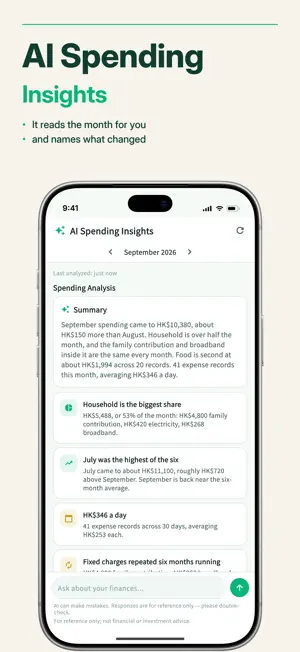
Ching is an automatic expense tracker designed for Hong Kong. Snap receipts, log Apple Wallet taps automatically, no bank login. • Receipt Photos Snap a paper bill, or pick a PayMe, Octopus or bank payment screenshot from your album. Ching reads the amount, merchant and date; you tap to confirm. 3 images a month on Free, 300 on Ching Pro. Cloud reading is its own opt-in switch. • Auto-Log Card Taps (requires iOS 27) Add one Ching Shortcut. When a card in Apple Wallet is used, or PayMe tells you money has arrived, Ching posts a notification and one tap confirms the entry. Set it up once. • Quick Manual Entry Expenses, income and transfers in seconds. Merchant categories that learn, multi-currency with live rates, recurring transactions, category budgets, and stock FIFO cost tracking. • AI Spending Insights Monthly spending analysis and trend statistics for tracking where your money goes. Informational only — see disclaimer below. • Cloud Backup (Ching Pro) Encrypted backup. Restore on a new phone in one step. • Privacy First Ching never asks for your bank password and never connects to your bank account. Data stays on your device by default; cloud reading and AI Spending Insights are separate opt-in switches. Free: Unlimited* tracking · Basic stats · 3 AI Spending Insights/month · 3 image reads/month · 3 category budgets Ching Pro: HK$28/month or HK$238/year — Unlimited* AI Spending Insights · 300 image reads/month · Cloud backup · Unlimited* category budgets *Fair-use limits apply to prevent abuse. Subscriptions renew automatically unless cancelled at least 24 hours before the end of the current period. Manage or cancel any time in your App Store account settings. Made by an independent developer in Hong Kong. Questions? We'd love to hear from you. Important Disclaimer Ching is a personal expense-tracking tool, not a financial advisor. All content — including AI-generated spending insights — is strictly informational and must not be relied upon as investment advice, a recommendation to buy or sell any security, a solicitation, or any form of regulated financial advice. Ching does not hold any licence from the Hong Kong Securities and Futures Commission (SFC) or any other regulator, and does not carry on any regulated activity under the Securities and Futures Ordinance (Cap. 571). Always consult a qualified, licensed professional before making financial decisions.
What’s new
Version 2.0.1 · Updated October 15, 2026
- Report an unrecognised payment notification with a screenshot, and Ching will add support soon. - Reads more payment notifications: AlipayHK transit QR and PayLater, mainland Alipay. - Octopus fare adjustments (refunds) now reduce the matching fare. - Bug fixes.
App privacy
The developer, I Love Working Limited, reported these privacy practices to Apple.
Data Linked to You
The following data, which may be collected and linked to your identity, may be used for the following purposes:
- Contact Info: Email Address
- User Content: Photos or Videos, Customer Support
Used for: App Functionality
Data Not Linked to You
The following data, which may be collected but is not linked to your identity, may be used for the following purposes:
- Purchases: Purchase History
- Identifiers: Device ID
- Usage Data: Product Interaction
- User Content: Other User Content
- Diagnostics: Crash Data, Other Diagnostic Data
Used for: Analytics, App Functionality