

Ivy6: Deep Work Planner
Giuseppe Pignataro Productivity iPhoneiPadiPod touchMac
Ivy6: Deep Work Planner is a free Productivity app for iPhone and iPad by Giuseppe Pignataro. Requires iOS 18.0. Updated October 4, 2026.
- Price
- Free
- on the App Store
- Size
- 13 MB
- Age 4+
- Updated
- Oct 4
- 2026 · v2.1
Screenshots


About Ivy6: Deep Work Planner
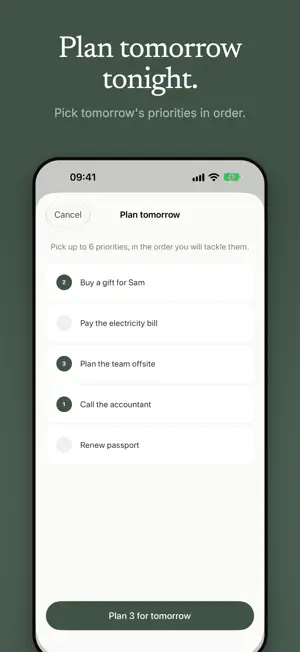
SIX PRIORITIES. ONE CLEAR DAY. Long to-do lists create noise. Ivy6 helps you decide what truly matters, work on one task at a time, and end the day knowing you did the important things. Built on the Ivy Lee Method, a 100-year-old productivity ritual, Ivy6 gives you a calm daily planner for iPhone, iPad and Mac: 1. Capture everything in your Inbox. 2. Choose your six most important tasks. 3. Put them in order. 4. Work through them one at a time. 5. Plan tomorrow tonight, and start fresh in the morning. YOUR DAILY 6 Commit to no more than six priorities. The limit makes you choose deliberately instead of carrying an endless list from day to day. CAPTURE NOW, DECIDE LATER Ideas, errands and future tasks wait in your Inbox until they earn a place in your plan. Add estimates, subtasks, tags, snooze and recurring routines when you need them. FOCUS ON ONE TASK Start a distraction-free session for your current priority. Use a stopwatch, a 5-minute sprint, Pomodoro or a countdown, and see how much time you really give to meaningful work. PLAN TOMORROW TONIGHT In the evening, Ivy6 invites you to choose tomorrow's priorities in order. Unfinished tasks return to your Inbox for a conscious decision, so every morning starts clean. MADE FOR APPLE DEVICES • Home Screen and Lock Screen widgets • Live Activities and Dynamic Island during Focus • Siri and Shortcuts for quick capture and your next priority • Read-only calendar context beside your plan • Native layouts for iPhone and iPad • A Mac app with menu bar access and keyboard shortcuts • Morning, evening and weekly review reminders • Break large tasks into smaller steps UNDERSTAND HOW YOU WORK Review completed tasks, focus time, streaks, rollover patterns and stale tasks, so you can plan a realistic day, not just a longer list. IVY6 PRO: ONE PURCHASE, NO SUBSCRIPTION Unlock everything forever with a single purchase: • Private iCloud sync across iPhone, iPad and Mac • Advanced weekly insights and task-level focus analytics • Full task history and a guided Weekly Review • Seasonal themes • Data export • Apple Intelligence task breakdown on supported devices PRIVATE BY DESIGN No ads. No tracking. No account to create. Your tasks stay on your device and, if you choose Pro sync, in your own private iCloud. Choose six. Focus on one. Finish what matters.
What’s new
Version 2.1 · Updated October 4, 2026
Ivy6 2.1 brings a new way to plan, a calmer Focus, and a much more reliable app. NEW • Plan tomorrow tonight: pick tomorrow's priorities in the order you'll tackle them. • Start with one real priority: onboarding now asks what matters most today. • Quick entry understands dates and durations. Review the suggested details and accept or remove each one. • Optional daily time budget: compare your estimates with the time you actually have. • Smarter Weekly Review: see why a task needs attention (waiting, rolled over, long estimate), choose Today, Tomorrow, Later or Archive, and undo any choice. • Reversible task breakdown: save the steps, find decomposed tasks in History, and restore the original with one tap. • Today shows what you've finished, with your progress at a glance. • A new ••• menu on every task: Plan for Today, Complete, Snooze, Break down or Delete. • Focus: a five-minute start, Pause and Resume that stay accurate in the background, and a clear choice when you leave early: Continue later or Mark as blocked. • A configurable widget with optional progress, now in sync with the app when you complete a task from the Home Screen. • Calendar context counts only the real hours of your day: overlapping events are merged. IMPROVED • Ivy6 Pro is now a single, simple screen with the price up front. Cancelled, pending and restored purchases are clearly explained. • Pro status is honest: it shows when iCloud sync is still waiting to be activated. • Capture several thoughts in a row: the keyboard stays open after each task. • Focus has a readable Pause button, a compact timer menu and a short "Done" confirmation. • Weekly Review is lighter: no duplicated numbers, and empty sections stay hidden. • Settings are shorter and easier to scan. • Dates and "tomorrow" plans behave correctly at midnight and on rollover. FIXED • Your data is better protected: Ivy6 backs up before any reset, no longer deletes data automatically at launch, and the widget uses the same data as the app. • Task notes no longer show internal text after leaving a Focus session. • Many reliability and accessibility refinements.
App privacy
The developer, Giuseppe Pignataro, reported these privacy practices to Apple.
Data Not Collected
The developer does not collect any data from this app.
Alternatives to Ivy6: Deep Work Planner
Looking for apps like Ivy6: Deep Work Planner? Here are 6 similar apps on the App Store. The highest rated is Claridy - Ivy Lee Method (4.5/5), and all 6 are free to download.
-
 Claridy - Ivy Lee Method
4.5
Claridy - Ivy Lee Method
4.5
-
 PriorityStack: Top Six
-
 Daily Frog
-
 SixDo - Ivy Lee Method To-Do
-
 TaskQuadrant - Task Planner
-
 TriDo - 3 Daily Tasks
| App | Rating | Price | Last updated | Compare |
|---|---|---|---|---|
| Ivy6: Deep Work Planner | – | Free | October 4, 2026 | |
| Claridy - Ivy Lee Method | 4.5 / 5 (2) | Free | Apr 8, 2026 | Compare |
| PriorityStack: Top Six | – | Free | Sep 10, 2026 | Compare |
| Daily Frog | – | Free | Mar 19, 2026 | Compare |
| SixDo - Ivy Lee Method To-Do | – | Free | Oct 2, 2026 | Compare |
| TaskQuadrant - Task Planner | – | Free | Jan 24, 2026 | Compare |
| TriDo - 3 Daily Tasks | – | Free | Apr 3, 2026 | Compare |