

Baby Camera - WiFi Nanny Cam
Mizuki Sango Lifestyle iPhoneiPadiPod touch
Baby Camera - WiFi Nanny Cam is a free Lifestyle app for iPhone and iPad by Mizuki Sango. Requires iOS 17.0. Updated August 22, 2026.
- Price
- Free
- on the App Store
- Size
- 21 MB
- Age 4+
- Updated
- Aug 22
- 2026 · v1.2.0
Screenshots
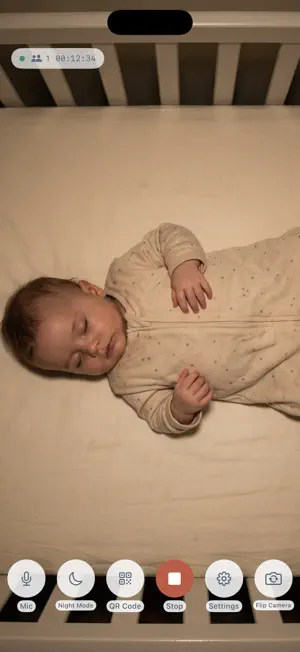
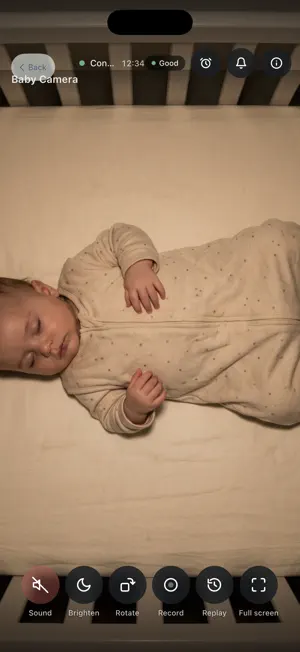
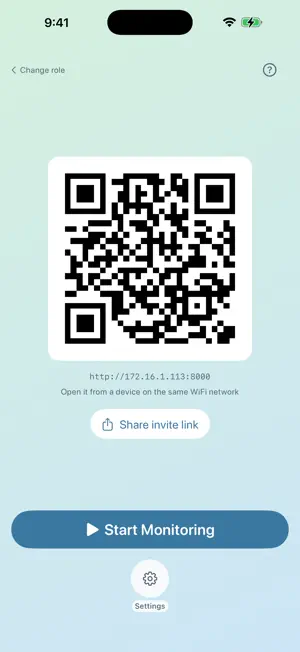
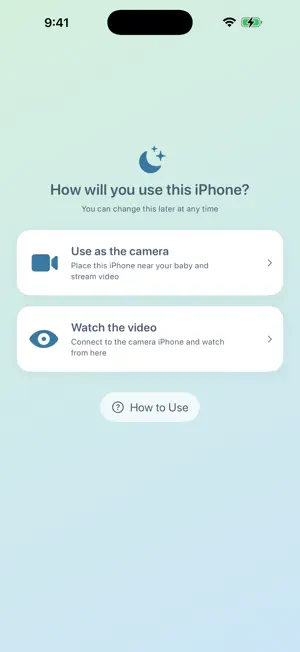
About Baby Camera - WiFi Nanny Cam
Turn that old iPhone in your drawer into a baby monitor. Launch the app on the camera-side iPhone, then scan the QR code it shows using the camera on your phone, tablet, or PC. There's no dedicated viewer app to install — the video and audio stream opens right in your browser. ◆ Features • No internet required. Video and audio stream entirely within your home Wi-Fi network and are never sent to any external server. • Low-latency, real-time streaming lets you check on your baby with almost no delay. • Watch from any device with a browser — smartphone, tablet, or PC, whatever you have on hand. • Simple setup: just scan a QR code. • Automatic face detection with a face box overlay — the viewer alerts you when your baby's face is no longer visible. • Night mode keeps dark rooms visible, with an extra brightness boost on the viewer side. • A dark, eye-friendly design built for nighttime use. ◆ Requirements • Camera device: iPhone 8 or later (iPhone 11 or later recommended) • Viewing device: a modern browser such as Safari, Chrome, Firefox, or Edge • The camera and viewing devices must be connected to the same Wi-Fi network • Keep the camera iPhone plugged in and the app running ◆ Privacy No account required. This app doesn't collect video, audio, or personal information — everything stays within your home network. You can also protect the viewer page with an optional 4-digit PIN.
What’s new
Version 1.2.0 · Updated August 22, 2026
This update makes everything easier, from first-time setup to everyday monitoring. ◆ New • Zoom: switch between 0.5x (ultra-wide), 1x, and 2x with one tap • In-app viewing: watch the stream right in the app on a second iPhone — scan the QR code or reconnect to the last camera • Invite link sharing: share a viewing link with your family via messaging apps or email • Away alarm: play an alarm sound in the viewer when the face is no longer visible • Rewind: review and save roughly the last 5 minutes of video in the viewer • Getting-started guide: added first-launch onboarding and a how-to guide • Role selection: choose "Use as camera" or "Watch video" at launch ◆ Improvements • Refreshed the whole app with a soft pastel design • The screen no longer auto-locks while watching • The viewer now keeps reconnecting automatically after temporary Wi-Fi drops • Fixed night mode and other settings being reset after switching cameras • General streaming stability improvements
App privacy
The developer, Mizuki Sango, reported these privacy practices to Apple.
Data Not Collected
The developer does not collect any data from this app.
Alternatives to Baby Camera - WiFi Nanny Cam
Looking for apps like Baby Camera - WiFi Nanny Cam? Here are 6 similar apps on the App Store. The highest rated is Baby Monitor 3G Naby:Nanny Cam (5.0/5), and all 6 are free to download.
-
 Baby Camera - Bella Monitor
-
 Baby Monitor - Remote Camera
-
 そばみる〜2台で見守りカメラ〜
-
 Baby Monitor 3G Naby:Nanny Cam
5.0
Baby Monitor 3G Naby:Nanny Cam
5.0
-
 ReAll&Co 公式アプリ
-
 Owly Baby Monitor
| App | Rating | Price | Last updated | Compare |
|---|---|---|---|---|
| Baby Camera - WiFi Nanny Cam | – | Free | August 22, 2026 | |
| Baby Camera - Bella Monitor | – | Free | Sep 18, 2025 | Compare |
| Baby Monitor - Remote Camera | – | Free | Aug 29, 2025 | Compare |
| そばみる〜2台で見守りカメラ〜 | – | Free | Jul 9, 2026 | Compare |
| Baby Monitor 3G Naby:Nanny Cam | 5.0 / 5 (1) | Free | Jan 28, 2026 | Compare |
| ReAll&Co 公式アプリ | – | Free | Dec 13, 2023 | Compare |
| Owly Baby Monitor | – | Free | Mar 3, 2026 | Compare |