

PixDraw!
Ryota Murakami Graphics & Design iPhoneiPadiPod touch
PixDraw! is a free Graphics & Design app for iPhone and iPad by Ryota Murakami. Requires iOS 16.0. Updated October 30, 2026.
- Price
- Free
- on the App Store
- Size
- 5 MB
- Age 4+
- Updated
- Oct 30
- 2026 · v2.2
Screenshots


About PixDraw!
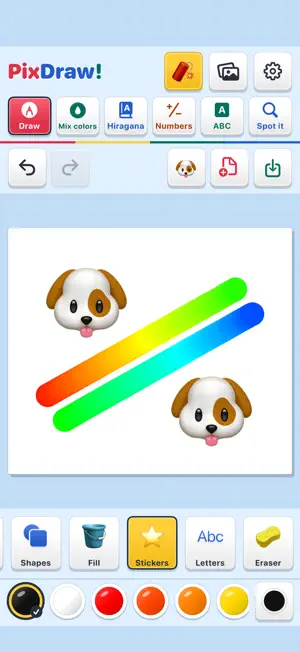
Draw, mix, trace, count, and spot the differences with PixDraw! Explore six creative and learning modes in one playful studio. DRAW WITH YOUR FAVORITE TOOLS Choose from 11 tools, including pencil, brush, crayon, and spray. Try rainbow and sparkle brushes, six shapes, emoji stamps, and letter stamps. Pick from 20 colors and four brush sizes, then draw with your finger or Apple Pencil. DISCOVER NEW COLORS Choose two paints from 50 colors and adjust the amounts. Tap Mix to watch and hear them swirl together before the new color appears. Change the ratio to explore the result, or use your new color to draw. PRACTICE 46 HIRAGANA CHARACTERS Trace Japanese hiragana one stroke at a time, with numbered starting points, animated demonstrations, and Japanese pronunciation. Completed characters are saved on your device. PLAY WITH NUMBERS Tap objects to count, then try addition and subtraction. Choose numbers up to 5 or 10 and pick from three answers. Picture groups help you see what each number means. EXPLORE THE ALPHABET Discover all 26 uppercase and lowercase letters with pictures, words, and English pronunciation. Try letter-finding quizzes and keep track of the letters you have answered correctly. SPOT THE DIFFERENCES Compare two pictures and find three differences in each of four scenes: Park, Ocean, Toys, and Space. Tap either picture to mark a difference. Use a hint when needed, with no timer or penalty for mistakes. KEEP YOUR ARTWORK Restore your drawing in progress, save creations to the local gallery, and export to Photos. Undo and redo make it easy to try something different. The fixed bomb at the top clears the paper in one tap, and Undo brings your artwork back. MAKE IT YOUR OWN Layouts adapt to the size and orientation of your iPhone, iPhone Duo, or iPad. Switch sound effects, pronunciation, and haptic feedback on or off separately. The interface follows your device's Japanese or English language setting. Hiragana pronunciation is Japanese; alphabet pronunciation is English. No ads, no in-app purchases, and no account required. Artwork and practice progress stay on your device. All six modes work offline.
What’s new
Version 2.2 · Updated October 30, 2026
Three new ways to play and learn in PixDraw! - Numbers: tap objects to count, then try addition and subtraction. Choose numbers up to 5 or 10. - ABC: discover A to Z with uppercase and lowercase letters, pictures, and English pronunciation. Practice with letter-finding quizzes. - Spot it: find three differences in each of four scenes: Park, Ocean, Toys, and Space. Hints are available, with no time limit. - Flexible layouts adapt to iPhone Duo, portrait screens, and changing window sizes. Your drawing tools, color mixing, hiragana practice, and fixed one-tap bomb are still here. All new modes work offline, with no ads or in-app purchases.
App privacy
The developer, Ryota Murakami, reported these privacy practices to Apple.
Data Not Collected
The developer does not collect any data from this app.
Alternatives to PixDraw!
Looking for apps like PixDraw!? Here are 6 similar apps on the App Store. The highest rated is ASMR Drawing for Kids (5.0/5), and all 6 are free to download.
-
 ColorMixTool
-
 ASMR Drawing for Kids
5.0
ASMR Drawing for Kids
5.0
-
 Kinder Paint: Kids Drawing
3.5
Kinder Paint: Kids Drawing
3.5
-
 TopMod 3D: Design Software
5.0
TopMod 3D: Design Software
5.0
-
 LenticularMaker Photo Motion
4.7
LenticularMaker Photo Motion
4.7
-
 Paint.exe - Retro Paint
4.6
Paint.exe - Retro Paint
4.6
| App | Rating | Price | Last updated | Compare |
|---|---|---|---|---|
| PixDraw! | – | Free | October 30, 2026 | |
| ColorMixTool | – | Free | Jan 19, 2026 | Compare |
| ASMR Drawing for Kids | 5.0 / 5 (7) | Free | Nov 14, 2025 | Compare |
| Kinder Paint: Kids Drawing | 3.5 / 5 (2) | Free | Oct 14, 2026 | Compare |
| TopMod 3D: Design Software | 5.0 / 5 (3) | Free | Oct 21, 2026 | Compare |
| LenticularMaker Photo Motion | 4.7 / 5 (25) | Free | Aug 6, 2026 | Compare |
| Paint.exe - Retro Paint | 4.6 / 5 (17) | Free | Aug 18, 2026 | Compare |
Compare PixDraw! with the top alternatives: ratings, updates, ASO score and keyword gaps →