

MonkeyLock: Earn Screen Time
RYAN DAVID BURNS Health & Fitness iPhoneiPadiPod touch
MonkeyLock: Earn Screen Time is a free Health & Fitness app for iPhone and iPad by RYAN DAVID BURNS. Rated 5.0/5 from 4 ratings. Requires iOS 17.0.
- Rating
- 5.0
- 4 ratings
- Price
- Free
- on the App Store
- Size
- 60 MB
- Age 4+
- Updated
- Aug 21
- 2026 · v1.1.0
Screenshots


About MonkeyLock: Earn Screen Time
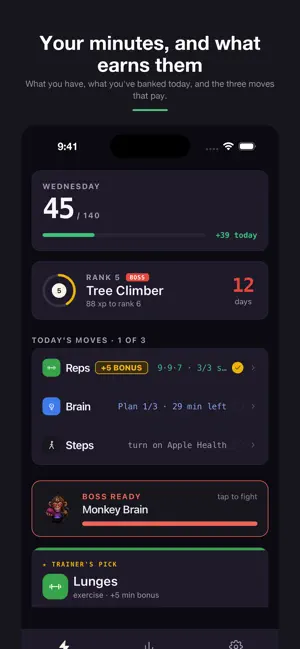
Your phone locks the apps you choose. Your body opens them. Pick the apps that eat your day. When your minutes run out, MonkeyLock locks them — really locks them, using Apple's Screen Time system. To open them again, you move: push-ups, squats, sit-ups, lunges, jump rope. Your camera counts the reps on device. Every rep buys minutes back. That's the whole idea. No willpower required, because willpower is the thing that keeps failing. FREE TO USE The wall works free. Block as many apps as you like, earn as many minutes as you like, keep your streak, keep your history. There is no trial timer and nothing expires. HOW IT WORKS • Choose the apps to put behind the wall • When your balance hits zero, they lock • Do the reps — your camera counts them, nothing is recorded or uploaded • Minutes go back in the bank and your apps open • Brain games and Apple Health steps earn a little on the side THE WALL IS HONEST ABOUT ITSELF An app you add to the wall goes on instantly. Taking one off waits until the next morning. That delay is deliberate: it means the wall does not move at the exact moment you most want it to. And when you genuinely need in — an airport, a wedding, a message that will not wait — Break Glass gives you five minutes for a ten-second hold. Three a day. No reps, no cost, nothing owed tomorrow. A blocker that only ever says no is a blocker people delete. BUILT TO STAY OUT OF YOUR WAY • Everything happens on your device. No account, no sign-up, no servers. • Camera frames are processed live and thrown away. Nothing is saved or sent. • No ads. No tracking. WHAT YOU GET FOR SHOWING UP Ranks, streaks with a couple of mercy days, and a Sunday page that shows the week you actually had — how many days the wall held, and what changed. Requires iPhone with iOS 17 or later. Screen Time permission is needed for blocking to work; MonkeyLock asks for it during setup and explains why.
What’s new
Version 1.1.0 · Updated August 21, 2026
MonkeyLock is now free. The wall, the earning, the streak — all of it, with no trial and nothing to unlock. New: Break Glass. When you genuinely need a blocked app, hold for ten seconds and get five minutes. Three a day, nothing owed tomorrow. Also: the wall now counts time correctly overnight, memory match fits on one screen, and matched cards are readable on dark themes.
App privacy
The developer, RYAN DAVID BURNS, reported these privacy practices to Apple.
Data Linked to You
The following data, which may be collected and linked to your identity, may be used for the following purposes:
- Purchases: Purchase History
- Identifiers: User ID
Used for: App Functionality
Alternatives to MonkeyLock: Earn Screen Time
Looking for apps like MonkeyLock: Earn Screen Time? Here are 6 similar apps on the App Store. The highest rated is HonorFit: Pushup App Blocker (5.0/5), and all 6 are free to download.
-
 Proofit — Lock Distractions
-
 Earned: Reclaim Your Time
-
 HonorFit: Pushup App Blocker
5.0
HonorFit: Pushup App Blocker
5.0
-
 ScreenReps
4.0
ScreenReps
4.0
-
 Clucky: Earn Your Screen Time
-
 IngreFit: AI Food Scanner
| App | Rating | Price | Last updated | Compare |
|---|---|---|---|---|
| MonkeyLock: Earn Screen Time | 5.0 / 5 (4 ratings) | Free | August 21, 2026 | |
| Proofit — Lock Distractions | – | Free | Jul 15, 2026 | Compare |
| Earned: Reclaim Your Time | – | Free | Jul 8, 2026 | Compare |
| HonorFit: Pushup App Blocker | 5.0 / 5 (6) | Free | Oct 21, 2026 | Compare |
| ScreenReps | 4.0 / 5 (1) | Free | Oct 7, 2026 | Compare |
| Clucky: Earn Your Screen Time | – | Free | Jul 10, 2026 | Compare |
| IngreFit: AI Food Scanner | – | Free | Sep 7, 2026 | Compare |