

Yomiage: Read Articles Aloud
Shunya Iwasaki News iPhoneiPadiPod touch
Yomiage: Read Articles Aloud is a free News app for iPhone and iPad by Shunya Iwasaki. Requires iOS 17.0. Updated October 15, 2026.
- Price
- Free
- on the App Store
- Size
- 23 MB
- Age 4+
- Updated
- Oct 15
- 2026 · v1.4.0
Screenshots


About Yomiage: Read Articles Aloud
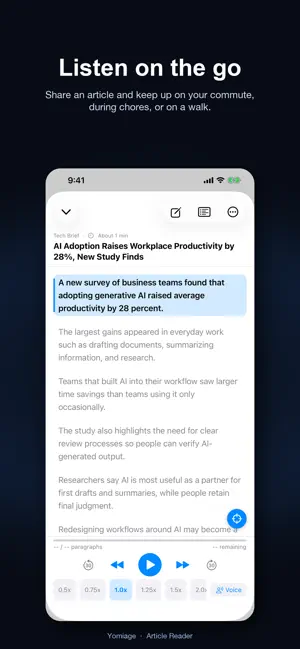
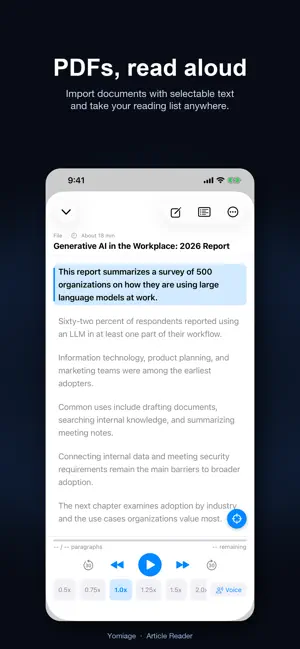
READ IT LATER—WITH YOUR EARS Share an article and Yomiage reads it aloud with a natural voice. Keep up with news, reports, and blogs while commuting, doing chores, exercising, or resting your eyes. No ads, no account. Pro is a one-time purchase, not a subscription. ONE-TIME PRO UPGRADE Yomiage Pro is a one-time purchase—not a subscription. It unlocks playback speeds up to 2.5x, paragraph pause and voice pitch controls, and other Pro features on devices using the same Apple ID. No account is required to use the app. SHARE AND START LISTENING Choose Yomiage from the Share menu in Safari or another app. Yomiage removes menus and other distractions, extracts the main article text, and opens it in the player. Japanese and English are detected automatically. Not ready to listen yet? Turn off auto-play in Settings and shared articles wait in Up Next. LISTEN TO PDFS AND TEXT • Import PDFs, reports, and documents with selectable text. • Paste text directly to hear notes, drafts, or anything without a URL. • Send a PDF to Yomiage from another app’s Share menu. SAVE YOUR READING LIST Bookmark articles, organize them into folders, and see what is unplayed, in progress, or finished. Add articles to Up Next and listen continuously in your preferred order. Articles you share in a row collect in Up Next too—tap Play All to hear them one after another. SAVE A SENTENCE TO REVISIT Tap Save Sentence while listening to keep the sentence you're hearing. You can also use Siri, Shortcuts, or Control Center (iOS 18 or later) to save without looking at your screen. Read your saved sentences in a list and tap one to listen again from that paragraph. Save up to 20 sentences, or an unlimited number with Pro. OPTIONAL AI FEATURES • Get a quick summary before listening. On supported devices, summaries can run on-device with no API key or network connection. • After an article finishes, generate related questions and create a researched follow-up audio article. • Improve Japanese pronunciation for names and specialized terms. Follow-up research requires your own Gemini API key. AI pronunciation correction works with your own Gemini or OpenAI-compatible API key. AI features are optional and separate from Yomiage Pro. VOICEVOX VOICES FOR JAPANESE (PRO) Read Japanese articles with 13 VOICEVOX voices, including Zundamon and Shikoku Metan. Speech is synthesized on your device, and article text is never sent anywhere for it. The voice data (about 80 MB or more) downloads when you choose a voice. Every voice can be previewed for free. English paragraphs are read with the system voice. COMFORTABLE, NATURAL PLAYBACK • Japanese and English system voices • Playback speed from 0.5x to 2.5x (2.5x requires Pro) • Adjustable pause between paragraphs and voice pitch (Pro) • Background playback and lock-screen controls • Sleep timer, continuous playback, and repeat playback (repeat requires Pro) • Tap any paragraph to start listening from that point • Adjustable reading text size • Home Screen and Lock Screen widgets, Siri, and Shortcuts to resume listening (Control Center on iOS 18 or later) • Listening Log for your listening time and finished articles, with an optional daily goal FIX PRONUNCIATION Correct a word once and Yomiage remembers it for future articles. Search your pronunciation dictionary, and with Pro, export or import a backup. CREDITS VOICEVOX:ずんだもん / VOICEVOX:四国めたん / VOICEVOX:春日部つむぎ / VOICEVOX:雨晴はう / VOICEVOX Nemo Terms of Use (EULA): https://www.apple.com/legal/internet-services/itunes/dev/stdeula/ Privacy Policy: https://common-legume-c99.notion.site/33cfb55d2567807c8d42f53617338b8e
What’s new
Version 1.4.0 · Updated October 15, 2026
• Save Sentence: tap it while listening to keep the sentence you're hearing. • Open Saved Sentences from the top left of the Bookmarks screen, and tap one to listen again from that paragraph. • Use Siri or Shortcuts to save without looking at your screen. On iOS 18 or later, you can also add it to Control Center.
App privacy
The developer, Shunya Iwasaki, reported these privacy practices to Apple.
Data Not Collected
The developer does not collect any data from this app.
Alternatives to Yomiage: Read Articles Aloud
Looking for apps like Yomiage: Read Articles Aloud? Here are 6 similar apps on the App Store.
-
 VoiceNews RSS
-
 RSSRadio
-
 Sumina - AI Finds & Talks News
-
 Briefs: AI News Summaries
-
 やさしいニュース:毎朝5分の厳選ニュース
-
 まとめRSS - 情報収集・ニュース&フィードリーダー
| App | Rating | Price | Last updated | Compare |
|---|---|---|---|---|
| Yomiage: Read Articles Aloud | – | Free | October 15, 2026 | |
| VoiceNews RSS | – | Free | Jan 7, 2026 | Compare |
| RSSRadio | – | Free | Jun 5, 2026 | Compare |
| Sumina - AI Finds & Talks News | – | Free | Sep 29, 2026 | Compare |
| Briefs: AI News Summaries | – | Free | Aug 6, 2026 | Compare |
| やさしいニュース:毎朝5分の厳選ニュース | – | Free | Aug 12, 2026 | Compare |
| まとめRSS - 情報収集・ニュース&フィードリーダー | – | Free | Oct 4, 2026 | Compare |