

SparkDeck: AI Command Center
Yunus Sahin Developer Tools iPhoneiPadiPod touch
SparkDeck: AI Command Center is a free Developer Tools app for iPhone and iPad by Yunus Sahin. Requires iOS 18.0. Updated October 25, 2026.
- Price
- Free
- on the App Store
- Size
- 16 MB
- Age 4+
- Updated
- Oct 25
- 2026 · v1.0.1
Screenshots


About SparkDeck: AI Command Center
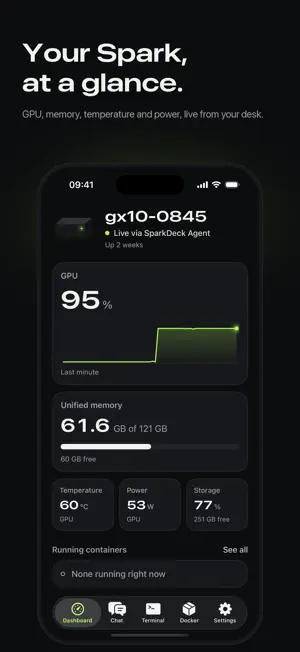
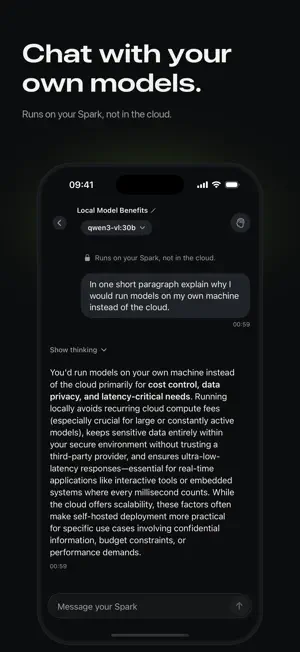
SparkDeck puts your NVIDIA DGX Spark in your pocket. See the GPU and memory live, chat with the models running on your desk, open a terminal and control your containers, all from your iPhone. YOUR SPARK AT A GLANCE • GPU load with a live trace, unified memory, temperature, power and storage. • The containers that are running, right on the dashboard. • A reading your Spark can't give shows a dash, never a made-up number. CHAT WITH YOUR OWN MODELS • Talk to the models your Spark serves with Ollama, vLLM or another OpenAI-compatible server. • Your conversations go between your iPhone and your Spark, not through a cloud service. • Get a notification when a reply finishes while SparkDeck is in the background. A REAL TERMINAL (PRO) • A full SSH terminal with several sessions, plus keys for esc, ctrl, tab and the arrows. • Sign in with your password or an Ed25519 key. Your password stays in this iPhone's Keychain. CONTAINERS (PRO) • Start, stop and restart Docker containers, and see why one failed. EASY SETUP SparkDeck finds your Spark on your Wi-Fi. Sign in with the account you use on your Spark, and SparkDeck installs its small agent (sparkdeck-agent, published on PyPI) for live stats, chat and Docker. Away from home, connect over Tailscale. FREE AND PRO SparkDeck is free with live stats, 25 chat messages a day and one device. Pro, a monthly or annual subscription, adds the terminal, Docker controls, unlimited chat and more devices. Subscriptions renew automatically unless cancelled at least 24 hours before the end of the period; manage them in your App Store account settings. REQUIREMENTS iOS 18 or later, and an NVIDIA DGX Spark or another GB10 system, such as the ASUS Ascent GX10, on your network or your Tailscale network. SparkDeck is an independent app. It is not affiliated with or endorsed by NVIDIA or ASUS. Terms of Use: https://sparkdeck.net/terms Privacy Policy: https://sparkdeck.net/privacy
What’s new
Version 1.0.1 · Updated October 25, 2026
SparkDeck has a new design, from the first run to every tab. • Setup: find your Spark on your Wi-Fi, sign in once, and SparkDeck sets up its agent for you. • Dashboard: GPU, unified memory, temperature, power and storage at a glance, with your running containers. A reading your Spark can't give shows a dash, not a made-up 0. • Chat: replies from reasoning models no longer show their thinking, each message is sent once, and a new chat opens on a model that can chat. • Terminal: sign in with an Ed25519 key, and SparkDeck remembers your Spark's host key. • Docker: clear messages when an action fails. • Send feedback from Settings. • Fixes for connecting, the agent and large text sizes.
App privacy
The developer, Yunus Sahin, reported these privacy practices to Apple.
Data Not Linked to You
The following data, which may be collected but is not linked to your identity, may be used for the following purposes:
- Diagnostics: Crash Data, Performance Data
- Purchases: Purchase History
- Identifiers: User ID
Used for: Analytics, App Functionality
Alternatives to SparkDeck: AI Command Center
Looking for apps like SparkDeck: AI Command Center? Here are 6 similar apps on the App Store. The highest rated is PasteMe - Pastebin Client (4.1/5), and 5 of the 6 are free to download.
-
 Machete DGX
-
 SparkSync Mobile
1.0
-
 EdgeLLM
-
 iTmux: Your AI Coding Terminal
-
 NativeX — On-Device AI Lab
-
 PasteMe - Pastebin Client
4.1
| App | Rating | Price | Last updated | Compare |
|---|---|---|---|---|
| SparkDeck: AI Command Center | – | Free | October 25, 2026 | |
| Machete DGX | – | Free | Nov 1, 2026 | Compare |
| SparkSync Mobile | 1.0 / 5 (1) | Free | Feb 21, 2026 | Compare |
| EdgeLLM | – | Free | Feb 24, 2026 | Compare |
| iTmux: Your AI Coding Terminal | – | Free | Oct 17, 2026 | Compare |
| NativeX — On-Device AI Lab | – | Free | Jul 14, 2026 | Compare |
| PasteMe - Pastebin Client | 4.1 / 5 (16) | 2.99 USD | Oct 23, 2026 | Compare |