

KidPoint: Chore & Reward Chart
ying lu Education iPhoneiPadiPod touch
KidPoint: Chore & Reward Chart is a free Education app for iPhone and iPad by ying lu. Rated 5.0/5 from 1 ratings. Requires iOS 15.0.
- Rating
- 5.0
- 1 ratings
- Price
- Free
- on the App Store
- Size
- 46 MB
- Age 4+
- Updated
- Nov 10
- 2026 · v2.3.0
Screenshots
Save to Pinterest


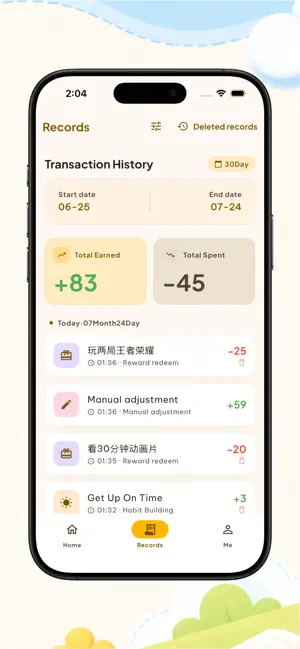
About KidPoint: Chore & Reward Chart
Homework battles, slow mornings, endless nagging? KidPoint turns chores into points: done means points, points mean the promised reward. Chores, homework, reading, exercise, bedtime — all become effort your child can see. Multiple kids? Separate balances, fair and conflict-free. [Why parents use it] • A chore chart that lives on your phone: set daily or weekly tasks, check them off, and let the points do the reminding • A reward chart you control: define the rewards, price them in points, and every redemption is logged automatically • An allowance and behavior tracker without spreadsheets: add the habits you want to see more of — and the ones you want less of — with daily limits so the rules stay fair • Milestones for the bigger goals: weekly or monthly targets with a reward at the end keep motivation going after the novelty wears off • One app for the whole family: a separate profile per child, with their own avatar, points and rules • Stuck on a parenting question? Ask the AI — homework delays, bedtime battles, tantrums — it answers with your family's real rules in mind [Main features] 1. Chore chart & recurring tasks Create daily, weekly or monthly tasks with target counts, completion bonuses and optional deductions for missed days. Local reminders nudge at the right time, so routines actually stick. 2. Behavior points, up or down Built-in templates for homework, reading, tidying up, chores and bedtime. Add your own behaviors freely, and set a daily cap per behavior so nobody can farm points. 3. Rewards & milestones You define what can be redeemed and for how many points, and add a photo to any reward — crop it and swap it anytime so kids see exactly what they're earning. Redemptions are deducted and logged automatically. Set weekly or monthly milestones and hand out a bigger reward when the goal is reached. 4. Habit tracker & charts Automatic trend charts show where points came from and where they went. Review the last 30 days of activity — even deleted records stay traceable. 5. Multiple child profiles Each child gets an avatar, a starting balance and their own rules. Siblings never get mixed up, and every child feels treated fairly. One-tap import: copy another child's rewards (with images, points and redemption limits) and milestones to a new child in one go. 6. AI Parenting Q&A Ask anything — "my kid puts off homework", "mornings are a battle", "tantrums over screen time". Tap "advise with my family's habits" and the AI reads that child's habits, tasks and rewards plus the last 3 days of records, then suggests concrete changes. Each suggestion is a card: tap "Apply" and the matching screen opens pre-filled — nothing changes until you confirm. History is kept per child. Free: 5 questions a week. Pro: 30. 7. Backup & restore (Pro) Automatic iCloud backup keeps months of records safe when you switch phones or make a mistake. [Free] The free version manages 1 child and includes the chore chart, behavior points, rewards, milestones, records and charts. AI Parenting Q&A: 5 questions a week. [Pro] Pro unlocks multiple child profiles plus iCloud backup, restore and automatic backup, and raises AI Parenting Q&A to 30 questions a week. If the subscription expires, existing child data is kept; the free version can continue managing 1 selected child, and Pro restores access to the others. [Subscription] Pro is an auto-renewable subscription purchased separately from the free download. Payment is charged to your Apple ID. It renews automatically unless canceled at least 24 hours before the end of the current period. Manage or cancel in Settings > Apple ID > Subscriptions. Purchases can be restored in the app. [Data & privacy] Points and records are stored on this device. Export/import and iCloud backup only run when you use them. Try it tonight: one "Finish homework" task, your kid adds the points after school. Free to start. Terms of Use (EULA): https://www.apple.com/legal/internet-services/itunes/dev/stdeula/
What’s new
Version 2.3.0 · Updated November 10, 2026
Making every small win visible. This update • Device transfer and other settings now live in fewer, clearer places • Some icons refreshed • Clearer in-app messages • Other known issues fixed Recent updates • Move to a new device (Pro): same Wi-Fi, show the QR code on the old device and scan it on the new one — children, point history, avatars and reward images all come along. • Milestone images. • Six new languages: Arabic, Turkish, Vietnamese, Hindi, Indonesian and Thai. • Automatic backup after key changes. From "how many times do I have to tell you" to "I did it myself" — KidPoint is here for every step.
App privacy
The developer, ying lu, reported these privacy practices to Apple.
Data Not Linked to You
The following data, which may be collected but is not linked to your identity, may be used for the following purposes:
- User Content: Photos or Videos
Used for: App Functionality
Alternatives to KidPoint: Chore & Reward Chart
Looking for apps like KidPoint: Chore & Reward Chart? Here are 6 similar apps on the App Store. The highest rated is 成长积分 (5.0/5), and all 6 are free to download.
-
 Reward Chart-Kids Points Stars
-
 成长积分
5.0
-
 HabitHero: Reward Chart
5.0
-
 Acorn Steps: Kids’ Habits
-
 打卡怪 - 小学生作业打卡与习惯养成
-
 家庭积分银行
| App | Rating | Price | Last updated | Compare |
|---|---|---|---|---|
| KidPoint: Chore & Reward Chart | 5.0 / 5 (1 rating) | Free | November 10, 2026 | |
| Reward Chart-Kids Points Stars | – | Free | Feb 12, 2026 | Compare |
| 成长积分 | 5.0 / 5 (1) | Free | Jul 28, 2026 | Compare |
| HabitHero: Reward Chart | 5.0 / 5 (1) | Free | Sep 20, 2026 | Compare |
| Acorn Steps: Kids’ Habits | – | Free | Nov 11, 2026 | Compare |
| 打卡怪 - 小学生作业打卡与习惯养成 | – | Free | Oct 30, 2026 | Compare |
| 家庭积分银行 | – | Free | Oct 24, 2026 | Compare |