

Signature Scanner: Sign PDF
Talha Yavcin Utilities iPhoneiPadiPod touch
Signature Scanner: Sign PDF is a free Utilities app for iPhone and iPad by Talha Yavcin. Requires iOS 16.4. Updated September 17, 2026.
- Price
- Free
- on the App Store
- Size
- 79 MB
- Age 4+
- Updated
- Sep 17
- 2026 · v1.0.4
Screenshots

About Signature Scanner: Sign PDF
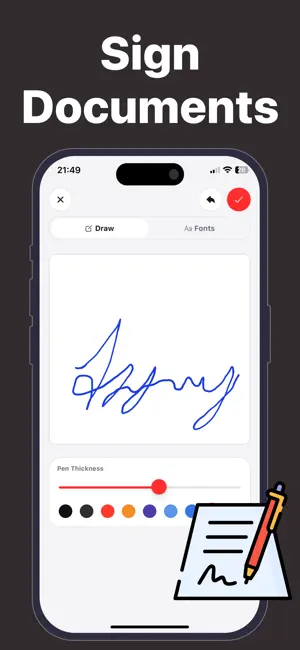
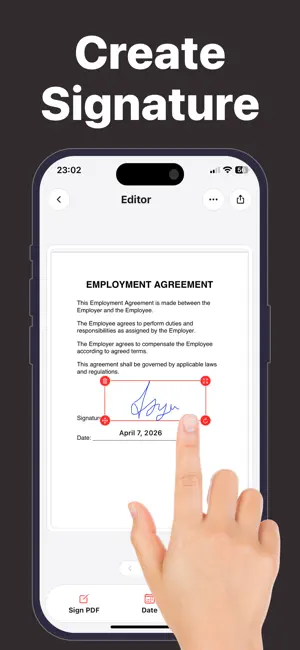
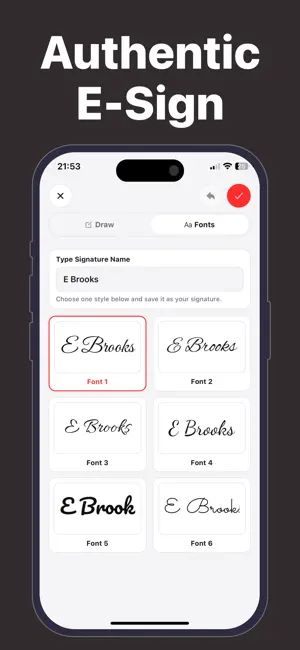
Signing a PDF should take seconds, not a trip to the printer. Signature Scanner is the fastest way to sign, fill, and scan documents right from your iPhone — professional results with no printing and no hassle. Sign any PDF or photo in under a minute. Draw your signature, type it in a handwritten-style font, or scan your real ink signature from paper, then drop it onto any document with a tap. KEY FEATURES - Scan Your Real Signature Snap a photo of your handwritten signature and the app instantly removes the background, creating a clean, transparent PNG you can reuse on any file. - Sign Documents Instantly Open any PDF or image, place your signature with a tap, and resize it to fit perfectly. Sign contracts, invoices, and forms in seconds. - Fill Forms & Auto-Date Add custom text boxes and stamp the date with a single touch. Complete any form without printing a page. - Multi-Page PDF Scanner Use your camera to scan multiple pages and merge them into one clean PDF, perfect for contracts on the go. - Signature Library Save and switch between multiple signatures, personal and professional, from your private library. - No Sign-Up, Fully Private Start signing immediately. No account, no email, no tracking. Your documents stay on your device. WHY SIGNATURE SCANNER? Speed: signed and sent in under a minute. Authenticity: use your real ink signature for a professional look. Simplicity: a clean, intuitive interface with zero learning curve. Privacy: no account means you stay in full control. Go paperless and sign smarter with Signature Scanner. Support: [email protected] Privacy Policy: https://talhayavcin.github.io/legal/signapp/privacy.html Terms of Use: https://talhayavcin.github.io/legal/signapp/terms.html
What’s new
Version 1.0.4 · Updated September 17, 2026
Bug fixes and improvements
App privacy
The developer, Talha Yavcin, reported these privacy practices to Apple.
Data Not Linked to You
The following data, which may be collected but is not linked to your identity, may be used for the following purposes:
- Identifiers: Device ID
Used for: App Functionality
Alternatives to Signature Scanner: Sign PDF
Looking for apps like Signature Scanner: Sign PDF? Here are 6 similar apps on the App Store. The highest rated is Save Our Secrets (5.0/5), and all 6 are free to download.
-
 Document Signer .
-
 Save Our Secrets
5.0
Save Our Secrets
5.0
-
 Bipp GPS Pro
-
 Sign PDF: Fill Forms & Scan
-
 Decibel Meter Pro – Sound dB
-
 Convexy - File Converter
| App | Rating | Price | Last updated | Compare |
|---|---|---|---|---|
| Signature Scanner: Sign PDF | – | Free | September 17, 2026 | |
| Document Signer . | – | Free | Oct 7, 2026 | Compare |
| Save Our Secrets | 5.0 / 5 (1) | Free | Nov 25, 2025 | Compare |
| Bipp GPS Pro | – | Free | Aug 18, 2026 | Compare |
| Sign PDF: Fill Forms & Scan | – | Free | Oct 6, 2026 | Compare |
| Decibel Meter Pro – Sound dB | – | Free | Feb 5, 2026 | Compare |
| Convexy - File Converter | – | Free | Oct 6, 2026 | Compare |