

Family Care & Meds: KinBond
Michael Alozie Health & Fitness iPhoneiPadiPod touch
Family Care & Meds: KinBond is a free Health & Fitness app for iPhone and iPad by Michael Alozie. Rated 5.0/5 from 2 ratings. Requires iOS 15.1.
- Rating
- 5.0
- 2 ratings
- Price
- Free
- on the App Store
- Size
- 53 MB
- Age 4+
- Updated
- Sep 29
- 2026 · v1.6.0
Screenshots

About Family Care & Meds: KinBond
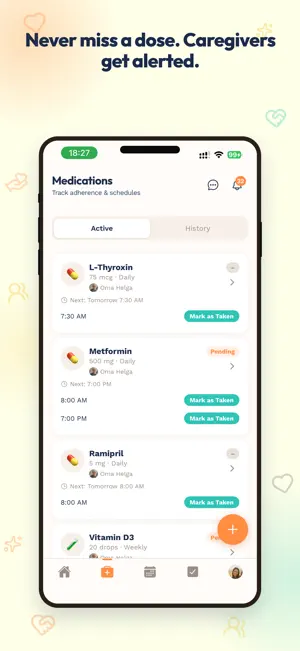
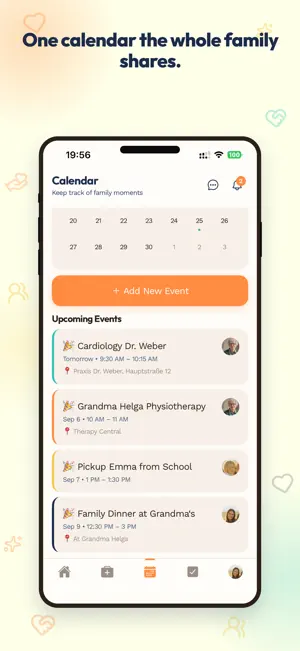
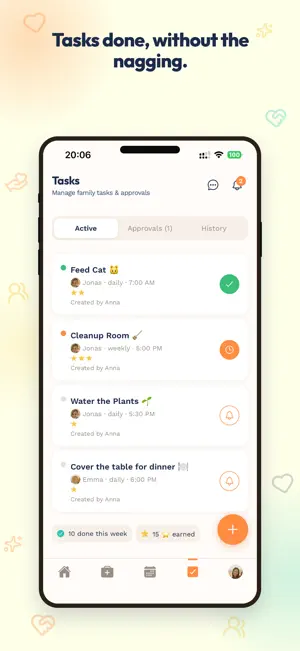
KinBond is the family care app that brings medication management, caregiver coordination, and a shared family calendar into one private space. Built for adult children caring for aging parents, parents juggling kids' schedules, and multigenerational families who want one tool instead of five group chats. No ads. No algorithm. No drama. WHY FAMILIES CHOOSE KINBOND Medication doses get missed. Caregivers across households lose track. Chores cause arguments. Family moments disappear in group chats. KinBond replaces it all with a shared family calendar, medication tracker, and care coordination — beautifully simple. EVERYTHING YOUR FAMILY NEEDS, IN ONE PLACE • Medication Management — Schedule doses for any family member with smart reminders 30 minutes before, on time, and missed-dose alerts that escalate to caregivers. Perfect for elderly parents, kids, or anyone managing complex regimens. • Caregiver Coordination — Multiple caregivers, multiple households, one shared view. Designed for adult children supporting aging or dementia-affected parents. • Shared Family Calendar — Doctor appointments, school events, birthdays, and family plans in one calendar everyone can see and contribute to. • Calendar Widget — Your family’s day at a glance on the home screen, refreshing itself whenever plans change. • Chore Management — Assign chores by role, set due dates, and approve with photo proof. Build responsibility without the nagging. • Family Board — A private social feed for photos, voice memos, text updates, and gratitude posts. No ads, no strangers, no algorithm. • Family Messages — Private one-to-one and group chats for your family, right inside the app. • Allowances — Track tasks, payouts, and savings for kids alongside their chores. • Smart Notifications — Push alerts that reach the right person at the right time, across every device. • Senior View — A simplified, large-text interface designed for elderly family members. Just what they need, nothing they don't. ROLES THAT FIT REAL FAMILIES Every family member gets their own profile with the right level of access: • Admin — Full control of the family group • Parent — Manage chores, posts, and events • Caregiver — Receive medication and care alerts • Senior — A simpler, focused experience • Child — A safe, age-appropriate view, with optional PIN PLAN YOUR FAMILY IN MINUTES 1. Create your family group 2. Invite your people with a QR code or link 3. Build profiles for everyone 4. Add medications, chores, and events 5. Share moments on your private board PRIVATE BY DESIGN KinBond is GDPR compliant. Your family's data is yours alone — never sold, never used for ads. Your Family Board is private to invited members only. WORKS EVERYWHERE iPhone and iPad. Light and dark mode. Full English and German support. PERFECT FOR • Adult children helping aging parents manage medication and care • Family caregivers coordinating care across multiple households • Parents juggling kids' chores, schedules, and school events • Multigenerational families who want one shared family planner • Anyone caring for an elderly parent, grandparent, or family member with dementia • Anyone tired of buried group chats and forgotten reminders Free to download. Plan, share, and bring your family together — beautifully. Questions? [email protected]
What’s new
Version 1.6.0 · Updated September 29, 2026
• A simpler start: the first screen now asks whether someone in your family already uses KinBond. Invited? Enter your code. First one here? Set up your family. No more guessing which button to tap • Add your family before you share: a new step during setup lets you create a profile for each family member first, so the moment someone enters your code, their name is already waiting for them • If nobody can join yet, the invite screen tells you and offers to add someone — the same check now appears in Family Settings, so a shared code is never a dead end • A short "How joining works" guide on the invite screen, shown once, so everyone knows the three steps: add each member, share the code, they pick their name • Get your family set up: a checklist on the Family Board walks new families through the first medication, task, event and post. Rows tick themselves off as you go, and you can skip it any time • Fixed: families could occasionally be created twice during sign-up. Family creation is now a single step that can't run twice • Behind-the-scenes updates for the latest iOS developer tools Questions? [email protected]
App privacy
The developer, Michael Alozie, reported these privacy practices to Apple.
Data Linked to You
The following data, which may be collected and linked to your identity, may be used for the following purposes:
- Contact Info: Email Address, Name
- Diagnostics: Crash Data
Used for: Developer’s Advertising or Marketing, App Functionality
Data Not Linked to You
The following data, which may be collected but is not linked to your identity, may be used for the following purposes:
- Usage Data: Product Interaction
- User Content: Photos or Videos, Audio Data
- Diagnostics: Performance Data
Used for: Analytics, App Functionality
Alternatives to Family Care & Meds: KinBond
Looking for apps like Family Care & Meds: KinBond? Here are 6 similar apps on the App Store. The highest rated is PillNudge (5.0/5), and all 6 are free to download.
-
 CareCompanion: Family Care
-
 CareCircle: Aging Parent Care
-
 PillNudge
5.0
PillNudge
5.0
-
 nudge me(d)
5.0
nudge me(d)
5.0
-
 DoseHub
2.0
DoseHub
2.0
-
 Baby Tracker: Tiny Timeline
| App | Rating | Price | Last updated | Compare |
|---|---|---|---|---|
| Family Care & Meds: KinBond | 5.0 / 5 (2 ratings) | Free | September 29, 2026 | |
| CareCompanion: Family Care | – | Free | Oct 5, 2026 | Compare |
| CareCircle: Aging Parent Care | – | Free | Oct 5, 2026 | Compare |
| PillNudge | 5.0 / 5 (1) | Free | May 21, 2026 | Compare |
| nudge me(d) | 5.0 / 5 (1) | Free | Feb 3, 2026 | Compare |
| DoseHub | 2.0 / 5 (1) | Free | Sep 28, 2026 | Compare |
| Baby Tracker: Tiny Timeline | – | Free | Sep 5, 2026 | Compare |