

Super Resolution
Inconnect Systems Ltd Photo & Video iPhoneiPadiPod touch
Super Resolution is a free Photo & Video app for iPhone and iPad by Inconnect Systems Ltd. Requires iOS 15.0. Updated October 22, 2026.
- Price
- Free
- on the App Store
- Size
- 48 MB
- Age 4+
- Updated
- Oct 22
- 2026 · v1.0
Screenshots
Save to Pinterest


About Super Resolution
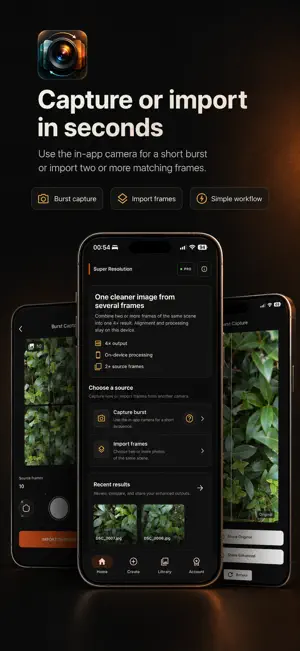
Turn a stack of photos into one higher-resolution image. Super Resolution aligns and combines multiple photos of the same still scene before upscaling the result. Capture a burst or import an existing photo stack, inspect the difference and share the image you want to keep—all with image processing on your device. TWO WAYS TO BUILD YOUR IMAGE Burst Capture: frame a still scene and press the shutter once. The app captures a sequence of frames and processes the stack. Manual Stack: choose at least two photos of the same scene from your photo library and combine them. COMPARE, LOOK CLOSER AND SHARE Drag the before-and-after divider to compare your original frame with the enhanced result. Open a saved image full-screen and pinch to zoom for a closer look. Share your enhanced image or individual source frames. KEEP YOUR STACKS ORGANISED Save results in your Library alongside their source frames. Add tags and ratings, mark favourites and search by name or tag to find the images you want to revisit. ON-DEVICE PROCESSING Image stacking and enhancement run locally, without requiring you to upload your photos to a cloud processing service. BUILT FOR STILL SCENES Explore landscapes, architecture, objects and textures. For the best results, keep your camera steady and use well-lit frames with consistent exposure and minimal movement. The built-in capture guide helps you prepare a suitable stack. Results depend on your source images and how well they align; stacking is not a guaranteed fix for blur or moving subjects, and a larger image does not guarantee more genuine detail. SUBSCRIPTIONS Burst Capture and Manual Stack enhancement require an active subscription or eligible free trial. Weekly and annual auto-renewing plans are available. Eligible Apple Accounts can receive a 7-day free trial; only one introductory offer is available per subscription group. After the trial, your selected plan renews at the price shown before purchase unless cancelled. Cancel at least 24 hours before the trial or current subscription period ends. Manage or cancel in your Apple Account subscription settings. Your existing Library remains accessible without an active subscription. Terms of Use: https://www.apple.com/legal/internet-services/itunes/dev/stdeula/ Privacy Policy: https://inconnect.co.uk/privacy/
App privacy
The developer, Inconnect Systems Ltd, reported these privacy practices to Apple.
Data Not Collected
The developer does not collect any data from this app.
Alternatives to Super Resolution
Looking for apps like Super Resolution? Here are 6 similar apps on the App Store. The highest rated is Motion Stitch: Align Photos (5.0/5), and all 6 are free to download.
-
 Motion Stitch: Align Photos
5.0
-
 GyroCam | Always Upright Video
5.0
-
 Photo Booth & Collage: PixUp
3.7
-
 Low-Res Pixel Photo Editing
-
 Flattr: Exposure Blend & Merge
5.0
-
 High resolution photo: AI Wand
4.2
| App | Rating | Price | Last updated | Compare |
|---|---|---|---|---|
| Super Resolution | – | Free | October 22, 2026 | |
| Motion Stitch: Align Photos | 5.0 / 5 (1) | Free | Oct 14, 2026 | Compare |
| GyroCam | Always Upright Video | 5.0 / 5 (9) | Free | Jun 11, 2026 | Compare |
| Photo Booth & Collage: PixUp | 3.7 / 5 (11) | Free | Oct 6, 2026 | Compare |
| Low-Res Pixel Photo Editing | – | Free | Jun 24, 2026 | Compare |
| Flattr: Exposure Blend & Merge | 5.0 / 5 (6) | Free | Nov 9, 2026 | Compare |
| High resolution photo: AI Wand | 4.2 / 5 (37) | Free | Apr 22, 2026 | Compare |
Compare Super Resolution with the top alternatives: ratings, updates, ASO score and keyword gaps →