

QuickConvert: Image Converter
Dt nova Productivity iPhoneiPadiPod touch
QuickConvert: Image Converter is a free Productivity app for iPhone and iPad by Dt nova. Requires iOS 16.0. Updated September 23, 2026.
- Price
- Free
- on the App Store
- Size
- 4 MB
- Age 4+
- Updated
- Sep 23
- 2026 · v1.1
Screenshots


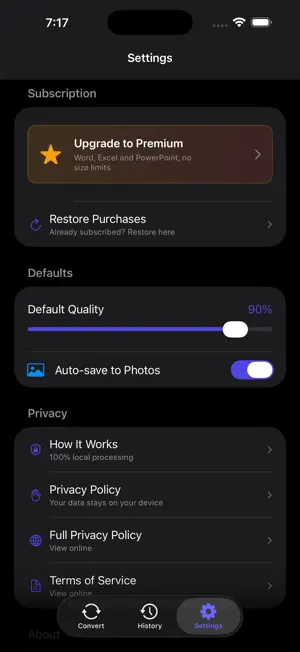

About QuickConvert: Image Converter
QuickConvert turns HEIC into JPG, shrinks photos that are too big to send, and builds PDFs. On your device, with no ads and nothing uploaded anywhere. UNLIMITED IMAGE CONVERSIONS, FREE - HEIC to JPG or PNG, PNG to JPG, JPG to PNG, WebP to either - Compress photos with a quality slider, and see the real before and after size - Up to 50 files at once, up to 100 MB each - Images to PDF, PDF to images, compress, merge and split PDFs YOUR PHOTOS KEEP THEIR DETAILS Capture date, location and orientation survive the conversion. Most converters quietly throw all three away, which is how a converted photo ends up sideways and sorted to the wrong place in your library. NOTHING LEAVES YOUR DEVICE No account, no sign in, no upload, no server. The app works in airplane mode, which is the simplest proof that your files stay with you. QUICKCONVERT PRO - PDF to Word and PDF to Excel, as editable .docx and .xlsx - Word, Excel and PowerPoint to PDF - Batches beyond 50 files, and files over 100 MB QuickConvert Pro is a subscription: 3.99 USD per month or 29.99 USD per year, shown in local currency by region. Payment is charged to your Apple Account at confirmation of purchase. It renews automatically for the same price and period unless cancelled at least 24 hours before the end of the current period. Manage or cancel it in your Apple Account settings. Terms of Use (EULA): https://thedolceway.com/terms Privacy Policy: https://thedolceway.com/privacy
What’s new
Version 1.1 · Updated September 23, 2026
Unlimited image conversions, free. The ten a day cap is gone. - Convert and compress as many images as you like, up to 50 at a time and 100 MB each. - Capture date, GPS and orientation now survive every conversion. PNG output was dropping all three. - Pro is now clearly what it always should have been: Word, Excel and PowerPoint, plus bigger batches and larger files.
App privacy
The developer, Dt nova, reported these privacy practices to Apple.
Data Not Collected
The developer does not collect any data from this app.
Alternatives to QuickConvert: Image Converter
Looking for apps like QuickConvert: Image Converter? Here are 6 similar apps on the App Store. The highest rated is FileZen - File Manager (5.0/5), and all 6 are free to download.
-
 Filey Studio
-
 FileZen - File Manager
5.0
FileZen - File Manager
5.0
-
 Doc Vault - File Manager
-
 Lookupp!
4.9
Lookupp!
4.9
-
 TTSPhone Text to Speech Phone
4.8
TTSPhone Text to Speech Phone
4.8
-
 iPlay File Manager: Explorer
2.0
iPlay File Manager: Explorer
2.0
| App | Rating | Price | Last updated | Compare |
|---|---|---|---|---|
| QuickConvert: Image Converter | – | Free | September 23, 2026 | |
| Filey Studio | – | Free | Mar 25, 2026 | Compare |
| FileZen - File Manager | 5.0 / 5 (2) | Free | Oct 11, 2026 | Compare |
| Doc Vault - File Manager | – | Free | Oct 15, 2026 | Compare |
| Lookupp! | 4.9 / 5 (25) | Free | Sep 22, 2026 | Compare |
| TTSPhone Text to Speech Phone | 4.8 / 5 (51) | Free | Dec 3, 2025 | Compare |
| iPlay File Manager: Explorer | 2.0 / 5 (4) | Free | Oct 12, 2026 | Compare |