

My Yarn Stash: Row Counter
Alain Kessler Lifestyle iPhoneiPadiPod touch
My Yarn Stash: Row Counter is a free Lifestyle app for iPhone and iPad by Alain Kessler. Requires iOS 16.0. Updated October 14, 2026.
- Price
- Free
- on the App Store
- Size
- 77 MB
- Age 4+
- Updated
- Oct 14
- 2026 · v1.0.8
Screenshots


About My Yarn Stash: Row Counter
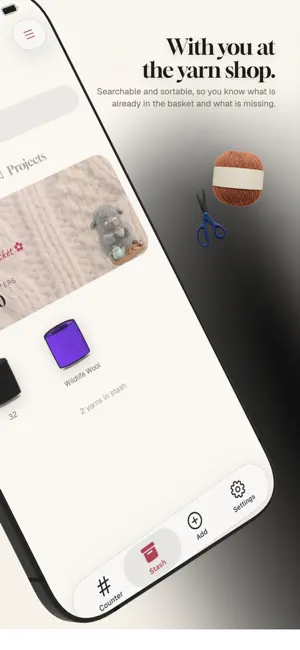
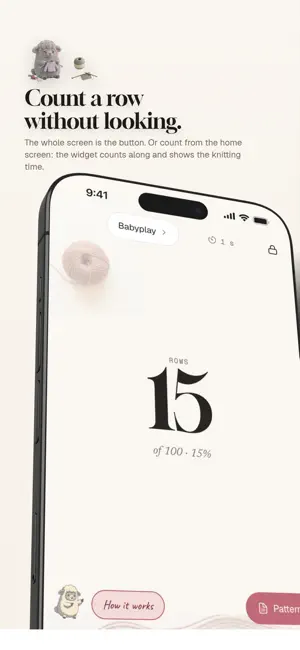
You are eleven rows into the raglan increases, someone asks you a question, and it is gone. My Yarn Stash is a row counter built for the moment your hands are full. No hunting for a small button, no unlocking and squinting. The number fills the screen, and the screen is the button. FEATURES The counter Tap anywhere to count. A short buzz confirms the row, so your eyes stay on your knitting. Undo takes back a miscount. A tap locks the screen against bags and cats, unlocking is a deliberate press and hold, and the screen stays awake while you work. Repeats that announce themselves Tell it once: increase every sixth row. It counts the cycle and, on the row it comes due, greets you with a different buzz. You never have to look to know, and it shows how often the repeat has fired. Count with the app closed A widget on your home screen adds a row with one tap, app running or not. The wide size shows your knit time beside the count, ticking along while the timer runs, and the same widget fits the Lock Screen with its own +1, so a row on a locked phone costs one tap. In Settings you choose whether it follows whatever you are counting or stays on one project. And if your iPhone has an Action Button, or you tap its back twice, that counts a row too. Your pattern, next to the count, with a ruler that follows you Open the pattern on the counter screen and a marker sits on the row you are working. Every tap moves it down one row, so you never lose your place. Bring a PDF, or simply photograph the page. Notes on the rows they belong to "Row 42, split for the sleeves." Write it once and it appears when you get there, not in a margin you forget to read. Jump straight to a row Long-press the number and type the row you are on. Realising at 300 that you were wrong at 240 should not cost sixty taps. Rows, and how long that is Enter your gauge, the rows per ten centimetres, and the counter shows length beside the row number. "Work until 40 cm" becomes something you read off. Counters of their own Sleeves, the second sock, an edging: as many side counters as the project needs, tapped independently. Rows and rounds Knitting or crochet, per project: the counter says rows or rounds. Switch projects without leaving the counter Two things on the needles at once is normal. Tap the project name at the top and pick the other one, or start a new one from the same place. Your yarn, next to your project Keep every skein with its brand, colour, weight, yardage and dye lot, and photos. Attach it to the project you are counting, so the two stay together. The pattern lives with the project Not a separate pile to manage: add it as a PDF or a photo, with source and difficulty, and it belongs to its project. Yarn scanner (Premium) Photograph a ball band and it reads brand, fibre and yardage for you, or the yarn itself when the band is long gone. Numbers it cannot read clearly, it leaves blank rather than inventing. A timer where you actually knit Start it from the counter itself and stop it when you put the work down. Every project keeps its own total, and the total is yours to correct when you forget to stop. Photos and export Photos on any entry. Export your whole stash as PDF or CSV whenever you like, at no cost. PLANS Free: the counter, all of it. Repeats, side counters, the lock, projects, the timer, export, and a stash of up to 30 items. My Yarn Stash Premium: the yarn scanner and an unlimited stash. Your data is stored securely on servers in the European Union. Auto-renewable subscription: My Yarn Stash Premium, monthly or yearly. Payment is charged to your Apple ID at confirmation of purchase. It renews automatically unless cancelled at least 24 hours before the period ends, and renewal is charged within those 24 hours. Manage or cancel it any time in your App Store account settings. Terms of Use (EULA): https://www.apple.com/legal/internet-services/itunes/dev/stdeula/ Privacy Policy: https://getklar.org/yarnstash/privacy
What’s new
Version 1.0.8 · Updated October 14, 2026
New: the Room. A new tab where everyone who knits and crochets with My Yarn Stash sits together as a ball of yarn. Your ball grows round by round with the time you spend on your projects. The timer counts, and now so does the time between counted rows when no timer runs. Whoever is working on a project right now winds in place, whoever is in the Room rolls around, and everyone else sleeps where they last were. No names, just yarn. Your portfolio. When a project is finished, a photo of it goes into your portfolio. Tap a ball in the Room to see the finished pieces, with the date and the time they took. Every photo is checked automatically first. You can hide your portfolio in Settings at any time, any photo can be reported and any ball blocked. And the app has a new look: an onboarding made of wool, through a knitted tunnel.
App privacy
The developer, Alain Kessler, reported these privacy practices to Apple.
Data Not Collected
The developer does not collect any data from this app.
Alternatives to My Yarn Stash: Row Counter
Looking for apps like My Yarn Stash: Row Counter? Here are 6 similar apps on the App Store. The highest rated is Woolio - You & your yarn (5.0/5), and all 6 are free to download.
-
 Woolio - You & your yarn
5.0
-
 GarnLog
5.0
-
 StitchWise: Crochet & Knit
-
 Yarn Project Tracker - Loom
5.0
-
 Yarnventory
2.6
-
 Loom - Knit Tracker
| App | Rating | Price | Last updated | Compare |
|---|---|---|---|---|
| My Yarn Stash: Row Counter | – | Free | October 14, 2026 | |
| Woolio - You & your yarn | 5.0 / 5 (2) | Free | Jul 20, 2026 | Compare |
| GarnLog | 5.0 / 5 (4) | Free | Apr 22, 2026 | Compare |
| StitchWise: Crochet & Knit | – | Free | Oct 5, 2026 | Compare |
| Yarn Project Tracker - Loom | 5.0 / 5 (1) | Free | Sep 5, 2026 | Compare |
| Yarnventory | 2.6 / 5 (5) | Free | Oct 8, 2026 | Compare |
| Loom - Knit Tracker | – | Free | Jun 6, 2026 | Compare |