

QRadio: Internet Radio
JAKUB KAPRZYK Music iPhoneiPadiPod touchMacApple Watch
QRadio: Internet Radio is a free Music app for iPhone and iPad by JAKUB KAPRZYK. Rated 5.0/5 from 1 ratings. Requires iOS 26.1. Updated October 7, 2026.
- Rating
- 5.0
- 1 ratings
- Price
- Free
- on the App Store
- Size
- 9 MB
- Age 4+
- Updated
- Oct 7
- 2026 · v10.6.1
Screenshots


About QRadio: Internet Radio
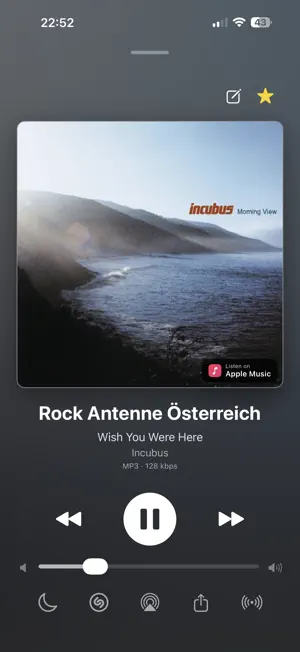
QRadio is a clean internet radio player for iPhone, iPad, Mac, CarPlay, and Apple Watch. Add your own streams, browse a catalog of public radio stations, sync favorites with iCloud, hand playback between your devices, identify songs with Shazam, and keep playback stable even with less reliable streams. Highlights: - Organize favorites into folders, synced with iCloud - Select several stations at once to move them into a folder or remove them together - Give a folder its own icon, or keep the station logos it shows by default - Home-screen widgets: tap a favorite to play it, or play/pause the current station - Buffering that adapts to your connection: Automatic (quick on Wi-Fi, steady on cellular), plus Fast, Stable, and Manual presets - Open recognized songs in Apple Music or Spotify - Add songs from your history to an Apple Music playlist - Long-press a song or a station for its full details and quick actions - Play custom internet radio streams - Choose between multiple stream qualities and sources per station, with automatic fallback when a stream is unavailable - Browse a catalog of public radio stations grouped by country and genre - Save favorites with custom names, logos, URLs, country, volume, and buffer settings - QRadio audio engine for older SHOUTcast/ICY streams, with adaptive buffering and smooth reconnects - Lossless FLAC streams, including FLAC in Ogg, up to 192 kHz - Real-time song metadata, artwork, song history, and Apple Music lookup - Merge stations in Song History when one station appears under several names, and separate them again later, or move one station's history to another - Delete everything a single station recorded, or record history only for your favorites - Rename a catalog station or give it your own logo, keeping the catalog's own name underneath - Hotel Mode: QRadio never falls back to cellular on its own - Arrange the tabs in the order you use them, synced across your devices - Shazam and Auto-Shazam song recognition - Smart previous/next controls across Favorites, Catalog, History, CarPlay, and Apple Watch - CarPlay with Favorites, History, a Catalog sorted by genre, Now Playing controls, and Auto-Shazam status - Siri Shortcuts for playback, sleep timer, song recognition, and "What's Playing" - Standalone Apple Watch playback plus Watch remote control - AirPlay, Lock Screen, Control Center, complications, and Digital Crown volume control - iCloud sync for favorites, settings, history, and per-station options - Handoff: continue the current station on a nearby iPhone, iPad, or Mac - Encrypted backup and restore - Light and dark mode - Full VoiceOver support in five languages, and text that scales with your preferred size
What’s new
Version 10.6.1 · Updated October 7, 2026
Lossless radio is here. - Support for FLAC stations. - You can now set a country for stations you added yourself. - Bug fixes and improvements, including on Apple Watch.
App privacy
The developer, JAKUB KAPRZYK, reported these privacy practices to Apple.
Data Not Collected
The developer does not collect any data from this app.
Alternatives to QRadio: Internet Radio
Looking for apps like QRadio: Internet Radio? Here are 6 similar apps on the App Store. The highest rated is Radiara - FM & Internet Radio (5.0/5), and all 6 are free to download.
-
 Radio & Podcasts - Ondio
-
 Radio Random
-
 AirWave - Internet Radio
3.5
-
 Radiara - FM & Internet Radio
5.0
-
 Ridio: FM Radio for the Car
-
 World Radios by RadaRadio
5.0
| App | Rating | Price | Last updated | Compare |
|---|---|---|---|---|
| QRadio: Internet Radio | 5.0 / 5 (1 rating) | Free | October 7, 2026 | |
| Radio & Podcasts - Ondio | – | Free | Jun 13, 2026 | Compare |
| Radio Random | – | Free | Sep 14, 2026 | Compare |
| AirWave - Internet Radio | 3.5 / 5 (2) | Free | May 5, 2026 | Compare |
| Radiara - FM & Internet Radio | 5.0 / 5 (1) | Free | Aug 30, 2026 | Compare |
| Ridio: FM Radio for the Car | – | Free | Aug 26, 2026 | Compare |
| World Radios by RadaRadio | 5.0 / 5 (2) | Free | Aug 10, 2026 | Compare |