

OneScreen for iPad
Spot Digital, Inc. Utilities iPad
OneScreen for iPad is a free Utilities app for iPad by Spot Digital, Inc. Requires iOS 18.3. Updated October 8, 2026.
- Price
- Free
- on the App Store
- Size
- 10 MB
- Age 4+
- Updated
- Oct 8
- 2026 · v1.0.6 (58)
Screenshots
About OneScreen for iPad
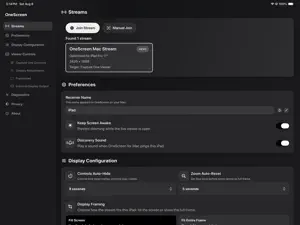
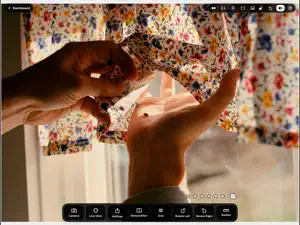
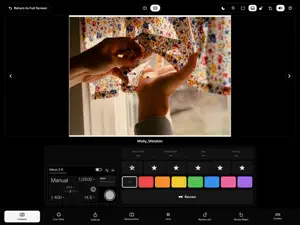
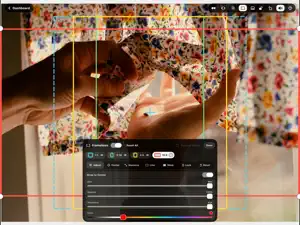
Turn your iPad into a real-time monitor and remote control for Capture One. OneScreen for iPad receives real-time streams from OneScreen for Mac. Hand an iPad to a client, mount it on a stand, or keep it beside the camera — everyone sees the same image without crowding around your Mac. Star-rate and color-tag images as they land, or flip into Review Mode to step back through your captures frame by frame. The camera tool changes aperture, shutter speed, ISO, and white balance — and triggers the capture itself — one of the many Capture One tools you can reach right from the iPad. Control Deck mode turns the iPad into a dedicated control surface when the picture is running on a larger monitor. Shoot to your crop with the frameline tool, rotate the display to fit your setup, and use Display Adjustments to tune warmth, tint, saturation, and contrast until the iPad matches the display you trust. OneScreen for iPad requires OneScreen for Mac, running on the same local network. Capture One Controls require Capture One on the Mac, and are unlocked with a subscription or a one-time purchase. Terms of Use: https://www.apple.com/legal/internet-services/itunes/dev/stdeula/ Privacy Policy: https://spotdgtl.com/apps/onescreen/ipad/privacy/
What’s new
Version 1.0.6 (58) · Updated October 8, 2026
• A stream shown as ready to join now means video will arrive. The iPad checks that it can reach the Mac's video before offering the stream, and a stream it can't reach says why. Requires OneScreen for Mac 1.0.6. • Connect to your Mac with a USB or Ethernet cable and video travels over the cable. Pull it and the stream moves to Wi-Fi at once. • Screen Timeout: dim the screen while the picture sits still, and wake it the moment something changes. Find it under General. • Fixed Zoom: set a zoom and framing on the live picture and keep it until the stream stops. The Control Deck's picture now pinches to zoom too. • Touch the network-trouble dot for a one-line verdict on what is wrong. The connection bars no longer read poor on a healthy link, and a cabled link shows an Ethernet mark. • The top bar's tools are grouped by what they change, and the navigation chevrons light up under your finger. • Settings are now grouped under General, Viewer Behavior and Viewer Tools. • Star ratings and color tags grey out while several images are selected in Capture One. • Fixes: video failing to appear on a cellular iPad, "Video stopped arriving" showing for a momentary blip, and reconnecting to a Mac that Bonjour can't find.
App privacy
The developer, Spot Digital, Inc., reported these privacy practices to Apple.
Data Not Collected
The developer does not collect any data from this app.
Alternatives to OneScreen for iPad
Looking for apps like OneScreen for iPad? Here are 6 similar apps on the App Store. The highest rated is EVmode (5.0/5), and 5 of the 6 are free to download.
-
 IntVtimer
-
 EVmode
5.0
-
 AirMic: Bluetooth Speaker Mic
-
 PlanetLapse Space
5.0
-
 LIT Light Meter
4.6
-
 StageTools
5.0
| App | Rating | Price | Last updated | Compare |
|---|---|---|---|---|
| OneScreen for iPad | – | Free | October 8, 2026 | |
| IntVtimer | – | Free | Aug 6, 2025 | Compare |
| EVmode | 5.0 / 5 (2) | Free | Sep 11, 2026 | Compare |
| AirMic: Bluetooth Speaker Mic | – | Free | Sep 26, 2026 | Compare |
| PlanetLapse Space | 5.0 / 5 (1) | 0.99 USD | Sep 30, 2026 | Compare |
| LIT Light Meter | 4.6 / 5 (5) | Free | Oct 16, 2026 | Compare |
| StageTools | 5.0 / 5 (4) | Free | Jun 29, 2026 | Compare |
Compare OneScreen for iPad with the top alternatives: ratings, updates, ASO score and keyword gaps →