

DayStretch: Bridge Day Planner
Baris Ozdemirci Productivity iPhoneiPadiPod touch
DayStretch: Bridge Day Planner is a free Productivity app for iPhone and iPad by Baris Ozdemirci. Requires iOS 17.0. Updated October 19, 2026.
- Price
- Free
- on the App Store
- Size
- 5 MB
- Age 4+
- Updated
- Oct 19
- 2026 · v1.1
Screenshots

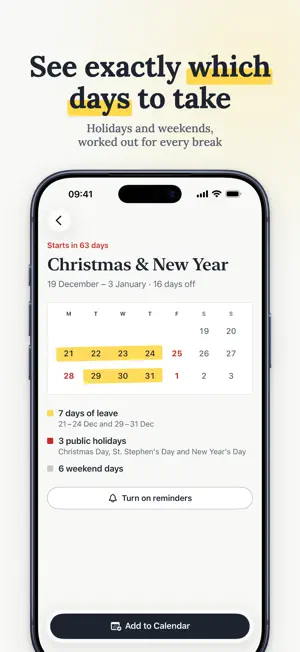


About DayStretch: Bridge Day Planner
Stop wasting leave days. Start stretching them. You have 25 days off this year. Used right, they could become 60. DayStretch shows you exactly how. By finding “bridge days” — the one or two workdays sitting between a public holiday and a weekend — DayStretch turns a single leave day into a 4, 5, or 9-day break. It’s not a trick. It’s just smart planning. See Your Whole Year at a Glance DayStretch maps every vacation opportunity across your entire year — ranked by efficiency. You’ll instantly see which dates give you the most days off for the fewest leave days spent. Book early, beat the crowd. Built for How You Actually Work • Supports 85+ countries and regions worldwide • Works with any schedule — 5-day, 4-day, custom work weeks • Filter by public, religious, and school holidays • Export any vacation block straight to Apple Calendar • Syncs across all your devices Never Miss a Bridge Day Get notified weeks before a bridge day opportunity passes — so you can request time off before your colleagues do. One Purchase. Forever. Try DayStretch free. When you’re ready, unlock everything with a single one-time payment. No subscription. No annual fee. No catch.
What’s new
Version 1.1 · Updated October 19, 2026
• A new design: your year on one page, each break on its own calendar, and a new My Year tab. Plus a new app icon. • Reminders are now free and work without an account. Choose when you get them: 6 months, 3 months, 1 month, 2 weeks or 1 day before a break (2 weeks and 1 day by default). They arrive at 9 a.m. your time, in English, German or Turkish. • Usage analytics are now off unless you allow them. • Clearer break names, and each holiday is listed once. • A break that has started shows which day of it you're on. • Dates are now correct in every time zone. • Add to Calendar keeps the events you added before and saves the right days. No calendar access? An "Open Settings" button now appears. • The Bridge Day Alerts switch in Settings now works: off stops reminders, on starts them right away. • Better support for larger text sizes and VoiceOver. • Clearer error messages, and a brief connection drop no longer signs you out.
App privacy
The developer, Baris Ozdemirci, reported these privacy practices to Apple.
Data Linked to You
The following data, which may be collected and linked to your identity, may be used for the following purposes:
- Purchases: Purchase History
- Location: Coarse Location
- Identifiers: Device ID, User ID
- Contact Info: Email Address
- Diagnostics: Other Diagnostic Data
- Other Data: Other Data Types
Used for: Analytics, App Functionality
Data Not Linked to You
The following data, which may be collected but is not linked to your identity, may be used for the following purposes:
- Usage Data: Product Interaction
Used for: Analytics
Alternatives to DayStretch: Bridge Day Planner
Looking for apps like DayStretch: Bridge Day Planner? Here are 6 similar apps on the App Store. The highest rated is Use Your Days (5.0/5), and all 6 are free to download.
-
 Day-Off Planner: Long Weekends
-
 Days Off: PTO Holiday Planner
-
 My PTO
4.5
My PTO
4.5
-
 Nagger: Reminder & To-Do
-
 Use Your Days
5.0
Use Your Days
5.0
-
 CardWallet: Bank Cards
| App | Rating | Price | Last updated | Compare |
|---|---|---|---|---|
| DayStretch: Bridge Day Planner | – | Free | October 19, 2026 | |
| Day-Off Planner: Long Weekends | – | Free | Oct 12, 2026 | Compare |
| Days Off: PTO Holiday Planner | – | Free | Aug 29, 2026 | Compare |
| My PTO | 4.5 / 5 (34) | Free | Sep 19, 2026 | Compare |
| Nagger: Reminder & To-Do | – | Free | Jul 4, 2026 | Compare |
| Use Your Days | 5.0 / 5 (3) | Free | Aug 23, 2026 | Compare |
| CardWallet: Bank Cards | – | Free | May 30, 2026 | Compare |