

Lupa Vision
Orange Hill GmbH Reference iPhoneiPadiPod touch
Lupa Vision is a free Reference app for iPhone and iPad by Orange Hill GmbH. Requires iOS 18.0. Updated July 21, 2026.
- Price
- Free
- on the App Store
- Size
- 58 MB
- Age 4+
- Updated
- Jul 21
- 2026 · v1.3
Screenshots

About Lupa Vision
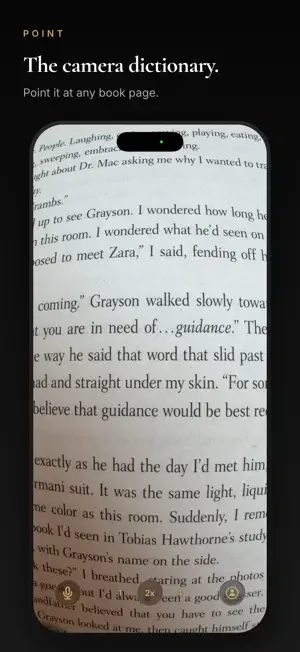
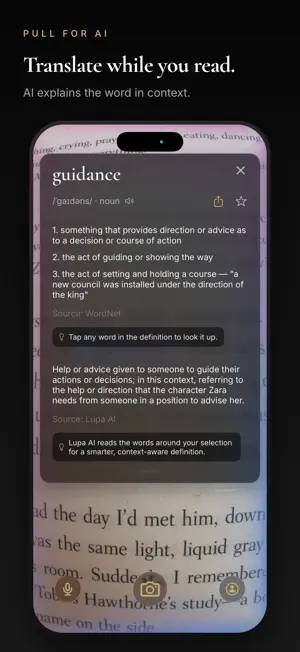
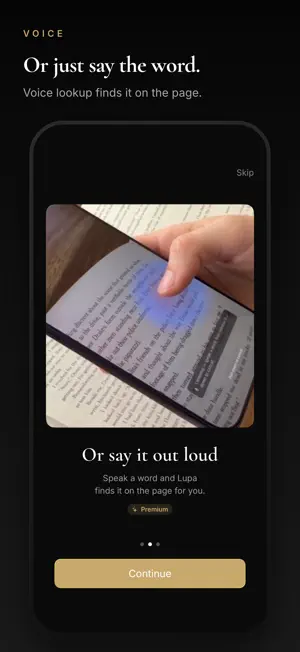
Lupa is a reader's lens. Point your camera at a page, tap any word, and see the definition in under two seconds. No typing. No switching apps. No losing your place. Built for people who read on paper — and want to stay there. KEY FEATURES • Tap-to-define: tap any word on a physical page, get the definition instantly. • Pinch to zoom: get closer to small print without lifting the book. • Works on anything you read: paper books, Kindle, magazines, your laptop screen, even another phone — Lupa just needs a camera and a word. • Drag to select: select a whole phrase and get a nuanced AI-powered reading. • Voice selection: hold the screen, say a word, and Lupa picks it out of the page for you. • Voice Search widget: tap on the Lock Screen, the app opens listening (Premium). • Today's Word widget: a word from your Glossary on your Home Screen each morning, with definition and a tap-to-launch camera shortcut. • Word pronunciation: hear how any word sounds. • History & favorites: every word you look up is saved. Star the ones worth remembering. • 2-second access: open Lupa instantly from the Action Button, Control Center, Lock Screen, or Home Screen widget. • Cloud sync: favorites and history follow you across devices when you sign in. DESIGNED FOR READING Lupa is built around a simple idea: reading flow is fragile, and looking up a word shouldn't break it. The camera-to-definition path is engineered to be faster than reaching for a physical dictionary or switching to a translation app. You keep your book in your hands. You keep your place. You keep going. PREMIUM Unlimited AI translations, voice selection, pronunciation, unlimited favorites and history, and the ability to save a snapshot of the page with each lookup. • 7-day free trial for new subscribers • $4.99 / month or $34.99 / year • Cancel anytime PRIVACY Your lookups live on your device by default. When you sign in, they sync across your devices through our own servers — never sold, never shared, never used to train third-party models. Voice audio is transcribed and discarded immediately. Lupa works best in good light, on flat pages, with the camera pointed straight down. The built-in help covers everything you need to know to get the sharpest possible results. Made with care by a small team in Europe. Terms of Use (EULA): https://www.apple.com/legal/internet-services/itunes/dev/stdeula/
What’s new
Version 1.3 · Updated July 21, 2026
New welcome experience - try your very first lookup on a built-in sample page, no book needed. Refinements and polish throughout.
App privacy
The developer, Orange Hill GmbH, reported these privacy practices to Apple.
Data Linked to You
The following data, which may be collected and linked to your identity, may be used for the following purposes:
- Contact Info: Email Address, Name
- Identifiers: User ID, Device ID
- Usage Data: Product Interaction
- Diagnostics: Crash Data, Performance Data
- Purchases: Purchase History
- User Content: Photos or Videos, Audio Data, Other User Content
Used for: Developer’s Advertising or Marketing, Analytics, App Functionality
Alternatives to Lupa Vision
Looking for apps like Lupa Vision? Here are 6 similar apps on the App Store. The highest rated is LensDict - Camera Dictionary (5.0/5), and all 6 are free to download.
-
 XiaoYing (小英) English OCR
-
 LensDict - Camera Dictionary
5.0
LensDict - Camera Dictionary
5.0
-
 Visionary OCR Dictionary
-
 Translate & Translator: TLingo
5.0
Translate & Translator: TLingo
5.0
-
 VocabSnap: Vocabulary Builder
-
 English Word OCR
| App | Rating | Price | Last updated | Compare |
|---|---|---|---|---|
| Lupa Vision | – | Free | July 21, 2026 | |
| XiaoYing (小英) English OCR | – | Free | Jun 21, 2026 | Compare |
| LensDict - Camera Dictionary | 5.0 / 5 (1) | Free | May 21, 2026 | Compare |
| Visionary OCR Dictionary | – | Free | Jul 2, 2026 | Compare |
| Translate & Translator: TLingo | 5.0 / 5 (1) | Free | Sep 14, 2026 | Compare |
| VocabSnap: Vocabulary Builder | – | Free | Jul 23, 2026 | Compare |
| English Word OCR | – | Free | Jul 7, 2026 | Compare |
Compare Lupa Vision with the top alternatives: ratings, updates, ASO score and keyword gaps →