

BaseballScorer
Mike Yawn Sports iPhoneiPadiPod touch
BaseballScorer is a free Sports app for iPhone and iPad by Mike Yawn. Rated 4.9/5 from 16 ratings. Requires iOS 17.6. Updated October 6, 2026.
- Rating
- 4.9
- 16 ratings
- Price
- Free
- on the App Store
- Size
- 110 MB
- Age 4+
- Updated
- Oct 6
- 2026 · v1.5
Screenshots



About BaseballScorer
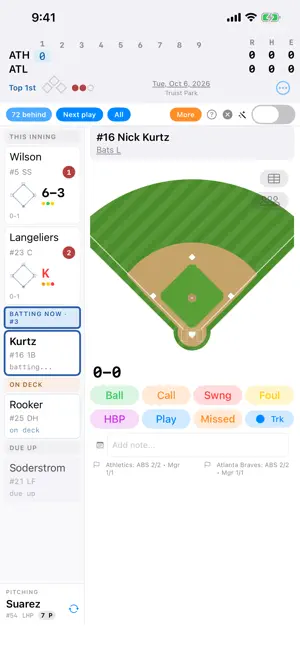
BaseballScorer is a free, complete baseball scorecard for your iPad or iPhone. No ads. No paywall. No in-app purchases required. Just open the app and start scoring. Whether you're keeping score for the first time or you've filled a shelf with scorebooks, BaseballScorer meets you where you are. Missed a few pitches while grabbing a hot dog? No problem — catch up from the MLB live feed, or just skip ahead and keep going. Made a mistake? Tap any at-bat to go back and fix it. The app never blocks you, never nags you, and never makes you feel like you're doing it wrong. **Free scoring guide** — Pair the app with our companion site at scoring.theyawns.com: in-depth explanations of every scoring situation, from dropped third strikes to fielder's choices, written for scorers of every level. **Learn by doing** — A built-in practice mode walks you through a real MLB game play by play. It tells you exactly what to tap, rejects wrong inputs so you can't get lost, and teaches you real scoring notation as you go. By the end you'll be reading 6-4-3 double plays like a pro. **Score at your own pace** — Track every pitch with Ball, Called, Swinging, and Foul buttons, or turn pitch tracking off and just record outcomes. The app adapts to how much detail you want. Walks and strikeouts record automatically when the count is full. **Real scoring notation** — Tap fielder positions on the diamond to build standard notation: 6-3 groundouts, F8 fly balls, 6-4-3 double plays, SF9 sac flies. Long-press for variants like bunt singles, ground-rule doubles, and fielder's choices. Your scorecard reads just like the real thing. **Traditional scorecard** — Rotate to landscape for a classic grid: lineup slots down the side, innings across the top. Fielding notation, pitch dots, runner paths, and RBI markers — everything a paper scorecard has, but you never have to erase. **The full game** — Pinch hitters, pinch runners, pitching changes, defensive substitutions, stolen bases, wild pitches, passed balls, balks, and replay challenges — both ABS pitch challenges and Manager challenges of on-field calls (safe/out, fair/foul, catch/trap, HR boundary). If it happens in a baseball game, you can score it. **MLB integration** — Pick today's game and lineups load automatically. Player stats (AVG, OBP, ERA) appear alongside each at-bat. Start from the first pitch, or use "Catch me up" to auto-score everything that's happened so far and pick up live. **Features:** - Pitch-by-pitch tracking or direct outcome entry - Full fielding notation including mid-chain errors (6-3, F8, 5-4-3 DP, SF9, E5, FC, 6-E4-3, K 2-E3) - Diamond visualization with runner tracking - All substitution types: PH, PR, defensive changes, pitching changes - Pitch count tracking per pitcher - ABS pitch challenges + Manager Challenge for on-field calls - Saved lineup favorites — switch between Vs LHP / Vs RHP / tournament lineups per team - Batter and pitcher stats (AVG, OBP, OPS, ERA) - Line score with R/H/E totals - Landscape scorecard grid - Save and resume games anytime - Works offline for non-MLB games - Interactive practice tutorial - iPad and iPhone optimized
Ratings & reviews
4.9
16 ratings
What’s new
Version 1.5 · Updated October 6, 2026
What's new in 1.5: • Ready for iPhone Duo. The scoring screen has been laid out for Apple's new foldable, so it works well whether the phone is open, closed, or half-open, in any orientation. • Landscape scoring on every device. Rotating while you score now keeps you on the scoring screen instead of switching to the scorecard grid. The grid is one tap away via the scorecard button next to the diamond or ⋯ → Show Scorecard. Prefer the old rotate-for-scorecard behavior? Turn on "Landscape shows scorecard" in Settings. • iPhone landscape layout. The scoring buttons now sit two across in a narrower sidebar so the full set stays on screen without scrolling, and the diamond makes better use of the space. • The defensive alignment overlay shown at the start of the 1st inning now steps aside on its own as soon as the first pitch or play is recorded.
App privacy
The developer, Mike Yawn, reported these privacy practices to Apple.
Data Not Collected
The developer does not collect any data from this app.
Alternatives to BaseballScorer
Looking for apps like BaseballScorer? Here are 6 similar apps on the App Store. The highest rated is ScoreKeep - Baseball Scoring (5.0/5), and all 6 are free to download.
-
 Baseball Scorebook App
4.8
-
 WeScore Baseball
-
 ScoreKeep - Baseball Scoring
5.0
-
 BatterUp Scorebook
5.0
-
 Baseball - Scorekeeper
5.0
-
 BB Score Keeper
3.2
| App | Rating | Price | Last updated | Compare |
|---|---|---|---|---|
| BaseballScorer | 4.9 / 5 (16 ratings) | Free | October 6, 2026 | |
| Baseball Scorebook App | 4.8 / 5 (5) | Free | Jul 15, 2026 | Compare |
| WeScore Baseball | – | Free | Apr 14, 2026 | Compare |
| ScoreKeep - Baseball Scoring | 5.0 / 5 (1) | Free | Oct 1, 2026 | Compare |
| BatterUp Scorebook | 5.0 / 5 (3) | Free | Jun 28, 2026 | Compare |
| Baseball - Scorekeeper | 5.0 / 5 (2) | Free | Aug 22, 2026 | Compare |
| BB Score Keeper | 3.3 / 5 (16) | Free | Oct 12, 2026 | Compare |
Compare BaseballScorer with the top alternatives: ratings, updates, ASO score and keyword gaps →