

Pressbook: Family Photo Album
SIDESWIPE LABS PRIVATE LIMITED Photo & Video iPhoneiPadiPod touchMac
Pressbook: Family Photo Album is a free Photo & Video app for iPhone and iPad by SIDESWIPE LABS PRIVATE LIMITED. Rated 4.5/5 from 2 ratings.
- Rating
- 4.5
- 2 ratings
- Price
- Free
- on the App Store
- Size
- 168 MB
- Age 4+
- Updated
- Oct 22
- 2026 · v1.5.0
Screenshots


About Pressbook: Family Photo Album
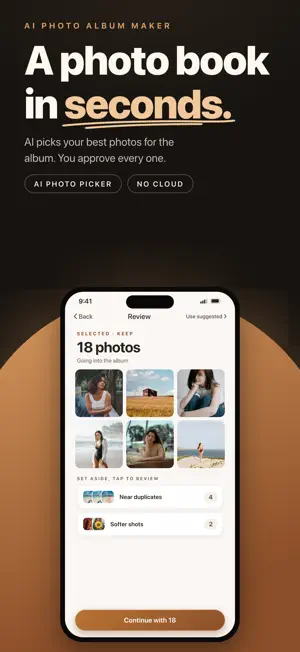
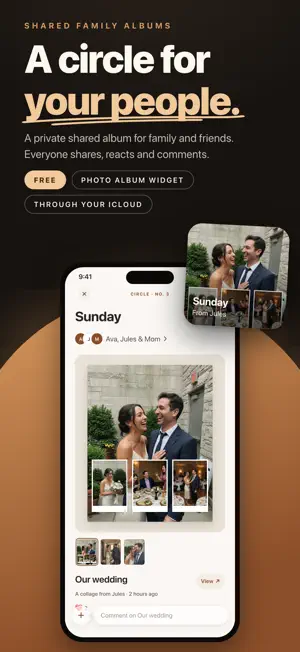
Pressbook is an on-device photo album, collage, and carousel maker for iPhone, iPad, and Mac. It turns your camera roll into magazine-style albums and photo books. Your photos are never uploaded to us, you don't need an account, and it's free to start. Share your work. One Share panel for albums, collages, and carousels — share a live memory, send a file, save images, export a PDF, or make a Reel. Invite with a one-person iCloud link for comments and reactions, or open a public link for reactions only. Guests open in Pressbook on their own device through your iCloud. Sharing is free for everyone. Circles, shared both ways. A private place for the people you invite, one at a time. Everyone in a circle shares albums, collages, and carousels, reacts to pages as they read, and comments. Updates keep every version, and a widget shows the newest from the circle you choose. It all goes through your iCloud. Reels for Stories and social. Turn a collage into a layer build-up reel, or a carousel into a continuous swipe or build reel — ready for stories and short-video apps. Reactions and comments. On a private shared memory, everyone can react and leave a short note. On multi-page albums, reactions sit on each page. Pick up to two people to sign off a page or ask for a change. Owners see Changes and can reply when they mark a note addressed. Memory Capsule. Seal a share until a birthday, anniversary, or any day you choose. Guests see the same countdown. On the day it opens for everyone together. You can still edit as the owner and push updates anytime. What you can make Photo albums and photo books. Multi-page albums that read like a printed magazine. Auto layout or pick each design. Flip with a page curl. Cover titles sit in Signature. On iPad, an opening sits across the spine. On iPhone Duo, the spine lands on the fold. Export a 600 DPI PDF for print. Video carousels. Two to ten panels you swipe through, with photos and video across the cuts. Export as sliced images, one video, or a carousel Reel. Collages. One composition from several photos, sized for a feed or story. Video clips work too. Export a still or a build-up Reel. How it works Pressbook reads your photos on your phone and builds the story — time, place, best burst frame, faces kept, people balanced. A fullness slider sets how full each page feels. Your photos stay private. Made on your phone. No sign-up. Nothing uploaded to us for making the work. Shared copies move through your iCloud to people you invite only. More you can do Camera viewfinders, film strips, instant frames, and stamps live in Frames. Date stamps use the photo day or today, in Digital, Stamp, or Film. Built-in sticker library. 593 stickers in ten packs. Search, recolor white doodles, or lift a cut-out from a photo. 520 templates with live preview. Edit the easy way. Move photos, group layers, text, borders, Apple Pencil, smart guides, curved text, photo fill. On Mac, File > Create in Photos starts an album, collage, or carousel. Built for iPhone, iPhone Duo, and iPad — widgets, Live Activities, Spotlight, Shortcuts. Free and Pro Free: albums up to 20 photos, standard quality, small watermark. Collages, carousels, stickers, templates, Reels, and sharing — including Memory Capsules, reactions, and comments — are included. Pro: albums up to 1,000 photos, 600 DPI exports, high-quality video, no watermark, drawing tools. Monthly, yearly, or lifetime. Download Pressbook and make your first album, collage, or carousel in under a minute. Subscription terms: - Pressbook Pro Monthly - Pressbook Pro Yearly - Pressbook Pro Lifetime (one-time purchase) Subscriptions renew automatically unless you turn them off at least 24 hours before the period ends. Manage or cancel anytime in Settings > your name > Subscriptions. Privacy Policy: https://pressbook.app/privacy Terms of Use (EULA): https://pressbook.app/terms Built by SideSwipe Labs: https://sideswipelabs.com
What’s new
Version 1.5.0 · Updated October 22, 2026
New in this version: • Explore, Home, and Shared. Explore shows every collage and carousel layout in sample photos: pick one, choose your photos, and Pressbook builds it. Home keeps the projects on this device. Shared holds what others share with you, what you share, and your circles. • 262 new templates. Explore now holds 520 collage and carousel layouts. Carousels take 2 to 10 panels, a New shelf shows the latest, and search finds templates by words like wedding or travel, in nine languages. When Pressbook lays out an album, it picks only layouts made for album pages that fit its page size. • Swipe to switch. At the top of each place, swipe left or right to move between its pages, like Albums, Collages, and Carousels in Home. • Smooth with big libraries. Long libraries scroll smoothly, and covers load just before you reach them. • Report and block. In shares and circles, report a comment, page, share, or person from someone else, or block them. Owners see reports and can remove what was reported. Before your first share, join, or comment, you agree to short community rules. • Sensitive images stay blurred. With Sensitive Content Warning on, sensitive images from others stay blurred until you choose to see them. The check runs on your device. • Reels from albums. Share > Reel turns an album into a page-by-page video. • Clearer Pro. Every purchase screen names Pressbook Pro, Restore purchases says when there is nothing to restore, and Manage subscription opens your subscriptions. • Quieter by default. Gentle comebacks stay off unless you turn them on. • Anonymous analytics. If you turn analytics on, each launch gets a new random ID, with no profile and no device model. • New names for some filters, frames, and layouts, and Settings > About Pressbook lists every font and open-source license. • Our privacy policy and terms are updated to match: pressbook.app/privacy
App privacy
The developer, SIDESWIPE LABS PRIVATE LIMITED, reported these privacy practices to Apple.
Data Not Linked to You
The following data, which may be collected but is not linked to your identity, may be used for the following purposes:
- Identifiers: Device ID
- Usage Data: Product Interaction
- Diagnostics: Other Diagnostic Data
Used for: Analytics
Alternatives to Pressbook: Family Photo Album
Looking for apps like Pressbook: Family Photo Album? Here are 6 similar apps on the App Store. The highest rated is Photo Albums 3D (5.0/5), and all 6 are free to download.
-
 Photo Album Maker: Family Aura
3.7
-
 BatchCraft - Edit, Bulk Export
-
 PhotoBooks by GraphicMeat
-
 Photo Albums 3D
5.0
-
 Sustain - AI Photo Album Maker
-
 Plogi - Photo Sticker Journal
4.0
| App | Rating | Price | Last updated | Compare |
|---|---|---|---|---|
| Pressbook: Family Photo Album | 4.5 / 5 (2 ratings) | Free | October 22, 2026 | |
| Photo Album Maker: Family Aura | 3.7 / 5 (3) | Free | Aug 31, 2026 | Compare |
| BatchCraft - Edit, Bulk Export | – | Free | Oct 24, 2026 | Compare |
| PhotoBooks by GraphicMeat | – | Free | Sep 8, 2026 | Compare |
| Photo Albums 3D | 5.0 / 5 (1) | Free | Sep 7, 2026 | Compare |
| Sustain - AI Photo Album Maker | – | Free | Oct 19, 2026 | Compare |
| Plogi - Photo Sticker Journal | 4.0 / 5 (2) | Free | Jul 26, 2026 | Compare |