

Expenz: AI Receipt Scanner
Pooya Alipoor Finance iPhoneiPadiPod touch
Expenz: AI Receipt Scanner is a free Finance app for iPhone and iPad by Pooya Alipoor. Requires iOS 16.4. Updated October 24, 2026.
- Price
- Free
- on the App Store
- Size
- 56 MB
- Age 17+
- Updated
- Oct 24
- 2026 · v2.0.0
Screenshots

About Expenz: AI Receipt Scanner
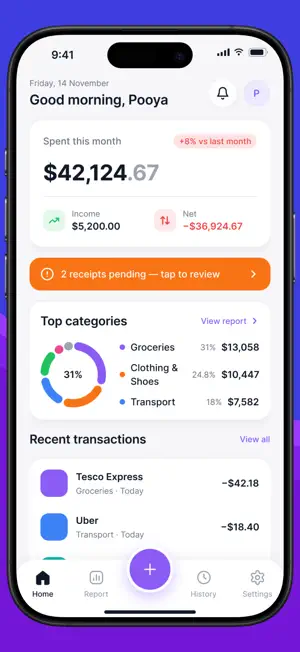
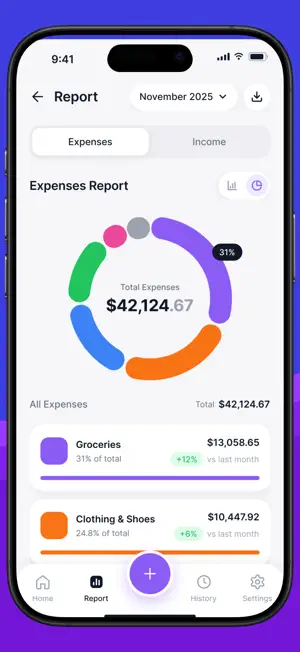
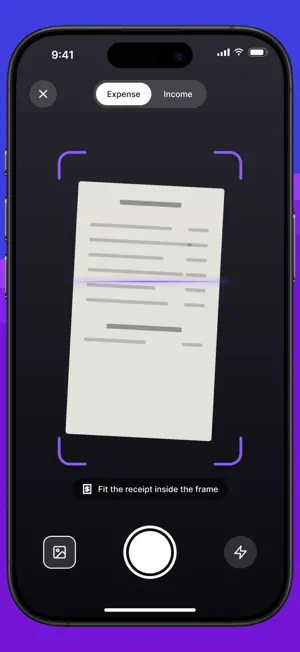
Expenz turns receipt scanning into a one-tap habit. Point your camera at any receipt, or pick one from your photo library, and Expenz uses AI to instantly extract the merchant, amount, date, category, and currency. No manual entry. No spreadsheets. FEATURES • AI Receipt Scanning - Snap or import receipts and let the AI fill in the details automatically. Works with printed and digital receipts. • Multi-Currency Support - Travel or work across borders? Expenz detects the receipt currency and converts totals to your base currency automatically. • Category Tracking - Organise expenses into custom categories with colour coding. See a breakdown of your spending at a glance on the dashboard. • Monthly Dashboard - View your total income and expenses for the current month, spending by category, and your most recent transactions, all on one screen. • Batch Scanning - Capture multiple receipts in one session and process them all at once. • CSV Export - Export your transactions to CSV with optional date filters. Ready for your accountant, expense report, or personal records. • Custom Fields - Add your own fields to transactions for notes, project codes, or anything else you track. • Secure & Private - Your data is stored securely. Authentication is handled with encrypted session tokens. PRO PLAN Unlock unlimited receipt scans with Expenz Pro. Free users get a limited number of scans per month to try the full experience. Terms of Use (EULA): https://www.apple.com/legal/internet-services/itunes/dev/stdeula/ --- Expenz is designed for freelancers, small business owners, and anyone who wants to stop losing track of expenses.
What’s new
Version 2.0.0 · Updated October 24, 2026
Expenz 2.0 is a new design for scanning, reviewing, and understanding your spending. • Scan a receipt with the document scanner, or add one from your photos or Files • Hide personal details on a receipt before it is read • See the last six months as a bar chart, alongside the category breakdown • Pick dates from a calendar when you filter history or export • Import transactions from another app with a CSV file, and export your own • Clearer Home, History, Settings, and receipt review screens
App privacy
The developer, Pooya Alipoor, reported these privacy practices to Apple.
Data Linked to You
The following data, which may be collected and linked to your identity, may be used for the following purposes:
- User Content: Photos or Videos, Customer Support
- Purchases: Purchase History
- Contact Info: Email Address
Used for: Third-Party Advertising, App Functionality
Data Not Linked to You
The following data, which may be collected but is not linked to your identity, may be used for the following purposes:
- Financial Info: Other Financial Info
- Other Data: Other Data Types
Used for: Other Purposes
Alternatives to Expenz: AI Receipt Scanner
Looking for apps like Expenz: AI Receipt Scanner? Here are 6 similar apps on the App Store. The highest rated is Cash Bucks Earn Money (4.6/5), and all 6 are free to download.
-
 Receipt Scanner - Easy Expense
-
 Smart Receipts: Scan & Track
4.3
Smart Receipts: Scan & Track
4.3
-
 Cash Bucks Earn Money
4.6
Cash Bucks Earn Money
4.6
-
 AYORemit
-
 Energy Tracker
4.6
Energy Tracker
4.6
-
 Money Pro
2.5
Money Pro
2.5
| App | Rating | Price | Last updated | Compare |
|---|---|---|---|---|
| Expenz: AI Receipt Scanner | – | Free | October 24, 2026 | |
| Receipt Scanner - Easy Expense | – | Free | Aug 7, 2026 | Compare |
| Smart Receipts: Scan & Track | 4.3 / 5 (51) | Free | Oct 17, 2026 | Compare |
| Cash Bucks Earn Money | 4.6 / 5 (93) | Free | May 18, 2026 | Compare |
| AYORemit | – | Free | Oct 28, 2026 | Compare |
| Energy Tracker | 4.6 / 5 (53) | Free | Dec 31, 2024 | Compare |
| Money Pro | 2.5 / 5 (40) | Free | Oct 28, 2026 | Compare |