

Sablo: AI Furniture Visualizer
Andrew Assef Lifestyle iPhoneiPadiPod touch
Sablo: AI Furniture Visualizer is a free Lifestyle app for iPhone and iPad by Andrew Assef. Requires iOS 16.4. Updated October 21, 2026.
- Price
- Free
- on the App Store
- Size
- 79 MB
- Age 4+
- Updated
- Oct 21
- 2026 · v1.0.12
Screenshots


About Sablo: AI Furniture Visualizer
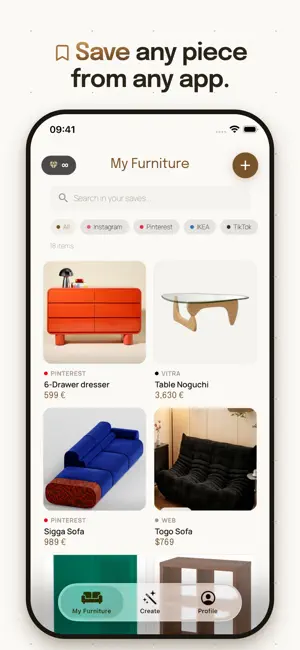
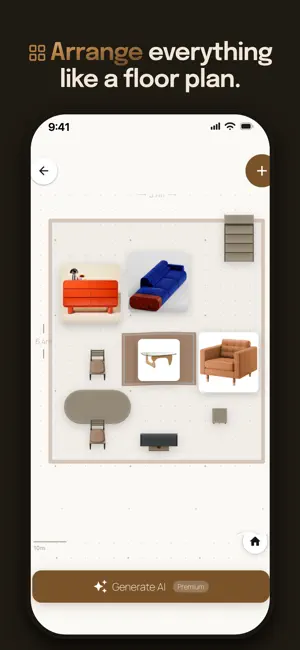
THAT PERFECT SOFA IN YOUR CART — WILL IT FIT IN YOUR LIVING ROOM? Sablo answers that before you check out. Scan your room, paste the link to a furniture listing — eBay, Facebook Marketplace, Craigslist, IKEA, Amazon, or Pinterest — and the AI places the real piece, true to scale, on a floor plan of your own room, then generates a photorealistic render in under a minute. Your first render is free. No tape measure, no hauling a sofa back to the store. WHAT OTHER APPS CAN'T DO Design apps hand you generic catalogs. Sablo starts from the piece you're actually about to buy. Paste any listing — brand-new or second-hand — and it automatically pulls the photo, the listed price, and the real dimensions. A vintage armchair on eBay, a used dresser on Facebook Marketplace, a new sofa from IKEA: what lands on your plan is the actual item, not a 3D stand-in that looks nothing like it. HOW IT WORKS 1. Scan your room with your phone. 2. Paste the link to the furniture listing. 3. Generate — and see the piece at home. YOUR ROOM, MAPPED TO SCALE Sweep your camera around the room: Sablo reads the walls, doors, and windows and builds an accurate 2D floor plan with real dimensions. Whole kitchens and bathrooms get mapped too. No tape measure, no graph paper, no arguing over whether that wall is six feet or nine. ANY LISTING BECOMES A PIECE ON YOUR PLAN Paste a link from eBay, Facebook Marketplace, Craigslist, Amazon, IKEA, or Pinterest — or share a product page straight from Safari — and the photo, listed price, and dimensions arrive with it. New or second-hand, armchair or whole dining set. RENDERS THAT LOOK LIKE YOUR ROOM Turn your plan into a photorealistic render in under a minute. Pick from 8+ styles — Scandinavian, Industrial, Japandi, Boho, and more — and regenerate as often as you like. Sablo works from your scan, so your walls, windows, and layout stay exactly where they really are. No invented rooms. THE 2D EDITOR Drag, rotate, and duplicate pieces on your floor plan. Move the couch to the window, then against the wall. Compare two layouts side by side and keep the one that works. WHEN TO USE SABLO • Moving into a new place and planning what goes where • Eyeing a second-hand find on Marketplace or Craigslist • Renovating one room without hiring a designer • Making sure the sofa clears the door and the stairs • Settling the "will it look good" debate before you buy • Test-driving a look before you drive to the showroom SABLO PREMIUM Unlimited renders, plus a priority spot in the generation queue. It's a weekly subscription — no commitment, cancel anytime — and you keep every render you've made. CREDIT PACKS Prefer to pay per render? No subscription needed: Starter (5 renders), Standard (15 renders), Pro (35 renders). See it in your room first — then buy it with confidence. Terms of Use: https://sablo.app/terms
What’s new
Version 1.0.12 · Updated October 21, 2026
This update gets you from listing to "yes, it fits" faster. • Listing import is much more reliable: photo, listed price, and real dimensions now come through from many more sites — including pages shared straight from Safari. • Better AI renders: furniture already in your room is kept by default, walls come out cleaner, generation is faster, and you need fewer retries. • A smoother guided start, all the way to your first render — even before you sign in. • The 2D editor got a redesign: full-screen plan, a pill-shaped furniture menu (name, price, rotate, duplicate), an undo button, and faster gestures. • Room scan now recognizes 18 furniture types, including full kitchens and bathrooms. • Pick a project back up right where you left it, and export your shopping list. • You now get a notification with a preview when a render finishes. Plus stability fixes — no more stuck renders.
App privacy
The developer, Andrew Assef, reported these privacy practices to Apple.
Data Used to Track You
The following data may be used to track you across apps and websites owned by other companies:
- Usage Data: Product Interaction
Data Linked to You
The following data, which may be collected and linked to your identity, may be used for the following purposes:
- Purchases: Purchase History
- Contact Info: Email Address, Name
- Identifiers: User ID, Device ID
- Usage Data: Product Interaction
- User Content: Photos or Videos
- Diagnostics: Crash Data, Performance Data
Used for: Analytics, App Functionality
Alternatives to Sablo: AI Furniture Visualizer
Looking for apps like Sablo: AI Furniture Visualizer? Here are 6 similar apps on the App Store. The highest rated is RoomFit: AI Furniture Preview (5.0/5), and all 6 are free to download.
-
 Bruma: Dreams & Meaning
-
 RoomFit: AI Furniture Preview
5.0
RoomFit: AI Furniture Preview
5.0
-
 TopbisGo
-
 Furniture Layout AI
-
 Vessel Journal
5.0
Vessel Journal
5.0
-
 Northside Christian Church
5.0
Northside Christian Church
5.0
| App | Rating | Price | Last updated | Compare |
|---|---|---|---|---|
| Sablo: AI Furniture Visualizer | – | Free | October 21, 2026 | |
| Bruma: Dreams & Meaning | – | Free | Jul 17, 2026 | Compare |
| RoomFit: AI Furniture Preview | 5.0 / 5 (2) | Free | Apr 26, 2026 | Compare |
| TopbisGo | – | Free | Sep 22, 2026 | Compare |
| Furniture Layout AI | – | Free | Oct 15, 2026 | Compare |
| Vessel Journal | 5.0 / 5 (3) | Free | Nov 24, 2025 | Compare |
| Northside Christian Church | 5.0 / 5 (1) | Free | Feb 5, 2024 | Compare |