

CardyWall
Dharmendra verma Finance iPhoneiPadiPod touch
CardyWall is a free Finance app for iPhone and iPad by Dharmendra verma. Requires iOS 15.1. Updated October 18, 2026.
- Price
- Free
- on the App Store
- Size
- 92 MB
- Age 4+
- Updated
- Oct 18
- 2026 · v2.1.4 (19)
Screenshots



About CardyWall
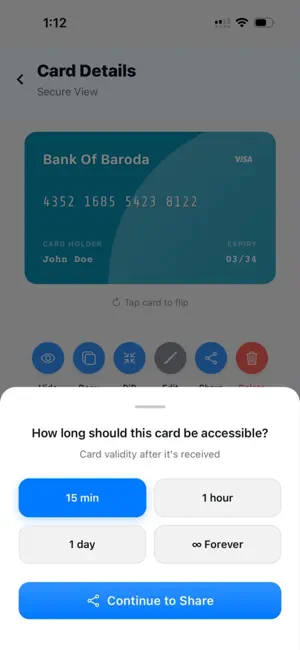
Cardy Wall — Secure Wallet for Cards & IDs Cardy Wall is a privacy-first digital wallet designed to securely store, manage, and share your cards and personal IDs — all in one place. Built with a strong focus on security, performance, and simplicity, it ensures your sensitive data stays protected and always under your control. Whether it's your credit/debit cards or important ID documents, Cardy Wall gives you a safe, fast, and elegant way to access everything you need — anytime, anywhere. Designed for Real Life Cardy Wall is built for everyday convenience without compromising security. • Access your cards and IDs anytime, even offline • Quickly find what you need with a structured and intuitive layout • Minimal permissions required — only what's necessary • A quick tour and Get Started checklist help you set up in minutes Whether you're sharing details, verifying identity, or managing essentials, Cardy Wall is designed to make it simple, fast, and reliable. Security & Privacy First Cardy Wall follows a zero-cloud architecture — your cards and documents never leave your device. • No account, no sign-up, no servers • AES-256 encryption, with keys protected by the iOS Keychain • Face ID, Touch ID or passcode to open the app, view card details, view IDs and delete items — each lock can be turned on separately • Screenshot and screen-recording protection on secure screens Your cards and documents are never uploaded and never shared without your action. Smart Card Management Add and organise all your cards with ease. • Scan a card with your camera: the number, expiry, holder name and card colour are filled in for you • Text recognition runs entirely on your device, and scan photos are deleted right after • Card numbers are checked across two photos and validated for accuracy • Or enter details manually, with a searchable bank list and name suggestions • Categorise cards as Self or Others • Save card type, co-brand name, and any colour you like • Pin frequently used cards for instant access • Select several cards and delete them together Personal ID Vault Securely store and manage your important identity documents. • Store IDs like passports and driving licences, with front and back photos or PDFs • Full-quality capture with built-in crop and rotate tools • Choose a compression level and see the file size before saving • Encrypted storage with secure viewing • Share or download documents when you choose Your personal documents are always protected and available when you need them. Secure Sharing Share your card details safely and confidently. • Branded QR code sharing experience • You choose how long a shared card lasts; it is removed automatically when time is up • Biometric authentication before full reveal • Import cards via QR codes or images • Get notified when a shared card expires Sharing is seamless while keeping your data protected at every step. Premium Experience A modern and refined experience built for everyday use. • Smooth animations and responsive interactions • Tabbed dashboard for better organisation (Self & Others) • Dark mode and dynamic theming • Card text that adapts to each card's colour for easy reading • Accessible design with screen reader support Why Cardy Wall? Because your data deserves more than just storage — it deserves security, control, and simplicity. Cardy Wall is free to use and supported by ads. Ads never have access to your cards or documents.
What’s new
Version 2.1.4 (19) · Updated October 18, 2026
Important for existing users CardyWall has moved to a new developer account. Because of how iOS protects app data, cards and IDs saved in earlier versions can't be unlocked after this update and will be removed. Your profile name and avatar may also be reset. We're truly sorry for the inconvenience. This is a one-time change and won't happen again: please add your cards again, and everything you add is stored securely on your device, as before. Card scanning • Scan right from the Add Card screen: tap "Scan card" and the card preview turns into the camera. Photos are taken automatically, and a progress bar shows when the next one is coming. • More accurate card numbers: a number is only filled in when two separate photos read it the same way, and it must pass real card-number checks. • Reads more card designs, including numbers printed in stacked groups, framed designs and vertical cards. • Your card's colour is picked up automatically from the scan. • Scanned fields are marked "From scan" so you know exactly what to double-check. • Raised (embossed) numbers can be hard to read; if a number can't be confirmed, you're asked to check it or enter it manually. • Better privacy: photos taken while scanning are deleted from your phone as soon as the scan finishes. Adding and managing cards • Redesigned Add Card screen with clear "Card details" and "Personalise" sections, and the Add Card button always visible. • Clearer errors: if something is missing, you're told what's wrong and taken straight to it. • Searchable bank list: find your bank quickly or type one that isn't listed. Banks you've used before are offered again. • Card holder name suggestions from your saved cards. • Pick any custom card colour, with a live preview of your card. • Smoother typing: fixing digits in the middle of a card number no longer moves the cursor. • Select several cards or IDs with a long press and delete them together. • New Delete Lock: require Face ID, Touch ID or your passcode before anything is deleted. • Easier-to-read cards: text colour now adapts to each card's colour. • Smoother pinning animations and a refreshed card details screen. ID documents • Attach PDF documents to your IDs, with the page count shown. • Sharper ID photos, captured at full quality. • New crop tool with corner and edge handles, plus rotation. • Choose a compression level and see the file size before saving. • Faster image previews and clearer messages when saving images. Sharing • Redesigned card sharing with step-by-step progress. • Fewer repeated authentication prompts when sharing and viewing cards. Getting started • A quick tour of the home screen and a Get Started checklist to help you set up. • Updated profile editing. • Rate CardyWall straight from Settings. Security and privacy • App Lock now checks that your device supports Face ID, Touch ID or a passcode before turning on. • The home screen reminds you if any security lock is turned off. • Updated Privacy Policy and Terms of Service. Fixes and improvements • Fixed a bug that could make some screens stop responding to touch. • Viewing your saved cards and IDs no longer needs an internet connection. • The same card-style font across the card list, card details and Add Card preview. • Accessibility improvements: screen reader labels for colours, toggles and buttons, and larger touch targets. • Smoother loading screens and many bug fixes.
App privacy
The developer, Dharmendra verma, reported these privacy practices to Apple.
Data Used to Track You
The following data may be used to track you across apps and websites owned by other companies:
- Identifiers: Device ID
- Usage Data: Product Interaction, Advertising Data
Data Not Linked to You
The following data, which may be collected but is not linked to your identity, may be used for the following purposes:
- Identifiers: Device ID
- Usage Data: Product Interaction, Advertising Data
- User Content: Photos or Videos
Used for: Third-Party Advertising, App Functionality
Alternatives to CardyWall
Looking for apps like CardyWall? Here are 6 similar apps on the App Store. The highest rated is Piggy Assets (5.0/5), and all 6 are free to download.
-
 HOLDR - Wallet, Keys & Notes
-
 GoGoPiggy - Digital Piggy Bank
-
 Networthy: Net Worth Tracker
-
 Piggy Assets
5.0
-
 Tower Virtual Bank
5.0
-
 Stock Trading Simulator Game
5.0
| App | Rating | Price | Last updated | Compare |
|---|---|---|---|---|
| CardyWall | – | Free | October 18, 2026 | |
| HOLDR - Wallet, Keys & Notes | – | Free | Jul 14, 2026 | Compare |
| GoGoPiggy - Digital Piggy Bank | – | Free | Nov 23, 2025 | Compare |
| Networthy: Net Worth Tracker | – | Free | May 5, 2026 | Compare |
| Piggy Assets | 5.0 / 5 (1) | Free | Apr 29, 2024 | Compare |
| Tower Virtual Bank | 5.0 / 5 (1) | Free | Jan 21, 2025 | Compare |
| Stock Trading Simulator Game | 5.0 / 5 (5) | Free | Dec 3, 2025 | Compare |
Compare CardyWall with the top alternatives: ratings, updates, ASO score and keyword gaps →