

SnapTwin: Dual Camera Video
Dinh Kim Ngan Photo & Video iPhoneiPadiPod touch
SnapTwin: Dual Camera Video is a free Photo & Video app for iPhone and iPad by Dinh Kim Ngan. Requires iOS 16.0. Updated October 7, 2026.
- Price
- Free
- on the App Store
- Size
- 107 MB
- Age 4+
- Updated
- Oct 7
- 2026 · v1.0.8
Screenshots


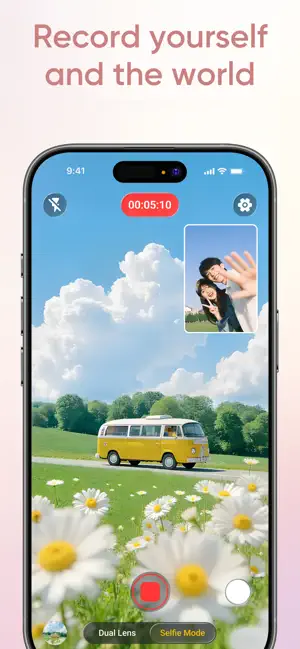

About SnapTwin: Dual Camera Video
Record from two cameras at once. SnapTwin lets you capture front and back camera video simultaneously - perfect for reaction videos, vlogs, product reviews, and social media content. One tap. Two perspectives. No editing required. Whether you're reacting to a viral clip, filming a travel vlog, or reviewing a product on camera, SnapTwin gives you both angles in a single recording. Choose your layout, hit record, and share. DUAL CAMERA RECORDING Use your iPhone's front and rear cameras at the same time. Both feeds record together, so your face and the scene are captured in sync. PICTURE IN PICTURE (PIP) Overlay your selfie anywhere on screen. Drag the floating window to the perfect position. Great for commentary, tutorials, and walkthroughs. SPLIT SCREEN LAYOUTS Place both camera views side by side or stacked top and bottom. Clean, cinematic framing for interviews, comparisons, and storytelling. PORTRAIT AND LANDSCAPE Shoot vertical for TikTok, Reels, and Shorts. Switch to landscape for YouTube and widescreen content. The layout adapts to your creative needs. PHOTO AND VIDEO CAPTURE Not just video — snap dual-camera photos too. Get the selfie and the scene in a single tap. BUILT FOR CREATORS SnapTwin is designed for people who make content. The recording experience is smooth, export is fast, and the output is ready to post on TikTok, Instagram Reels, YouTube Shorts, or any platform. Use cases people love: - Film reaction videos without extra editing software - Create travel vlogs with your face and the view together - Record product unboxings from two angles at once - Shoot interviews or conversations in split screen - Make tutorial walkthroughs with PIP commentary Simple to start. Powerful enough for daily content creation. Download SnapTwin and start recording from both cameras today. Privacy Policy: https://mobocovietnam.com/Privacy-policy.html Terms of Use: https://mobocovietnam.com/Term-of-Use.html Apple Standard EULA: https://www.apple.com/legal/internet-services/itunes/dev/stdeula/
What’s new
Version 1.0.8 · Updated October 7, 2026
• Seamless Dual-Camera Parity: Picture-in-Picture (PiP) exports now match your live preview with pixel-perfect alignment. • Enhanced Export Pipeline: Smoother video rendering and instant recovery between consecutive takes. • Performance & Stability Improvements: Polished controls and rock-solid recording reliability.
App privacy
The developer, Dinh Kim Ngan, reported these privacy practices to Apple.
Data Used to Track You
The following data may be used to track you across apps and websites owned by other companies:
- Identifiers: Device ID
- Usage Data: Product Interaction, Advertising Data
Data Linked to You
The following data, which may be collected and linked to your identity, may be used for the following purposes:
- Usage Data: Advertising Data
Used for: Third-Party Advertising
Data Not Linked to You
The following data, which may be collected but is not linked to your identity, may be used for the following purposes:
- Identifiers: Device ID
- Usage Data: Product Interaction
- Diagnostics: Performance Data, Crash Data
Used for: Third-Party Advertising, Analytics, App Functionality
Alternatives to SnapTwin: Dual Camera Video
Looking for apps like SnapTwin: Dual Camera Video? Here are 6 similar apps on the App Store. The highest rated is AI Interior Design Offline (5.0/5), and 5 of the 6 are free to download.
-
 SoloSnap Studio
1.0
SoloSnap Studio
1.0
-
 AspectPhoto Pro
-
 LiveColor - Live Palette
-
 AI Interior Design Offline
5.0
AI Interior Design Offline
5.0
-
 Photolys:Photo Editor & Filter
5.0
Photolys:Photo Editor & Filter
5.0
-
 Kondobox
5.0
Kondobox
5.0
| App | Rating | Price | Last updated | Compare |
|---|---|---|---|---|
| SnapTwin: Dual Camera Video | – | Free | October 7, 2026 | |
| SoloSnap Studio | 1.0 / 5 (1) | Free | Oct 19, 2026 | Compare |
| AspectPhoto Pro | – | 0.99 USD | May 5, 2026 | Compare |
| LiveColor - Live Palette | – | Free | Apr 20, 2026 | Compare |
| AI Interior Design Offline | 5.0 / 5 (1) | Free | Aug 25, 2026 | Compare |
| Photolys:Photo Editor & Filter | 5.0 / 5 (1) | Free | Apr 15, 2026 | Compare |
| Kondobox | 5.0 / 5 (1) | Free | Oct 18, 2026 | Compare |