

Waver AI
Sivaraman Balasubramanian Productivity iPhoneiPadiPod touch
Waver AI is a free Productivity app for iPhone and iPad by Sivaraman Balasubramanian. Requires iOS 15.0. Updated October 19, 2026.
- Price
- Free
- on the App Store
- Size
- 12 MB
- Age 4+
- Updated
- Oct 19
- 2026 · v1.3.2
Screenshots


About Waver AI
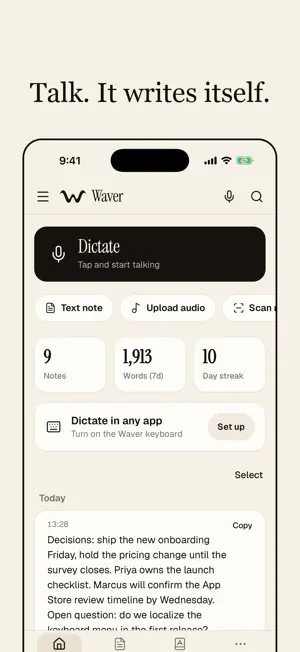
Waver turns your voice into polished, structured text — instantly. Just talk, and Waver writes. SPEAK ANYTHING, GET EVERYTHING Tap record and speak naturally. Waver transcribes you in 125+ languages and rewrites it into whatever you need: clean notes, professional emails, blog posts, social captions, study flashcards, meeting summaries, and more. WHY YOU'LL LOVE IT • Perfect notes from messy speech — no typing, no editing • 15+ writing styles — from formal emails to YouTube scripts • 125+ languages with automatic detection • Auto-edit — removes "um/uh", fixes grammar, formats lists • Up to 30 minutes of free recording MORE THAN A RECORDER • AI Chat — ask questions across all your notes ("what did I decide last week?") • Live Talk — have a real spoken conversation with an AI • Smart Day Planner — AI builds your schedule; track tasks, subtasks & streaks • Studios — turn ideas into images, video, and music • Scan handwriting, documents & whiteboards with your camera BUILT FOR Students, creators, founders, and busy professionals who think faster than they type. PRIVATE & FLEXIBLE Start free — no payment required. Upgrade anytime for recordings of any length and more AI credits. Download Waver and never lose a thought again. Subscriptions: Premium renews automatically (3 months or 1 year) until cancelled in your Apple ID settings at least 24 hours before the period ends. Terms of Use: https://www.apple.com/legal/internet-services/itunes/dev/stdeula/ Privacy Policy: https://waverai.in/privacy
What’s new
Version 1.3.2 · Updated October 19, 2026
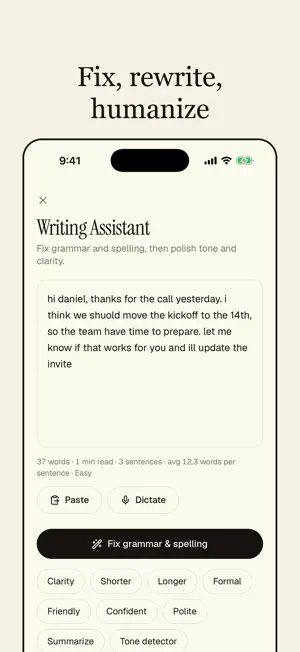
Waver 1.3.2 is about making everything work properly. • The Waver keyboard menu is rebuilt: one clean scrolling panel, better key feel, smarter next-word suggestions and a writing menu with Fix all, tone, rewrite, humanize, translate and summarize. • Dictation setup detects the keyboard and Full Access and takes you straight to Home. • A new meeting recorder with a permissions screen, summary, action items and transcript. A rebuilt Draw Studio. • Folders in a simple menu, with Study, Work, Personal, Ideas, Meetings and Journal ready to use. • Dictations from the keyboard are now saved in your history, searchable, with a switch and a delete button in Settings. • Refer a friend with your own personal link. • Fixes for Text note, Upload audio and recordings that failed to save, and no more notes you did not create. • Dark mode follows your phone, everywhere.
App privacy
The developer, Sivaraman Balasubramanian, reported these privacy practices to Apple.
Data Linked to You
The following data, which may be collected and linked to your identity, may be used for the following purposes:
- Contact Info: Email Address, Name
- Purchases: Purchase History
- User Content: Audio Data, Other User Content
- Identifiers: User ID
Used for: Product Personalization, App Functionality
Alternatives to Waver AI
Looking for apps like Waver AI? Here are 6 similar apps on the App Store. The highest rated is CloudVault - File Storage (5.0/5), and all 6 are free to download.
-
 Hermes AI: Smart Assistant
4.7
-
 Clippix AI
-
 Scira
1.0
-
 CloudVault - File Storage
5.0
-
 GeoReminder: Location Reminder
4.2
-
 Pipe Fitter Calculator Pro
| App | Rating | Price | Last updated | Compare |
|---|---|---|---|---|
| Waver AI | – | Free | October 19, 2026 | |
| Hermes AI: Smart Assistant | 4.7 / 5 (13) | Free | Oct 20, 2026 | Compare |
| Clippix AI | – | Free | Aug 31, 2026 | Compare |
| Scira | 1.0 / 5 (1) | Free | Jul 10, 2026 | Compare |
| CloudVault - File Storage | 5.0 / 5 (1) | Free | Mar 31, 2026 | Compare |
| GeoReminder: Location Reminder | 4.2 / 5 (5) | Free | Oct 11, 2026 | Compare |
| Pipe Fitter Calculator Pro | – | Free | Jun 23, 2026 | Compare |
Compare Waver AI with the top alternatives: ratings, updates, ASO score and keyword gaps →