

MilliLog
Lucas Dima Utilities iPhoneiPadiPod touchMac
MilliLog is a free Utilities app for iPhone and iPad by Lucas Dima. Requires iOS 18.5. Updated October 27, 2026.
- Price
- Free
- on the App Store
- Size
- 12 MB
- Age 4+
- Updated
- Oct 27
- 2026 · v1.6.2
Screenshots
About MilliLog
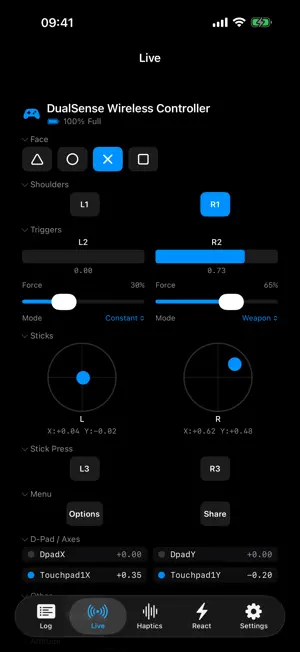
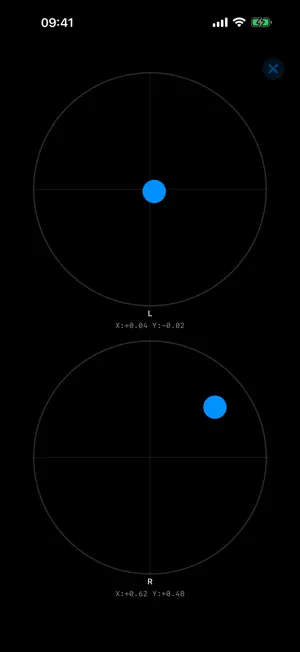
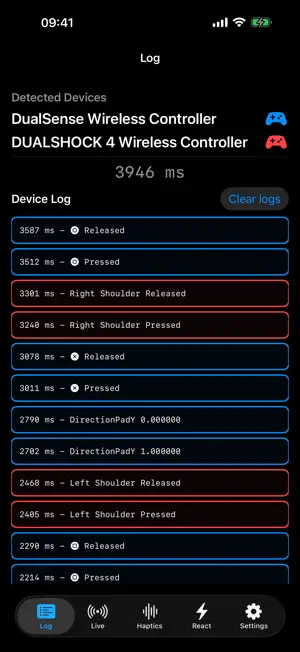
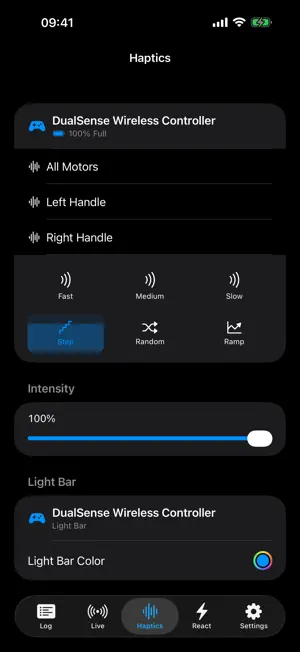
Does your controller drift, miss presses, or behave differently from one game to the next? MilliLog shows you exactly what it is sending. Turn every controller input into visible, measurable data. Watch buttons, sticks, triggers, the D-pad, touchpad, and gyroscope in real time, then record a millisecond-accurate log when you need evidence you can inspect or share. FREE TO DOWNLOAD Everything you need to check one controller is free: the live view, millisecond logs, sound feedback, and the React game with Game Center leaderboards. The free version never expires: no trial, no time limit, no ads, no account. DIAGNOSE CONTROLLER PROBLEMS • Spot stick drift and dead zones in the live stick view. • Catch missed, delayed, or unexpected inputs. • Check trigger travel, motion data, touchpad events, and battery level. • Hear inputs as they happen with optional sound feedback. NATIVE AND PRECISE MilliLog is built natively on Apple's GameController framework, with no web views or extra layers in between. Each button press is timestamped with the system's high-resolution clock the moment it reaches the app, before anything is drawn on screen. FULL VERSION: TEST MORE THAN BUTTONS One optional purchase unlocks the rest of the toolkit: • Vibration at the intensity you choose, on all motors or each handle. • Six haptic oscillator patterns: Fast, Medium, Slow, Step, Random, and Ramp. • DualSense adaptive trigger force on L2 and R2, with Constant, Weapon, Vibration, and Slope effects. • Light-bar color on supported controllers. • Several controllers at the same time, in the live view and the log. • React local multiplayer for up to four players. • Export logs as CSV or JSON for troubleshooting, QA reports, spreadsheets, or your own analysis. PLAY REACT Put your reflexes to the test in a built-in reaction game. Sign in to Game Center to submit your best times and streaks to the leaderboards. MilliLog works with controllers supported by Apple's GameController framework, including DualSense, DualShock 4, Xbox Wireless Controller, and many MFi-compatible gamepads. Made for developers, QA testers, repair technicians, hardware enthusiasts, and players who want answers before replacing a controller. Also available on Mac. The Full Version is a one-time purchase that covers iPhone, iPad, and Mac, works with Family Sharing, and can be restored at any time. Bought MilliLog before it became free? You already have the Full Version. No ads. No tracking. No subscriptions. One optional upgrade.
What’s new
Version 1.6.2 · Updated October 27, 2026
MilliLog is now available in Japanese.
App privacy
The developer, Lucas Dima, reported these privacy practices to Apple.
Data Not Collected
The developer does not collect any data from this app.
Alternatives to MilliLog
Looking for apps like MilliLog? Here are 6 similar apps on the App Store. The highest rated is SwipeClean26: Photo Cleaner (5.0/5), and 5 of the 6 are free to download.
-
 SWAtlas - Shortwave Explorer
-
 SwipeClean26: Photo Cleaner
5.0
SwipeClean26: Photo Cleaner
5.0
-
 VoicePen Pro
-
 FartTakster
-
 Kerchunk
-
 iMonitor: System Monitor
3.4
iMonitor: System Monitor
3.4
| App | Rating | Price | Last updated | Compare |
|---|---|---|---|---|
| MilliLog | – | Free | October 27, 2026 | |
| SWAtlas - Shortwave Explorer | – | Free | Oct 26, 2026 | Compare |
| SwipeClean26: Photo Cleaner | 5.0 / 5 (1) | Free | Oct 15, 2026 | Compare |
| VoicePen Pro | – | 2.99 USD | May 28, 2026 | Compare |
| FartTakster | – | Free | Oct 14, 2026 | Compare |
| Kerchunk | – | Free | Sep 21, 2026 | Compare |
| iMonitor: System Monitor | 3.4 / 5 (30) | Free | Oct 23, 2026 | Compare |
Compare MilliLog with the top alternatives: ratings, updates, ASO score and keyword gaps →