

3D Print Assistant
Mustafa Ozturk Utilities iPhoneiPadiPod touch
3D Print Assistant is a free Utilities app for iPhone and iPad by Mustafa Ozturk. Rated 5.0/5 from 1 ratings. Requires iOS 17.0. Updated October 7, 2026.
- Rating
- 5.0
- 1 ratings
- Price
- Free
- on the App Store
- Size
- 22 MB
- Age 4+
- Updated
- Oct 7
- 2026 · v2.1
Screenshots

About 3D Print Assistant
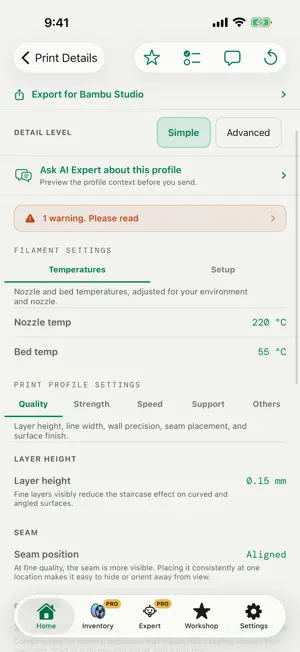
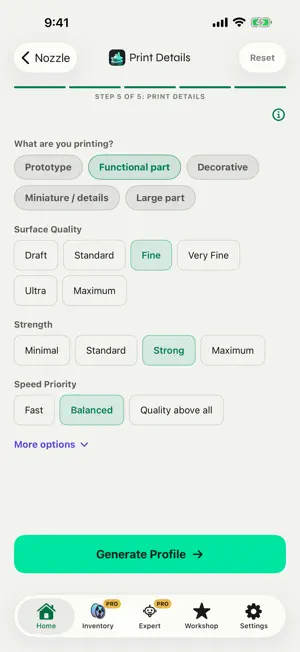
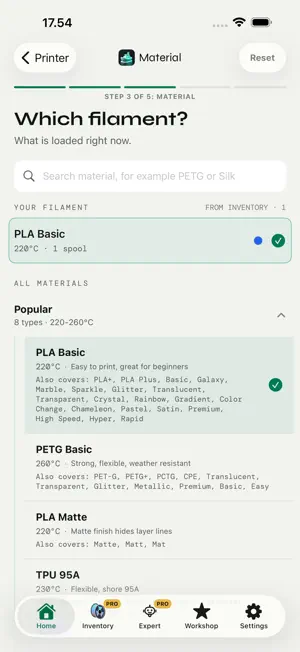
Slicer profiles for 100+ 3D printers from Bambu Lab, Prusa, Creality, Anycubic, Elegoo and more, made for Bambu Studio, OrcaSlicer and PrusaSlicer. Choose your printer, nozzle, filament and print goal. 3D Print Assistant builds a practical starting profile with settings you can review and adjust. The core tools are free and need no account. MADE FOR YOUR PRINTER AND SLICER Pick from 100+ printers, including models from QIDI, Sovol, FlashForge, Artillery, Snapmaker and Voron. Each profile follows the slicer that fits the printer: Bambu Studio for Bambu Lab, PrusaSlicer for Prusa and OrcaSlicer for the other brands, with settings grouped under the same tabs as in the slicer. Can't find your printer? Answer four questions and start from a generic profile. FROM PROFILE TO SLICER Export a profile file your slicer can import when it has a matching preset for your printer and nozzle. For every other setup, share the profile as text and enter the values by hand. Switch between Simple for the essentials and Advanced for the full profile. YOUR SETUP, READY TO GO Save printers, nozzles and materials in My Gear. Pick a setup next time and skip the details you already know. Keep the profiles that work for you in Workshop. A CLEARER WAY TO CHOOSE MATERIALS Start from material profiles for PLA, PETG, ABS, ASA, TPU, nylon, PC and carbon fiber blends. Browse filament by category, compare popular choices and see useful details before you select a material. Inventory adds a searchable catalog of 2,089 filament products from 151 brands across 38 material types. KEEP FILAMENT IN VIEW Track spools in Inventory, including color, weight and status. Up to five active spools are free. Pro removes the limit, and with a 3DPA account it syncs Inventory across iPhone, iPad and the web app. GET HELP WITH THE NEXT STEP AI Expert can help explain settings, compare options and troubleshoot a print, also from a photo. It requires an internet connection and a 3DPA account, which you create by signing in with Apple or Google. A new account includes free credits to try it. Also included: a pre-print checklist. The core printing tools work offline after installation; AI Expert and sync need an internet connection. Available in English, Danish, German and Russian.
What’s new
Version 2.1 · Updated October 7, 2026
A small update with a nozzle fix and two improvements. • Nozzle fix: profiles were calculated for a standard 0.4 mm nozzle, no matter which nozzle you picked. The app now uses the nozzle you choose. • The export button now stays at the top of the profile screen while you scroll through the settings. • New switch in Settings: “Share anonymous usage data”. It is on by default. Turn it off and the app sends no usage data.
App privacy
The developer, Mustafa Ozturk, reported these privacy practices to Apple.
Data Linked to You
The following data, which may be collected and linked to your identity, may be used for the following purposes:
- Purchases: Purchase History
- Contact Info: Email Address
- User Content: Photos or Videos, Other User Content
- Identifiers: User ID
Used for: App Functionality
Data Not Linked to You
The following data, which may be collected but is not linked to your identity, may be used for the following purposes:
- Identifiers: Device ID
- Usage Data: Product Interaction
- Diagnostics: Crash Data, Performance Data, Other Diagnostic Data
Used for: Analytics, App Functionality
Alternatives to 3D Print Assistant
Looking for apps like 3D Print Assistant? Here are 6 similar apps on the App Store. The highest rated is Spool Programmer (5.0/5), and all 6 are free to download.
-
 Printer Tools App
2.2
Printer Tools App
2.2
-
 3D Printing Thingiverse Models
4.5
3D Printing Thingiverse Models
4.5
-
 Spool Programmer
5.0
Spool Programmer
5.0
-
 Spool Master
5.0
Spool Master
5.0
-
 SpoolFlux
5.0
SpoolFlux
5.0
-
 PandaWatch
5.0
PandaWatch
5.0
| App | Rating | Price | Last updated | Compare |
|---|---|---|---|---|
| 3D Print Assistant | 5.0 / 5 (1 rating) | Free | October 7, 2026 | |
| Printer Tools App | 2.3 / 5 (4) | Free | Oct 14, 2026 | Compare |
| 3D Printing Thingiverse Models | 4.5 / 5 (2) | Free | Sep 25, 2026 | Compare |
| Spool Programmer | 5.0 / 5 (5) | Free | Oct 8, 2025 | Compare |
| Spool Master | 5.0 / 5 (1) | Free | Oct 6, 2026 | Compare |
| SpoolFlux | 5.0 / 5 (8) | Free | Sep 9, 2026 | Compare |
| PandaWatch | 5.0 / 5 (3) | Free | Sep 24, 2026 | Compare |
Compare 3D Print Assistant with the top alternatives: ratings, updates, ASO score and keyword gaps →