

Captions for Video: CaptionKit
Innovia IT Solutions Photo & Video iPhoneiPadiPod touch
Captions for Video: CaptionKit is a free Photo & Video app for iPhone and iPad by Innovia IT Solutions. Requires iOS 13.0. Updated May 18, 2026.
- Price
- Free
- on the App Store
- Size
- 56 MB
- Age 4+
- Updated
- May 18
- 2026 · v1.0.1
Screenshots


About Captions for Video: CaptionKit
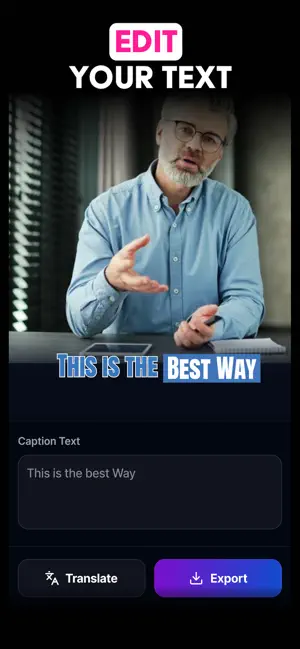
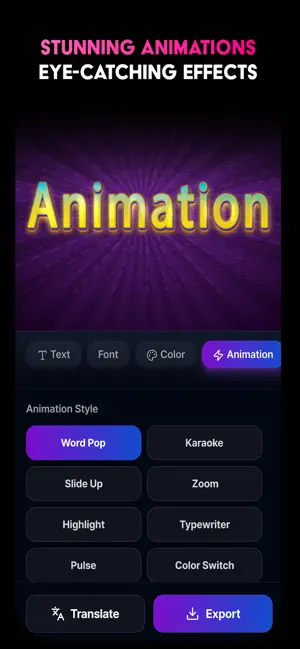
Turn your videos into engaging content with CaptionKit, an easy to use app for adding captions and subtitles to any video. Whether you are creating videos for social media, marketing, or personal use, CaptionKit helps you generate accurate subtitles, customize styles, and reach a wider audience in just a few steps. Auto Captions in Seconds Generate subtitles automatically using advanced speech recognition. Simply select your video and the app will create captions quickly without manual typing. Multi Language Support Translate captions into different languages and make your videos accessible to viewers around the world. Custom Caption Styles Create professional looking subtitles with full customization options. Adjust fonts, colors, backgrounds, outlines, and shadows. You can also save your own styles for reuse. Social Media Ready Preview your video before exporting to make sure captions are properly placed for platforms like Instagram and TikTok, avoiding blocked or cut off text. Add Background Music Enhance your videos by adding music and adjusting audio levels for the perfect balance. Fast and Simple Editing CaptionKit is designed to be simple and fast, allowing you to create high quality captioned videos in minutes. Perfect For Content creators Influencers Video marketers Anyone who wants better video engagement Why Choose CaptionKit High accuracy subtitles Multiple language support Customizable caption styles Optimized for social media Smooth performance Start creating professional captions for your videos with CaptionKit today. Privacy Policy: https://sites.google.com/view/privavyvypolcicy/home Terms of Use: https://www.apple.com/legal/internet-services/itunes/dev/stdeula/
What’s new
Version 1.0.1 · Updated May 18, 2026
minor bug fixed improved user experience
App privacy
The developer, Innovia IT Solutions, reported these privacy practices to Apple.
Data Used to Track You
The following data may be used to track you across apps and websites owned by other companies:
- Identifiers: Device ID
Data Linked to You
The following data, which may be collected and linked to your identity, may be used for the following purposes:
- Identifiers: Device ID
Used for: Third-Party Advertising
Alternatives to Captions for Video: CaptionKit
Looking for apps like Captions for Video: CaptionKit? Here are 6 similar apps on the App Store. The highest rated is Video Captions Maker - AutoCap (5.0/5), and all 6 are free to download.
-
 FastCap : Caption for Video
-
 Video Captions Maker - AutoCap
5.0
Video Captions Maker - AutoCap
5.0
-
 AI Captions - Subtitle Maker
-
 AI Video Caption Generato
5.0
AI Video Caption Generato
5.0
-
 Captions for Videos. Subtitles
3.8
Captions for Videos. Subtitles
3.8
-
 Auto Caption Video Subtitles
4.8
Auto Caption Video Subtitles
4.8
| App | Rating | Price | Last updated | Compare |
|---|---|---|---|---|
| Captions for Video: CaptionKit | – | Free | May 18, 2026 | |
| FastCap : Caption for Video | – | Free | Nov 14, 2024 | Compare |
| Video Captions Maker - AutoCap | 5.0 / 5 (9) | Free | Oct 14, 2026 | Compare |
| AI Captions - Subtitle Maker | – | Free | Sep 30, 2026 | Compare |
| AI Video Caption Generato | 5.0 / 5 (4) | Free | Jan 28, 2026 | Compare |
| Captions for Videos. Subtitles | 3.8 / 5 (6) | Free | Jul 24, 2025 | Compare |
| Auto Caption Video Subtitles | 4.8 / 5 (921) | Free | Oct 27, 2026 | Compare |