

Traduco: AI Translate Keyboard
Javlonbek Elamonov Utilities iPhoneiPadiPod touch
Traduco: AI Translate Keyboard is a free Utilities app for iPhone and iPad by Javlonbek Elamonov. Rated 5.0/5 from 1 ratings. Requires iOS 17.6.
- Rating
- 5.0
- 1 ratings
- Price
- Free
- on the App Store
- Size
- 19 MB
- Age 4+
- Updated
- Oct 6
- 2026 · v1.0.3
Screenshots

About Traduco: AI Translate Keyboard
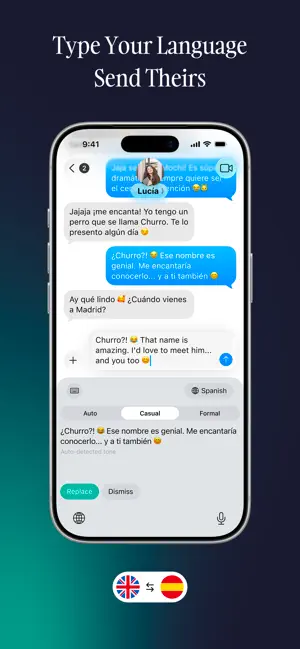
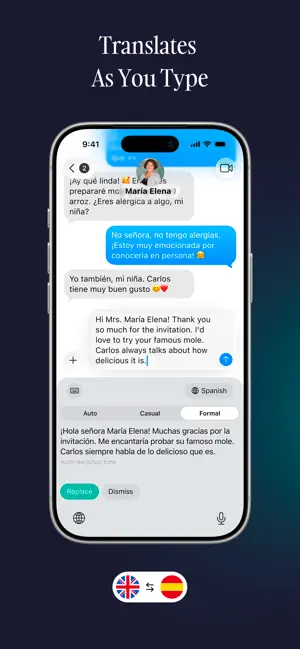
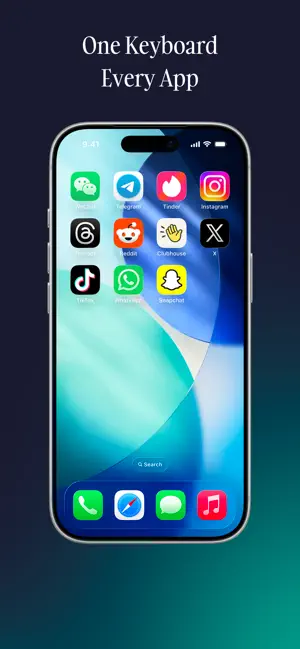
Traduco translates your message right where you type it. No copy-pasting, no switching apps — write in any language, switch to the Traduco keyboard, and the translation is ready. HOW IT WORKS 1. Type your message in any chat — WhatsApp, iMessage, Instagram, Telegram, Mail and most other apps where you type 2. Switch to the Traduco keyboard 3. Your text is translated automatically — select part of it to translate only that part 4. Tap Replace — your original text is replaced with the translation, and you're back on your usual keyboard Not what you wanted? Tap Dismiss and nothing changes. NATURAL, HUMAN-SOUNDING TRANSLATIONS - AI translation (by OpenAI) that sounds like a native speaker, not a dictionary - Automatic language detection — write in any language, Traduco figures it out - Auto reads how you wrote and keeps that register — friendly stays friendly, polite stays polite - With Pro, choose Casual or Formal yourself: casual for friends and family, formal for clients, landlords and teachers - Casual and Formal use the right form of "you" — tu/vous, du/Sie, tú/usted, ты/вы 25 LANGUAGES Translate into English, Spanish, French, German, Italian, Portuguese, Dutch, Polish, Czech, Swedish, Ukrainian, Russian, Turkish, Arabic, Hindi, Bengali, Chinese, Japanese, Korean, Indonesian, Malay, Vietnamese, Thai, Tagalog and Uzbek. Write in any language — Traduco detects it automatically. DESIGNED FOR PRIVACY - No account, no sign-up — start translating right away - Nothing is sent until you switch to Traduco, and only after you allow AI translation in the app - Text is sent over HTTPS, kept in our server's memory for at most 24 hours to speed up repeats, and never written to disk - Translation history stays on your device only - No ads, no tracking, no third-party analytics SDKs — only anonymous aggregate counts (in-app counts can be turned off in Settings) FREE - 10 translations every day, in all 25 languages - Auto tone - Free translations end with a short "Translated by Traduco" line TRADUCO PRO - No 10-a-day limit — up to 1,000 translations a day (fair use) - All tones: Auto, Casual and Formal - No "Translated by Traduco" line - Weekly, monthly or annual plan — the annual plan includes a free trial for eligible new subscribers Full Access is required so the keyboard can reach our translation server and save your history on your iPhone. Traduco reads only the text in the current field when you switch to it — it never logs keystrokes. GOOD TO KNOW - Up to 500 characters per translation - iOS doesn't allow third-party keyboards in password fields, and some apps block them - Traduco works alongside the keyboard you already use, so swipe typing, autocorrect and dictation stay the same Traduco means "I translate" in Latin. Simple name, simple app, natural translations. Privacy Policy: https://www.traduco.app/privacy Terms of Use: https://www.traduco.app/terms
What’s new
Version 1.0.3 · Updated October 6, 2026
What's new • Pro and free-trial translations are no longer capped at 10 a day • A clear message when you reach the free daily limit, with the time it resets • New in Settings: Rate Traduco • Clearer privacy details during setup • Performance and stability improvements Enjoying Traduco? A quick rating helps other people find it.
App privacy
The developer, Javlonbek Elamonov, reported these privacy practices to Apple.
Data Not Linked to You
The following data, which may be collected but is not linked to your identity, may be used for the following purposes:
- Usage Data: Product Interaction
- Purchases: Purchase History
- User Content: Other User Content
- Identifiers: User ID, Device ID
Used for: Analytics, App Functionality
Alternatives to Traduco: AI Translate Keyboard
Looking for apps like Traduco: AI Translate Keyboard? Here are 6 similar apps on the App Store. The highest rated is AI Translator Keyboard - iKey (4.7/5), and all 6 are free to download.
-
 AI Translator Keyboard - iKey
4.7
AI Translator Keyboard - iKey
4.7
-
 Keybridge - Translate Keyboard
-
 Translator Keyboard - Verbyte
4.6
Translator Keyboard - Verbyte
4.6
-
 Keyboard Translator ChatKey AI
4.7
Keyboard Translator ChatKey AI
4.7
-
 Keyboard Translator: LingoType
3.0
Keyboard Translator: LingoType
3.0
-
 Kate • Keyboard Translator
4.4
Kate • Keyboard Translator
4.4
| App | Rating | Price | Last updated | Compare |
|---|---|---|---|---|
| Traduco: AI Translate Keyboard | 5.0 / 5 (1 rating) | Free | October 6, 2026 | |
| AI Translator Keyboard - iKey | 4.7 / 5 (3) | Free | Aug 29, 2026 | Compare |
| Keybridge - Translate Keyboard | – | Free | Aug 26, 2026 | Compare |
| Translator Keyboard - Verbyte | 4.6 / 5 (10) | Free | Aug 24, 2026 | Compare |
| Keyboard Translator ChatKey AI | 4.7 / 5 (29) | Free | Oct 19, 2026 | Compare |
| Keyboard Translator: LingoType | 3.0 / 5 (2) | Free | Oct 6, 2026 | Compare |
| Kate • Keyboard Translator | 4.4 / 5 (432) | Free | May 2, 2026 | Compare |