

PhotoBench : AI Photo Tools
yanming wang Utilities iPhoneiPadiPod touch
PhotoBench : AI Photo Tools is a free Utilities app for iPhone and iPad by yanming wang. Requires iOS 17. Updated July 27, 2026.
- Price
- Free
- on the App Store
- Size
- 161 MB
- Age 4+
- Updated
- Jul 27
- 2026 · v1.3
Screenshots


About PhotoBench : AI Photo Tools
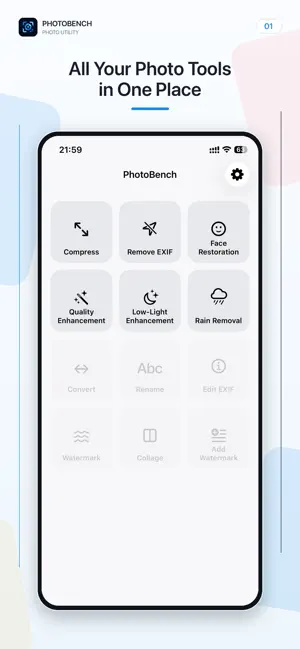
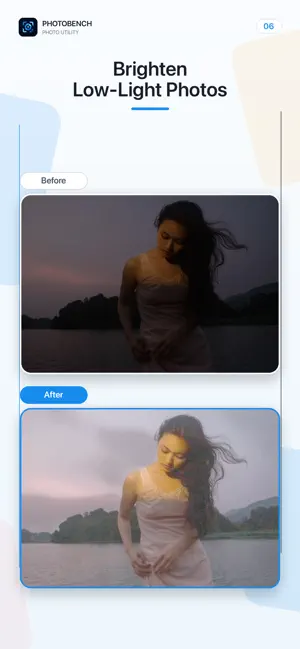
PhotoBench is an all-in-one photo utility for iPhone, combining flexible compression, EXIF privacy tools, and AI image enhancement. Your photos are processed directly on your device and are never uploaded to a server for editing. PHOTO COMPRESSION • Compress multiple photos to reclaim storage space • Adjust image quality and dimensions to suit your needs • Keep your originals while saving processed copies to Photos • Follow clear progress and result details EXIF PRIVACY TOOLS • Inspect camera, lens, aperture, ISO, capture date, GPS, and other metadata • Remove location coordinates while keeping other shooting information • Clear all EXIF metadata in one step • Process one photo or a batch without changing the originals ON-DEVICE AI ENHANCEMENT • Face Restoration improves blurred or damaged facial details • Quality Enhancement increases clarity and overall visual quality • Low-Light Enhancement brightens dark scenes and reveals more detail • Rain Removal reduces distracting rain streaks and droplets • Press and hold the image to compare the original with the result • Export in JPEG, PNG, or HEIC format PRIVACY FIRST Compression, EXIF cleanup, and AI enhancement run on your iPhone. PhotoBench does not upload your photos to a server for processing. A new copy is saved only when you choose to export it. Terms of Use: https://www.apple.com/legal/internet-services/itunes/dev/stdeula/ Privacy Policy: https://hikoming.github.io/photobench/privacy.html
What’s new
Version 1.3 · Updated July 27, 2026
• Restore blurred or damaged facial details with Face Restoration • Improve clarity and overall image quality with Quality Enhancement • Brighten dark scenes and reveal more detail with Low-Light Enhancement • Reduce distracting rain streaks and droplets with Rain Removal • Quickly compare the original photo with the processed result • Export AI results as JPEG, PNG, or HEIC • Subscribe to PhotoBench Pro and restore previous purchases • Choose Light, Dark, or System appearance • Enjoy updated Chinese, English, French, Spanish, and Brazilian Portuguese support • Benefit from improvements to photo selection, compression, and EXIF processing, plus additional bug fixes
App privacy
The developer, yanming wang, reported these privacy practices to Apple.
Data Not Collected
The developer does not collect any data from this app.
Alternatives to PhotoBench : AI Photo Tools
Looking for apps like PhotoBench : AI Photo Tools? Here are 6 similar apps on the App Store. The highest rated is RadPaul Auto (1.0/5), and 4 of the 6 are free to download.
-
 Collect This Inventory
-
 RadPaul Auto
1.0
RadPaul Auto
1.0
-
 Clip Status
-
 Smart Bubble Level: Clinometer
-
 Hido: Hide Face
-
 EasyBeauty-Beauty is so easy
| App | Rating | Price | Last updated | Compare |
|---|---|---|---|---|
| PhotoBench : AI Photo Tools | – | Free | July 27, 2026 | |
| Collect This Inventory | – | Free | Jul 21, 2026 | Compare |
| RadPaul Auto | 1.0 / 5 (1) | Free | Aug 29, 2026 | Compare |
| Clip Status | – | Free | Jul 22, 2026 | Compare |
| Smart Bubble Level: Clinometer | – | 0.29 USD | Jun 29, 2026 | Compare |
| Hido: Hide Face | – | 0.99 USD | Jun 3, 2026 | Compare |
| EasyBeauty-Beauty is so easy | – | Free | Aug 11, 2026 | Compare |