

AllPlayer Pro
子卓 匡 Entertainment iPhoneiPadiPod touchMacApple Watch
AllPlayer Pro is a free Entertainment app for iPhone and iPad by 子卓 匡. Rated 3.0/5 from 2 ratings. Requires iOS 17. Updated October 29, 2026.
- Rating
- 3.0
- 2 ratings
- Price
- Free
- on the App Store
- Size
- 167 MB
- Age 4+
- Updated
- Oct 29
- 2026 · v1.0.21
Screenshots

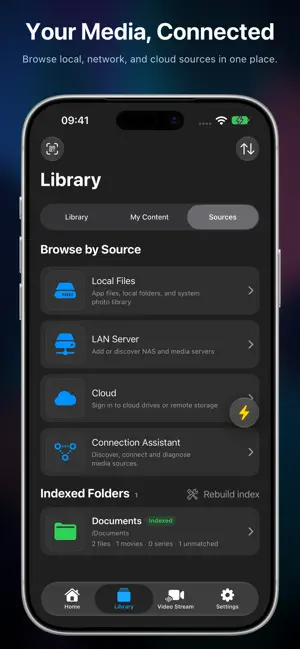


About AllPlayer Pro
AllPlayer is a media player and manager for iPhone, iPad, Mac, Apple TV, and Apple Vision Pro. Play local files, Photos, NAS, cloud media, and online streams. Bring your movies and shows together with Movie Wall, iCloud sync, and cross-device playback. -- Main Features -- -- Media Library and Movie Wall -- Index local, LAN, and cloud folders. Match movies and shows, browse seasons and episodes, and search by title, cast, or filename. Group versions, choose preferred sources, correct matches, and organize favorites, Watch Later, and viewing progress. Customize home sections and browse posters, ratings, and cast. -- iCloud Sync and Cross-Device Playback -- Sync indexed folders, metadata, artwork, and progress through iCloud. On the same iCloud account and local network, resume authorized, previously played local videos from another device. Enable iCloud sync and cross-device playback on both devices; initial setup needs internet access. Keep AllPlayer in the foreground on the source iPhone or iPad, or running on an awake Mac. Video transfers are encrypted; video files are not uploaded to iCloud. Photos, disc content, external subtitles, and transcoding are not supported for cross-device playback. -- High-Quality Picture and Sound -- Enjoy HDR, Dolby Vision, and Dolby Atmos with compatible content and equipment. Choose decoders and audio tracks, adjust brightness, contrast, and saturation, and fine-tune sound with a 10-band equalizer. -- Media Formats -- Play MP4, MOV, MKV, AVI, FLV, WMV, TS, M2TS, MPEG, VOB, RMVB, WEBM, and more. Supports MP3, AAC, FLAC, WAV, ALAC, and other audio formats, plus common images and Photos browsing. Play ISO images and Blu-ray / BDMV or DVD / VIDEO_TS folders. -- Servers and Cloud Storage -- Connect SMB, WebDAV, FTP, SFTP, NFS, DLNA / UPnP, Plex, Jellyfin, and Emby. Access OneDrive, Google Drive, Dropbox, Box, pCloud, Yandex.Disk, Baidu Netdisk, Quark Drive, MEGA, Synology NAS, and fnOS. Discover LAN servers and use fnOS direct connections with FN Connect fallback. -- Remote Access and Speed Tests -- Use Tailscale to reach private-network media. Test internet upload and download speeds and LAN or cloud read speeds. -- Streams, Chat, and Multiple Views -- Add stream URLs and supported live-room links. Group, search, sort, and share lists, select available quality levels, and save authorized streams. View stream chat from multiple platforms. Watch up to four streams in five layouts with adjustable splits and independent audio controls. Access layout and automatic floating playback options from stream menus on supported platforms. -- Subtitles and Playback -- Load SRT, VTT, ASS, and SSA subtitles, including matching files in the same folder. Find online subtitles with OpenSubtitles. Use speed controls, A-B repeat, aspect ratios, playlists, resume, and autoplay next. AirPlay, Picture in Picture, and background playback are available where supported. Receive DLNA / UPnP casts; iPhone, iPad, and Mac also support AirPlay reception. -- Files and Sharing -- Copy, move, rename, delete, and download files. Preview supported remote files and remember a download folder on Mac. Import files and links from the share sheet, and import, export, or sync connection and stream configurations. -- Widgets, Search, and Apple Devices -- Use library widgets, Spotlight search, and Shortcuts on supported platforms. Apple TV offers remote-friendly playback, QR-assisted setup, and Top Shelf library access. Apple Watch provides library picks, Smart Stack access, and paired iPhone playback controls. Apple Vision Pro offers immersive cinema, adjustable screens, and side-by-side or over-under 3D video. Feature availability depends on the platform, media format, decoder, connected service, and audio/video output equipment.
What’s new
Version 1.0.21 · Updated October 29, 2026
-- What's New -- 1. Numeric Pairing Codes Connect devices with an eight-digit pairing code, without scanning a QR code. 2. iPhone Duo Half-Folded Playback Enjoy a frosted video reflection during half-folded playback for a more cohesive viewing experience. -- Fixes and Improvements -- 1. Improved video playback compatibility for a better viewing experience. 2. Improved remote connection stability, picture clarity, and control responsiveness, and fixed intermittent audio. 3. Added confirmation before unpairing devices to help prevent accidental removal. 4. Fixed some LAN and cloud videos failing to play from Continue Watching. 5. Refined translations and interface details.
App privacy
The developer, 子卓 匡, reported these privacy practices to Apple.
Data Not Collected
The developer does not collect any data from this app.
Alternatives to AllPlayer Pro
Looking for apps like AllPlayer Pro? Here are 6 similar apps on the App Store. The highest rated is OmniPlayer – HD Video Player (4.2/5), and all 6 are free to download.
-
 Visorium
-
 Plynic
4.0
-
 Aether Player
2.0
-
 OopsPlayer - Media Player
2.8
-
 ZeoPlayer
2.0
-
 OmniPlayer – HD Video Player
4.2
| App | Rating | Price | Last updated | Compare |
|---|---|---|---|---|
| AllPlayer Pro | 3.0 / 5 (2 ratings) | Free | October 29, 2026 | |
| Visorium | – | Free | Aug 26, 2026 | Compare |
| Plynic | 4.0 / 5 (1) | Free | Oct 20, 2026 | Compare |
| Aether Player | 2.0 / 5 (3) | Free | Oct 29, 2026 | Compare |
| OopsPlayer - Media Player | 2.8 / 5 (4) | Free | Oct 14, 2026 | Compare |
| ZeoPlayer | 2.0 / 5 (1) | Free | Oct 10, 2026 | Compare |
| OmniPlayer – HD Video Player | 4.2 / 5 (5) | Free | Oct 25, 2026 | Compare |
Compare AllPlayer Pro with the top alternatives: ratings, updates, ASO score and keyword gaps →