

Expense AI: Budget & Receipts
WHITE DIGIT LLC Finance iPhoneiPadiPod touch
Expense AI: Budget & Receipts is a free Finance app for iPhone and iPad by WHITE DIGIT LLC. Rated 5.0/5 from 2 ratings. Requires iOS 26.0.
- Rating
- 5.0
- 2 ratings
- Price
- Free
- on the App Store
- Size
- 20 MB
- Age 4+
- Updated
- Oct 10
- 2026 · v2.0
Screenshots


About Expense AI: Budget & Receipts
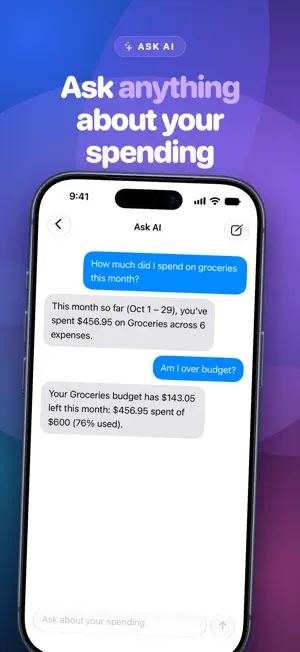
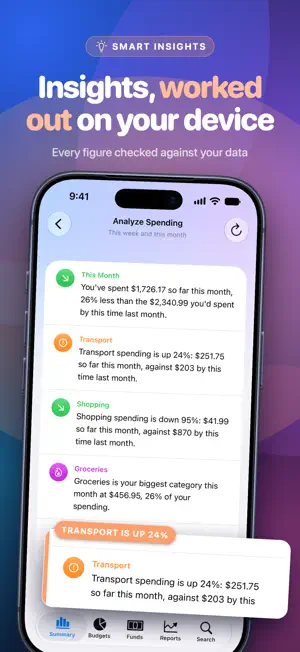
Track what you spend, scan receipts, and ask questions about your money in plain English. Every answer is worked out on your device, so your spending never goes to a server. Expense AI is a private expense tracker with on-device intelligence. There are no bank logins, no accounts and no ads. Your expenses stay on your iPhone and iPad, synced through your own iCloud. ASK ANYTHING ABOUT YOUR SPENDING "How much did I spend on groceries this month?" "Am I over budget?" "What was my biggest expense?" Ask in your own words and get a straight answer from your own numbers, in seconds. SCAN A RECEIPT. DONE. Point the camera at a receipt and the amount, shop, date and category are filled in for you. Check it, tap Save, and move on. INSIGHTS THAT STAY ON YOUR DEVICE See how this month compares with last, which category is growing, where your biggest expense went and how your budgets are holding up. Every figure is checked against your data before it's shown. BUDGETS THAT RESET THEMSELVES Set a weekly or monthly limit for groceries, dining out or anything else. Each period closes on its own and every past period is kept, so you can see how you did. FUNDS FOR THE THINGS YOU'RE SAVING TOWARD Set money aside for a trip, gifts or the car, and spend from each pot. Every fund keeps its own balance and history. REPORTS YOU'LL ACTUALLY READ Totals by category and by day, for the week, month, year or any range. Export to CSV whenever you need the numbers elsewhere. MADE FOR EVERY SCREEN A new design for iPhone, with two-column layouts on iPad and iPhone Duo that follow the fold. Home Screen, Lock Screen and Control Center widgets. Add an expense or scan a receipt with Siri and Shortcuts. ALSO INCLUDED • 150+ currencies, with totals kept separate per currency • Search by note, category, budget, fund or amount • Budget alerts and a morning insight, if you want them • iCloud sync across your devices • Dark Mode and Dynamic Type FREE AND PRO Free: unlimited expense tracking, 19 categories, budgets, funds, search, widgets, reminders and iCloud sync. Expense AI Pro adds receipt scanning, Ask AI, spending insights, reports and CSV export. Choose monthly, yearly or a one-time lifetime purchase. A monthly or yearly subscription renews automatically unless cancelled at least 24 hours before the end of the current period. Payment is charged to your Apple Account, and you can manage or cancel subscriptions in your Apple Account settings. The lifetime option is a single purchase. Receipt scanning, Ask AI and insights use Apple Intelligence on your device, so they need an iPhone or iPad that supports Apple Intelligence with it turned on. Everything else works on any device running iOS 26 or later. Privacy Policy: https://apps.whitedigit.com/expense-ai/privacy-policy Terms of Use: https://www.apple.com/legal/internet-services/itunes/dev/stdeula/
What’s new
Version 2.0 · Updated October 10, 2026
Expense AI 2.0 is a new app from the ground up. NEW DESIGN Every screen has been redrawn, with a lighter, faster Summary and a cleaner way to add expenses. OPTIMIZED FOR IPAD AND IPHONE DUO Two-column layouts on iPad and on iPhone Duo's inner display. When the Duo is half folded, the columns follow the fold. SMARTER, MORE ACCURATE AI Ask AI, receipt scanning and spending insights have been rebuilt. Every figure is now checked against your data before it's shown, and answers come back faster. Still entirely on your device. ANALYZE ANY PERIOD Open Analyze Spending from Reports to get insights for the exact range you're looking at, with a comparison to the period before. SEARCH Open the Search tab and start typing. Recent searches and your categories are one tap away. ALSO • Export Data now pre-fills the dates from the report you came from • Budget history is ordered by period • Widgets update when you add expenses on another device • Performance and stability fixes throughout
App privacy
The developer, WHITE DIGIT LLC, reported these privacy practices to Apple.
Data Not Linked to You
The following data, which may be collected but is not linked to your identity, may be used for the following purposes:
- Purchases: Purchase History
- Identifiers: User ID
- Diagnostics: Crash Data
Used for: App Functionality
Alternatives to Expense AI: Budget & Receipts
Looking for apps like Expense AI: Budget & Receipts? Here are 6 similar apps on the App Store. The highest rated is Loan Tamer (5.0/5), and all 6 are free to download.
-
 Expense+ Budget Money Tracker
-
 Loan Tamer
5.0
Loan Tamer
5.0
-
 Expense AI: Budget Tracker
5.0
Expense AI: Budget Tracker
5.0
-
 Expra: Receipt Scanner
-
 Expense Tracker: Budgeting
2.0
Expense Tracker: Budgeting
2.0
-
 ZOVOX: Freelancer Finance
5.0
ZOVOX: Freelancer Finance
5.0
| App | Rating | Price | Last updated | Compare |
|---|---|---|---|---|
| Expense AI: Budget & Receipts | 5.0 / 5 (2 ratings) | Free | October 10, 2026 | |
| Expense+ Budget Money Tracker | – | Free | Mar 2, 2026 | Compare |
| Loan Tamer | 5.0 / 5 (1) | Free | Aug 10, 2025 | Compare |
| Expense AI: Budget Tracker | 5.0 / 5 (7) | Free | Oct 3, 2026 | Compare |
| Expra: Receipt Scanner | – | Free | Oct 24, 2026 | Compare |
| Expense Tracker: Budgeting | 2.0 / 5 (1) | Free | Aug 23, 2026 | Compare |
| ZOVOX: Freelancer Finance | 5.0 / 5 (2) | Free | Jul 13, 2026 | Compare |