

iGrade: Teacher Test Grader
iGrade LLC Education iPhoneiPadiPod touch
iGrade: Teacher Test Grader is a free Education app for iPhone and iPad by iGrade LLC. Rated 4.9/5 from 7 ratings. Requires iOS 15.0.
- Rating
- 4.9
- 7 ratings
- Price
- Free
- on the App Store
- Size
- 62 MB
- Age 4+
- Updated
- Oct 21
- 2026 · v1.0.20
Screenshots


About iGrade: Teacher Test Grader
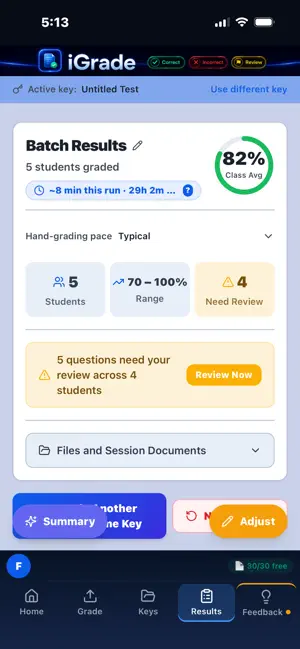
iGrade is an AI grading assistant — built by a teacher, for teachers. Photograph your answer key. Photograph your students' papers. iGrade tells you what's right, what's wrong, and what it's not sure about. You stay in charge of every grade and all feedback. iGrade doesn't replace your judgment. It replaces the stack of papers on your kitchen table. WHAT iGRADE DOES Reads handwritten answers from photos of paper tests Grades multiple choice, fill-in-the-blank, short answer, and free response Flags answers it isn't sure about — so you can review before a grade is final Warns you when a student's answers look shifted by a line, so one skipped line doesn't mark the rest of the test wrong Summarizes class performance to help you decide what to reteach Exports per-student results as CSV you can bring into most gradebooks WHAT iGRADE DOESN'T DO Mark your papers (nothing is ever written on the physical page) Write feedback for students (that stays with you) Store student paper images (they are deleted after grading) Sell, share for advertising, or train on your students' personal data — ever PRIVACY IS THE DEFAULT, NOT A FEATURE iGrade is designed to be restrictive about how much student identifying information ever travels digitally in association with a paper. Before a student page leaves your phone, iGrade looks for the student's name and covers it. We also strip names and IDs from extracted text, and we don't keep them. Student paper images are processed for grading only, are not used to build profiles, and are deleted after grading. Answer keys are kept so you can reuse them. If you photograph a student's paper to use as your key, that image is stored with your saved keys until you delete it. There are no student accounts — students never touch iGrade. No automated system catches everything, so cropping identifying information before uploading is recommended best practice. HOW IT WORKS Snap a photo of your answer key Snap photos of your students' papers (one or many) Review anything iGrade flagged for your attention Adjust anything you disagree with, and export results if you wish BUILT BY A TEACHER I have taught in NY at the middle and high school level for 26 years. I built iGrade because I wanted a grading assistant that would dramatically speed up the manual labor of grading but stay honest about its uncertainty. I wanted it to stand out as unique because it doesn't seek student data and keeps it private by default. It wasn't worth building to me if it wasn't going to make my own daily life as a teacher better. Questions, feedback, or bug reports: [email protected] Terms of Use (EULA): https://www.apple.com/legal/internet-services/itunes/dev/stdeula/current
Ratings & reviews
4.9
7 ratings
What’s new
Version 1.0.20 · Updated October 21, 2026
New: Let iGrade draft your key Photograph a blank test or a key you've started. iGrade suggests an answer for each empty question, and answers already on your key stay yours. Nothing goes into your key until you choose it. Uses 1 paper. New: Show me how Short guided tours for each part of iGrade, using sample papers. Tap Play to watch, or step through at your own pace. Includes a full run on a quiz and on an essay. Also new • Key Check shows how iGrade read your answer key before you grade. • Edit your key: set points, name parts, add a part or a question. • Learn from my grading: answers you mark correct are kept with that saved key. • Essay results show who set each rubric level and how many still need you. • Your strictness and blank-answer settings show above the Grade button and stay as you set them when you load a saved key. • Bonus questions are labeled on results. • On a shared iPad or iPhone, each teacher sees only their own saved keys. • Improved name covering on cropped papers. Fixes • Result cards lay out cleanly on narrow screens. • Back to Home on Log In and Sign Up.
App privacy
The developer, iGrade LLC, reported these privacy practices to Apple.
Data Linked to You
The following data, which may be collected and linked to your identity, may be used for the following purposes:
- Purchases: Purchase History
- Contact Info: Email Address
- Identifiers: User ID
- Usage Data: Product Interaction
Used for: App Functionality
Data Not Linked to You
The following data, which may be collected but is not linked to your identity, may be used for the following purposes:
- User Content: Photos or Videos
Used for: App Functionality
Alternatives to iGrade: Teacher Test Grader
Looking for apps like iGrade: Teacher Test Grader? Here are 6 similar apps on the App Store. The highest rated is TransferUp (5.0/5), and all 6 are free to download.
-
 GradeIt AI: School Work Grader
-
 DeepGrading: AI Paper Grader
-
 Insta-Grading
3.0
Insta-Grading
3.0
-
 Peck Check: Writing Feedback
-
 LessonBridge
-
 TransferUp
5.0
TransferUp
5.0
| App | Rating | Price | Last updated | Compare |
|---|---|---|---|---|
| iGrade: Teacher Test Grader | 4.9 / 5 (7 ratings) | Free | October 21, 2026 | |
| GradeIt AI: School Work Grader | – | Free | Apr 9, 2026 | Compare |
| DeepGrading: AI Paper Grader | – | Free | Oct 12, 2026 | Compare |
| Insta-Grading | 3.0 / 5 (2) | Free | Apr 17, 2026 | Compare |
| Peck Check: Writing Feedback | – | Free | Aug 24, 2026 | Compare |
| LessonBridge | – | Free | Mar 27, 2026 | Compare |
| TransferUp | 5.0 / 5 (1) | Free | Aug 7, 2026 | Compare |