

SafeKnot
SafeKnot UG haftungsbeschraenkt Productivity iPhoneiPadiPod touch
SafeKnot is a free Productivity app for iPhone and iPad by SafeKnot UG haftungsbeschraenkt. Requires iOS 17.6. Updated October 5, 2026.
- Price
- Free
- on the App Store
- Size
- 58 MB
- Age 4+
- Updated
- Oct 5
- 2026 · v1.2
Screenshots


About SafeKnot
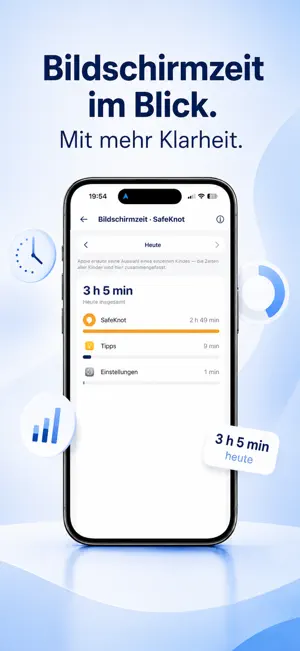
SafeKnot – Parental controls for a more relaxed family life SafeKnot helps parents keep an easy overview of their children's digital everyday life. See the location, set screen time rules, restrict apps, lock the phone when needed and organise family tasks – all in one app. On the way to school, out with friends or at home: SafeKnot combines practical features for parental controls and family organisation in one clear interface. HOW TO SET UP SAFEKNOT 1. Install SafeKnot on your phone and create a parent account. 2. Tap "Add child". SafeKnot shows you a 6-digit connection code. 3. Install SafeKnot Kids on your child's phone. 4. Enter the connection code there – both devices are now connected. 5. On your child's phone, allow the requested permissions, such as location and Screen Time. Some features cannot work without them. KEY FEATURES FOR PARENTS LOCATION & GPS See your child's current location directly in SafeKnot and keep an eye on important routes. The location history helps you review past places and movements at a glance. Ideal for parents looking for practical family location sharing for everyday life. SCREEN TIME RULES Decide when your child's phone may be used – for example with fixed time windows for school, homework or the evening. This creates clear rules for digital everyday life that you can agree on together with your child. BLOCK AND RESTRICT APPS SafeKnot helps you manage app access on your child's device. Set schedules for school, free time or the weekend and restrict apps at certain times – for example during school hours, homework or in the evening. LOCK THE PHONE When a break from the phone is needed, you can quickly use the lock features in SafeKnot. RING – REACH YOUR CHILD QUICKLY The phone is on silent or your child isn't responding? With the Ring feature, you can play a clearly audible sound on your child's device. APPOINTMENTS & TO-DOS SafeKnot is more than a classic parental control app. Organise shared appointments and to-dos within the family. Tasks, doctor's appointments, school, leisure and other family activities are collected in one place. STEP COUNTER & WIDGET The built-in step counter shows steps and other activity values clearly. The most important information can also be shown as a widget on the home screen. STATUS AT A GLANCE The parent view summarises important information about the selected child device, for example: - Online status - Location - Battery level - Lock status - Quick actions for key features MANAGE MULTIPLE CHILDREN Manage several children in one parent app and switch quickly between their profiles. This makes SafeKnot suitable for families with several children and different phone rules. OVERVIEW INSTEAD OF CONSTANT CONTROL SafeKnot was developed to give parents important information and features for family life in one place. The app helps you manage digital rules clearly while making everyday family life easier to organise. SafeKnot – so you can keep an eye on what matters, when it matters.
What’s new
Version 1.2 · Updated October 5, 2026
New welcome screen, follow-us links, and various improvements and bug fixes.
App privacy
The developer, SafeKnot UG haftungsbeschraenkt, reported these privacy practices to Apple.
Data Used to Track You
The following data may be used to track you across apps and websites owned by other companies:
- Identifiers: Device ID
Data Linked to You
The following data, which may be collected and linked to your identity, may be used for the following purposes:
- Identifiers: Device ID, User ID
- Health & Fitness: Fitness
- Purchases: Purchase History
- Location: Precise Location
- Contact Info: Email Address, Name
- User Content: Emails or Text Messages, Photos or Videos, Audio Data, Customer Support
- Usage Data: Product Interaction
Used for: Developer’s Advertising or Marketing, App Functionality
Data Not Linked to You
The following data, which may be collected but is not linked to your identity, may be used for the following purposes:
- Identifiers: User ID
Used for: Analytics
Alternatives to SafeKnot
Looking for apps like SafeKnot? Here are 6 similar apps on the App Store. The highest rated is Screen Time Control・App Block (4.6/5), and all 6 are free to download.
-
 Benning TC-Image Link
-
 Citibox Point: for business
1.0
Citibox Point: for business
1.0
-
 Screen Time Control・App Block
4.6
Screen Time Control・App Block
4.6
-
 SYR
SYR
-
 one.com Mail
-
 useLess: Screen Time Blocker
4.5
useLess: Screen Time Blocker
4.5
| App | Rating | Price | Last updated | Compare |
|---|---|---|---|---|
| SafeKnot | – | Free | October 5, 2026 | |
| Benning TC-Image Link | – | Free | May 28, 2026 | Compare |
| Citibox Point: for business | 1.0 / 5 (1) | Free | Sep 2, 2026 | Compare |
| Screen Time Control・App Block | 4.6 / 5 (9) | Free | Jun 6, 2026 | Compare |
| SYR | – | Free | Mar 4, 2026 | Compare |
| one.com Mail | – | Free | Oct 15, 2026 | Compare |
| useLess: Screen Time Blocker | 4.5 / 5 (292) | Free | Oct 28, 2026 | Compare |
Compare SafeKnot with the top alternatives: ratings, updates, ASO score and keyword gaps →