

Reverie: Soundscape Generator
Parallel Minds Music iPad
Reverie: Soundscape Generator is a free Music app for iPad by Parallel Minds. Rated 4.8/5 from 6 ratings. Requires iOS 16.4. Updated October 15, 2026.
- Rating
- 4.8
- 6 ratings
- Price
- Free
- on the App Store
- Size
- 10 MB
- Age 4+
- Updated
- Oct 15
- 2026 · v1.15.1
Screenshots


About Reverie: Soundscape Generator
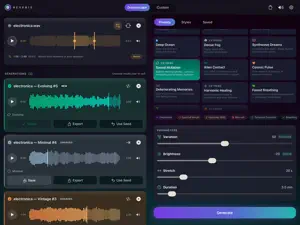
Turn any sound into slow, evolving ambient. Reverie takes a sample, a loop, a song, or a field recording and stretches it into long, drifting soundscapes and drones. A few seconds of audio can become many minutes of calm, cinematic texture. Drop in a file, choose a style, and Reverie does the rest. HOW IT WORKS 1. Bring in any audio: from the Files app, by drag and drop, from the iPad microphone or a USB interface, or straight off a track in your DAW with the Reverie Capture plugin. 2. Drag two handles across the waveform if you only want part of it stretched. 3. Pick a style, then shape it with four simple sliders: variation, brightness, stretch, and duration. 4. Listen, then export your soundscape to keep, share, or drop into your own projects. No music theory, no studio needed. Every render comes out a little different, so you can keep exploring until something feels right. STYLES AND PRESETS More than twenty styles, from warm and luminous to dark, aquatic, choral, and deep drone. Twenty ready-made presets give you a finished starting point: Deep Ocean, Cathedral, Infinite Drone, Frozen Time, Forest Breathing, and more. Want to go further? Build your own chain from thirty-seven effects, including time-stretching, spectral freezing, shimmer reverb, tape saturation, and resonators. AUv3: IN AND OUT OF YOUR DAW Reverie ships with two AUv3 plugins, for AUM, Logic Pro, GarageBand, Cubasis and any other AUv3 host. You make your textures in the app; the plugins are how they get in and out of a session. Parallel Minds: Reverie is an instrument that plays your library. Choose a texture you have already made, then play it from a keyboard: hold a note and the drone holds, release it and the tail falls away. It follows the host transport, and its controls can be MIDI-mapped and automated. Parallel Minds: Reverie Capture is an effect. Put it on any bus and it passes audio through untouched. Arm it and it also records that bus, punching in when the host plays. The recording lands in the app, ready to stretch. No bouncing, no exporting. MADE FOR - Ambient and electronic musicians - Sound design for film, video, and games - Backgrounds for meditation, sleep, focus, and yoga - Anyone curious about turning everyday sounds into music YOURS ALONE Reverie runs entirely on your iPad. No account, no internet connection, nothing sent to a server. Your audio stays with you, and everything you make is royalty-free. FREE TO START Download Reverie and start creating at no cost, with six styles, a set of presets and renders up to three minutes. Recording, DAW capture and region selection are all included. A single one-time purchase unlocks the full library, renders up to thirty minutes, extreme stretching, the seed system for reproducible results, and the custom chain builder. No subscription, ever.
Ratings & reviews
4.8
6 ratings
What’s new
Version 1.15.1 · Updated October 15, 2026
This update fixes two crashes. FIXED - Cancelling a render and starting a new one straight away could crash Reverie, mostly on older iPads. A cancelled render now stops completely before the next one can begin. Until it has, the progress reads Cancelling…, which can take a few seconds on an older iPad. - Some long renders could crash on styles and chains that use Chord Layer or Harmonic Shift. They now finish normally. NEW IN 1.15 If you are updating from an earlier version, 1.15 is about how many textures you hear at once, and what goes into them before they are stretched. Takes can now play on top of each other, and the sample can be filtered before the engine ever touches it. LAYER YOUR TEXTURES Starting a take used to stop the one before. Turn on Layer Mode, the new switch at the top of your session results, and play adds to what is already playing instead: up to three takes at once, a drone under a shimmer under a slow pad. Reverie turns each layer down a little as others join, and back up as they leave, so the mix keeps its headroom. Once two layers play, a bar appears with Stop all, which silences everything in one tap, the source included. Layer Mode stays off until you turn it on, and your library still plays one take at a time. CUT THE LOWS OR THE HIGHS BEFORE THE STRETCH The rumble under a field recording, the hiss on top of an old sample, the low end of a pad you only want the air of. Filter sample, in the source card, puts a low cut and a high cut on the sample itself, before anything is stretched. Drag the two handles and hear the result live on the source player: only what lies between them reaches Reverie. Brightness still shapes the result afterwards; the filter decides what goes in. Close the filter and the sample goes in exactly as before. ALSO FIXED IN 1.15 - On iOS 27, text stopped truncating after the first render: a long title ran over the NEW and UNSAVED badges and the buttons of its card, and on iPad mini it could push the whole card off the edge of the screen. Titles are cut short again, everywhere in the app. - After a phone call or another interruption, only the take that was playing resumes. Takes you had paused no longer start playing again. - Tapping play several times in a row, or scrubbing a take while it loads, no longer starts a second copy playing underneath. A note on seeds: the filter belongs to the sample, not to the seed. Reusing a seed restores the chain and its settings, and renders from whatever sample you load, filtered or not.
App privacy
The developer, Parallel Minds, reported these privacy practices to Apple.
Data Not Collected
The developer does not collect any data from this app.