

Interval - Stop Motion Camera
Marinko Brdarevic Photo & Video iPhoneiPadiPod touch
Interval - Stop Motion Camera is a free Photo & Video app for iPhone and iPad by Marinko Brdarevic. Requires iOS 17.0. Updated September 13, 2026.
- Price
- Free
- on the App Store
- Size
- 5 MB
- Age 4+
- Updated
- Sep 13
- 2026 · v1.1.3
Screenshots
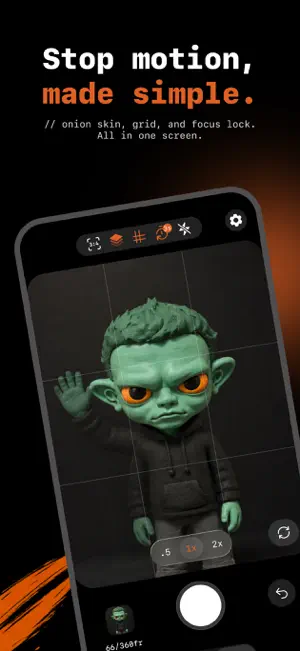
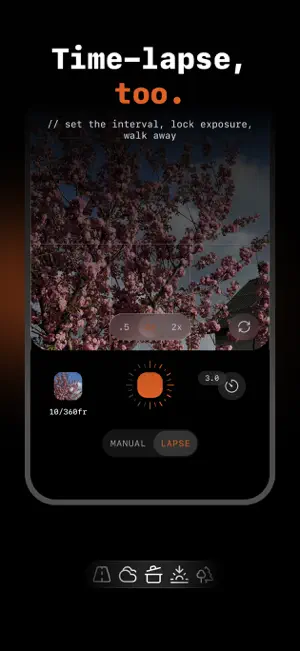
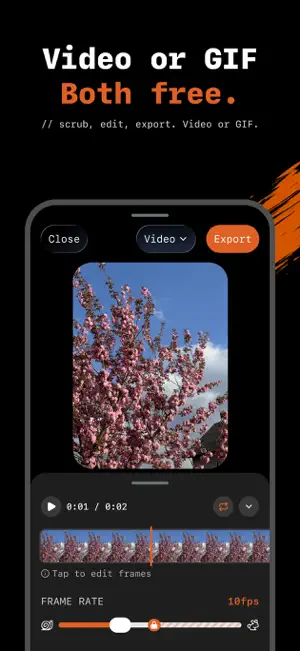
About Interval - Stop Motion Camera
Make a stop-motion video in the time it takes to read this. No timeline. No clutter. Onion skin shows your last frame behind the live view, so every move lands. Time-lapse mode is one tap away. Export as video or GIF. One purchase, no subscription, ever. CAPTURE - Stop-motion mode: tap to capture, frame by frame - Onion skin: see your previous frame to guide the next - Burst mode: press and hold the shutter to fire a run of frames - Time-lapse mode: set your interval and let it run - Auto-capture with custom frame limits - Aspect ratios from square to 16:9, set before you shoot - Grid overlay and tap-to-focus - Pinch to zoom with native lens switching - Exposure, white-balance, and focus lock between frames - Self-timer: 3s, 5s, or 10s before the first frame - Shoot in portrait or landscape PREVIEW - Scrub through your frames on a filmstrip - Delete frames you don't want - Loop playback to check your timing - Close the app and come back — your frames are still there EXPORT - Save to Photos or share anywhere - Export as GIF at 240px, 320px, or 640px — free - Export in 1080p, or 4K with Pro INTERVAL PRO (one-time upgrade) - 4K export - Manual frame rate, 1 to 30 FPS - No watermark One purchase. Yours forever. No subscription. Time-lapse runs while Interval is open on screen — it's built for minutes and hours, not overnight. Interval is for animators, hobbyists, and anyone turning still moments into motion, without a steep learning curve. Built by a designer who wanted a simpler animation tool.
What’s new
Version 1.1.3 · Updated September 13, 2026
Onion skin, three strengths Tap the onion skin icon to step through three levels. A faint ghost for a quick check, a strong one when a move has to land exactly. Locked from the first frame Time-lapse and auto-capture now lock focus, exposure and white balance the moment a run starts, so every frame matches the first. Tap the AF/AE pill to release it mid-run. A clearer frame-rate slider Three stops, 5, 10 and 15 fps, sit where your thumb expects them. Pro keeps the full 1 to 30 range. Works with VoiceOver The shutter, the frame-rate slider and every control now announce what they do. New Settings Redrawn from the ground up, with links to Interval on Instagram and TikTok. Polish & fixes The toolbar icons have new glyphs and motion, the auto-capture sheet fits its content, the shutter stays put when you switch modes, and tap-to-focus lands where you tapped in landscape. Version 1.1.3: steadier runs, clearer controls. One-time purchase. No subscription.
App privacy
The developer, Marinko Brdarevic, reported these privacy practices to Apple.
Data Not Linked to You
The following data, which may be collected but is not linked to your identity, may be used for the following purposes:
- Identifiers: Device ID
- Usage Data: Product Interaction
Used for: Analytics
Alternatives to Interval - Stop Motion Camera
Looking for apps like Interval - Stop Motion Camera? Here are 6 similar apps on the App Store. The highest rated is PhotoBot - Endless timer cam (4.2/5), and 5 of the 6 are free to download.
-
 Anima: Toy Stop Motion
-
 BurstWizard
-
 SimuLook: Film Recipes
-
 PhotoBot - Endless timer cam
4.2
PhotoBot - Endless timer cam
4.2
-
 Align: Stop Motion Camera
-
 Stop Motion: Frame Animator
| App | Rating | Price | Last updated | Compare |
|---|---|---|---|---|
| Interval - Stop Motion Camera | – | Free | September 13, 2026 | |
| Anima: Toy Stop Motion | – | Free | Oct 10, 2026 | Compare |
| BurstWizard | – | Free | Sep 2, 2026 | Compare |
| SimuLook: Film Recipes | – | Free | Sep 26, 2026 | Compare |
| PhotoBot - Endless timer cam | 4.2 / 5 (110) | 12.99 USD | Sep 9, 2025 | Compare |
| Align: Stop Motion Camera | – | Free | Jun 4, 2026 | Compare |
| Stop Motion: Frame Animator | – | Free | Jul 30, 2026 | Compare |