

fami-suke: Family Meal Count
BEAK,K.K. Lifestyle iPhoneiPadiPod touch
fami-suke: Family Meal Count is a free Lifestyle app for iPhone and iPad by BEAK,K.K. Requires iOS 15.0. Updated August 27, 2026.
- Price
- Free
- on the App Store
- Size
- 85 MB
- Age 4+
- Updated
- Aug 27
- 2026 · v1.2
Screenshots


About fami-suke: Family Meal Count
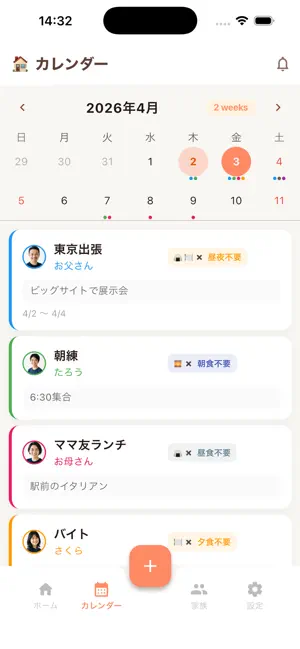
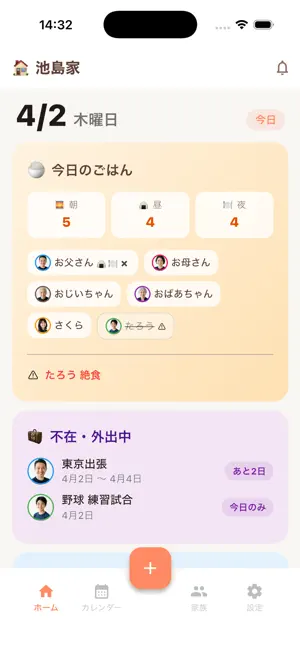
Stop asking "Are you home for dinner tonight?" every single day. One partner travels and has late work dinners. A child needs a packed lunch only on match days. A grandparent is on a low-salt diet and skips lunch on day-care days. It is different every day. So you end up asking every day. fami-suke removes the asking. Put the schedule in once, and today's and this week's headcount is already decided. ◆ Does this sound like your week? - You cannot tell whether to cook dinner, because of trips and late meetings - A packed lunch is needed only on match days, and you find out the night before - You want to shop for the whole week but cannot tell how many you are cooking for - The school lunch menu is stuck on the fridge, where you cannot see it at the shops - You ask in the family chat and the message is read but never answered - One family member eats differently, and it is easy to forget ◆ What fami-suke does [Carry the school lunch menu with you all month] Photograph the menu once at the start of the month. Open any day in September and it is there. "Today's school lunch is fried chicken, so dinner should be something else" - you can check that in the shop, not at the fridge. School handouts and hospital schedules work the same way: choose the period and pin it. Nothing gets buried in your camera roll. Open the day and it is there. [One-tap schedule tags] Drinks - Business trip - Overtime - Night shift - Remote work Packed lunch (match day) - Early practice - Lunch out - Medical test (fasting) One tap sets the event and that day's meal at the same time. Tap "Drinks" and dinner is off. Tap "Match day" and a packed lunch is on. You never set the meal separately. [Repeating events, set once] Practice, cram school, lessons, piano, school runs, trash day, recycling, regular checkups, home nursing, rehab. Pick a preset once and it keeps appearing on the calendar from then on. Multiple weekdays and skip-on-holidays are both supported. No more re-typing the same event over and over. [10 meal states] Normal / No breakfast / No lunch / No dinner / No breakfast or lunch / No breakfast or dinner / No lunch or dinner / No meals / Fasting / Packed lunch Departure and return days are often different, and both fit. Add a meal note such as "porridge only", "allergy-free" or "liquid diet" so whoever cooks does not have to remember. [Packed lunch alert] The home screen tells you how many lunchboxes are needed today, up front. Whether you pack one every day or only on match days, you never recount during the busiest part of the morning. [Reminders the day before and in the morning] All-day events without a time can remind you too. Quiet hours hold notifications until the window ends. [Group events] Family trips and visits that involve several members can be added at once. [For multi-generation and caregiving households] Each member has a free-text note and a contact field. "Egg allergy", "Care level 4", "Liquid diet", "Family doctor: 03-xxxx-xxxx" - anything the rest of the family should be able to see. Day care, home nursing and rehab work as repeating events. [Sync with a family code] No account needed. Share the family code and everyone's phone syncs in real time. [5 languages] Japanese / English / Korean / Traditional Chinese / Spanish The app picks its language from your device. ◆ Pricing - Basic (free): up to 3 family members - Pro (JPY 300/month or JPY 2,400/year): up to 9 members, no ads Terms: https://b19.co.jp/terms-of-service/ Privacy: https://b19.co.jp/privacy-policy/
What’s new
Version 1.2 · Updated August 27, 2026
You can now pin the school lunch menu and handouts to the calendar. - Photograph the monthly menu once and it appears on every day of that month. Unlike the copy on the fridge, you can check it while you are out shopping. - School handouts and hospital schedules work the same way - choose the period and pin it. You can now create repeating events. - Club practice, cram school, school runs, day care, trash day and anything else that repeats every week or month. Set it once and it keeps appearing on the calendar. Create one from the add-event screen with "Make it recurring". - No more re-typing the same event over and over. Reminders now work for all-day events. - Previously a reminder could only be set on events with a time. Now all-day events can notify you the day before and on the morning of. Also - The app now picks its language from your device. - Screens that were still Japanese only, such as the shopping list, now work in all 5 languages. - Simplified Chinese can now be chosen in Settings.
App privacy
The developer, BEAK,K.K., reported these privacy practices to Apple.
Data Used to Track You
The following data may be used to track you across apps and websites owned by other companies:
- Usage Data: Advertising Data
Data Not Linked to You
The following data, which may be collected but is not linked to your identity, may be used for the following purposes:
- Usage Data: Advertising Data
- Health & Fitness: Health
- Contact Info: Name
- User Content: Photos or Videos
- Identifiers: Device ID
Used for: Third-Party Advertising, App Functionality
Alternatives to fami-suke: Family Meal Count
Looking for apps like fami-suke: Family Meal Count? Here are 6 similar apps on the App Store.


| App | Rating | Price | Last updated | Compare |
|---|---|---|---|---|
| fami-suke: Family Meal Count | – | Free | August 27, 2026 | |
| FamilyChecker | – | Free | Apr 7, 2026 | Compare |
| 家族ご飯 | – | Free | Sep 4, 2026 | Compare |
| EaTogether - 家族とご飯の予定共有 | – | Free | Jun 20, 2026 | Compare |
| 明日ごはん | – | Free | Oct 11, 2026 | Compare |
| 大久保整体院 公式アプリ | – | Free | Jul 15, 2025 | Compare |
| シェアポケット | – | Free | Oct 23, 2026 | Compare |