

Ugh! Storage: Private Cloud
Honorius Neogy Productivity iPhoneiPadiPod touch
Ugh! Storage: Private Cloud is a free Productivity app for iPhone and iPad by Honorius Neogy. Rated 5.0/5 from 1 ratings. Requires iOS 17.0.
- Rating
- 5.0
- 1 ratings
- Price
- Free
- on the App Store
- Size
- 21 MB
- Age 4+
- Updated
- Apr 21
- 2026 · v2.0
Screenshots
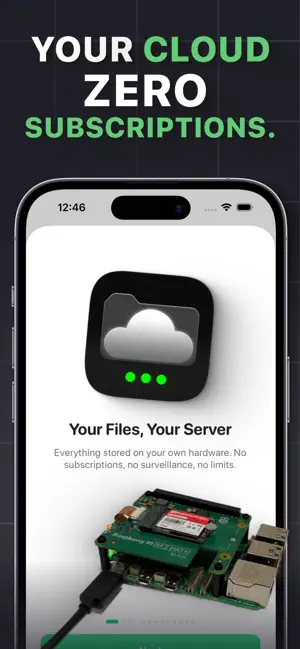
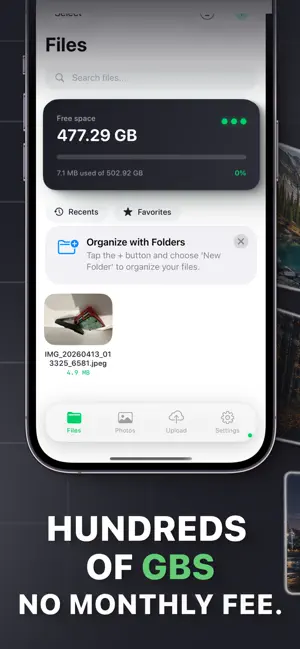


About Ugh! Storage: Private Cloud
Ugh! Storage turns a Raspberry Pi 5 into your personal cloud — encrypted, subscription-free, and yours forever. Your photos and files sync to hardware in your home, not a server farm you'll never see. WHY UGH! STORAGE No monthly fee. Ever. You already paid when you bought the Pi. Your storage grows when you want — just swap in a bigger drive. No family-tier upgrades. No "you're out of space" emails at 2 AM. Your files are encrypted on your device before they leave it. The server on your Pi never sees them in plaintext — and neither do we. You hold the keys. WHAT'S INSIDE • Automatic photo backup with duplicate detection • Full file manager: folders, drag-and-drop, preview, share links • End-to-end AES-256 encryption • AI search: find photos by what's in them, search videos by transcript • Built-in OCR — search text inside scanned documents • Spotlight integration: find a file from your iPhone home screen • Home-screen widget showing storage usage at a glance • Share sheet extension — send anything from any app to your cloud • Document scanner with perspective correction • Offline mode: browse cached files without a connection • Face ID / Touch ID lock • Native macOS app with proper menus, keyboard shortcuts, and windows • Guided setup over Bluetooth — no terminal, no SSH, no command line WHAT YOU NEED • Raspberry Pi 5 with an NVMe SSD (1TB+ recommended) • Wi-Fi or Ethernet • This app — that's it The app walks you through assembling, flashing, and pairing — step by step, no terminal required. First-time setup takes about 20 minutes. PRIVATE BY DESIGN • Zero-knowledge encryption: your data is encrypted with keys only you hold • No tracking of your content, no analytics on your files • Access tokens stored in the iOS Keychain • HTTPS-only with strict certificate validation • Apple Privacy Manifest (2024+ compliance) • Biometric lock prefers Face ID / Touch ID only — never falls back to passcode WHO IT'S FOR • Anyone with cloud subscription fatigue • Privacy-conscious families • Photographers with terabyte-scale libraries • NAS users wanting a simpler, native iPhone + Mac experience • Developers and self-hosting enthusiasts • Anyone who owns a Raspberry Pi and wants to put it to work VERSION 2.0 HIGHLIGHTS New guided setup flow. Smoother browsing. Off-thread encryption for large uploads. Background uploads that actually finish overnight. Fully native macOS app. Full Apple Privacy Manifest. Over 40 reliability and privacy fixes. FREE. NO TIERS. NO ADS. The app is free. No in-app purchases. No "premium" tier. You already paid for your storage when you bought the Pi.
What’s new
Version 2.0 · Updated April 21, 2026
Welcome to Ugh! Storage 2.0 — the biggest reliability and polish release since launch. Setup is smoother, uploads are more resilient, the macOS app feels properly native, and we've hardened privacy end-to-end. SMOOTHER SETUP Signing in now routes you straight into a guided device-pairing flow instead of dropping you into an empty app. If you re-install or sign in on a new device, the same flow walks you back through connecting to your Pi. The "Invalid server URL" dead-end is gone. FASTER BROWSING • Thumbnails debounce during fast scrolling so your Pi and your battery aren't hammered fetching images you've already scrolled past • Encryption for large uploads moved off the main thread — a 500 MB video no longer freezes the UI • Memory-cached access tokens make file grids snappier BACKGROUND UPLOADS THAT ACTUALLY RUN Uploads queued before you close the app now finish in the background while you sleep, instead of waiting for you to reopen. A missed system declaration was silently disabling this — fixed. RELIABILITY • Upload queue survives crashes (atomic writes) • Share extension safely rejects oversized files instead of crashing • Share sheet auto-recovers when your access token refreshes mid-batch • Undo on "moved to trash" now tells you if it fails instead of silently swallowing the error • Empty Trash disables during the request — no more accidental double-taps macOS, PROPERLY NATIVE • Closing the main window no longer strands you — reopen from the Window menu or by clicking the dock icon • Toolbar controls use native macOS placement (primary-action / cancellation-action) • Biometric prompt uses macOS-appropriate language ("Authenticate…" instead of "Unlock…") • Share sheet uses the correct key-window lookup instead of a deprecated API WIDGET • Tap the storage widget to jump straight into the app • Widget clears itself on logout so a shared device never shows the previous user's stats PRIVACY & SECURITY • Biometric lock prefers Face ID / Touch ID only — won't fall back to device passcode • Lock engages when the app becomes inactive, hiding content from the app-switcher preview • Manual server URL entry enforces HTTPS (private LAN addresses still allowed) • Full logout wipe: device name, theme preference, photo-backup history, AI-derived metadata — nothing leaks to the next user • Apple Privacy Manifest added (2024+ requirement) • Sentry crash-report breadcrumbs scrub any credential-shaped keys before transmission • Client-side path validation rejects traversal attempts before they reach your Pi ACCESSIBILITY • Toasts ("upload complete", "moved to trash", "couldn't restore") now announce to VoiceOver • Global search progress updates announce as they change ("Searching…" / "Thinking…") • Photo scrubber announces the current month as you drag • Dynamic Type capped at xxxLarge so extra-large text settings can't break layouts UNDER THE HOOD • Swift strict concurrency enforced across the entire project • AI metadata, upload staging, and offline cache excluded from iCloud backups (saves GB on restore) • Widget and Share extensions sync properly with the main app after token refresh • Over 40 individually reviewed hardening fixes Thanks for using Ugh! Storage. Your feedback shapes every release — keep it coming.
App privacy
The developer, Honorius Neogy, reported these privacy practices to Apple.
Data Not Collected
The developer does not collect any data from this app.
Alternatives to Ugh! Storage: Private Cloud
Looking for apps like Ugh! Storage: Private Cloud? Here are 6 similar apps on the App Store. The highest rated is Notesnook: Private notepad (4.7/5), and all 6 are free to download.
-
 AI Writer: Essay, Story, Email
4.1
AI Writer: Essay, Story, Email
4.1
-
 Motes - modern notes
3.0
Motes - modern notes
3.0
-
 Notesnook: Private notepad
4.7
Notesnook: Private notepad
4.7
-
 My Space - File Manager
4.1
My Space - File Manager
4.1
-
 Math Notes - Math Solver
3.6
Math Notes - Math Solver
3.6
-
 Lidar Room Scanner - 5DPlan
4.1
Lidar Room Scanner - 5DPlan
4.1
| App | Rating | Price | Last updated | Compare |
|---|---|---|---|---|
| Ugh! Storage: Private Cloud | 5.0 / 5 (1 rating) | Free | April 21, 2026 | |
| AI Writer: Essay, Story, Email | 4.1 / 5 (7) | Free | Sep 25, 2026 | Compare |
| Motes - modern notes | 3.0 / 5 (1) | Free | Aug 12, 2026 | Compare |
| Notesnook: Private notepad | 4.7 / 5 (682) | Free | Oct 9, 2026 | Compare |
| My Space - File Manager | 4.1 / 5 (13) | Free | Aug 29, 2024 | Compare |
| Math Notes - Math Solver | 3.6 / 5 (22) | Free | Oct 20, 2026 | Compare |
| Lidar Room Scanner - 5DPlan | 4.1 / 5 (143) | Free | Oct 14, 2026 | Compare |