

FlySpaceA
FlySpaceA Travel iPhoneiPadiPod touch
FlySpaceA is a free Travel app for iPhone and iPad by FlySpaceA. Rated 5.0/5 from 3 ratings. Requires iOS 15.0. Updated October 15, 2026.
- Rating
- 5.0
- 3 ratings
- Price
- Free
- on the App Store
- Size
- 24 MB
- Age 4+
- Updated
- Oct 15
- 2026 · v1.6.0
Screenshots



About FlySpaceA
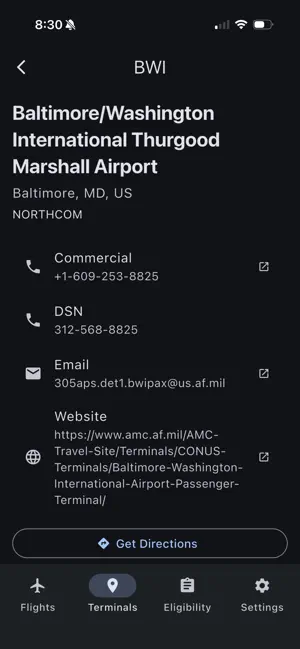
FlySpaceA puts Space Available flight data from Air Mobility Command in your pocket. No more refreshing terminal Facebook pages for 72-hour schedules. Open the app, check what's flying, and go. FLIGHT MAP: All tracked flights show up on an interactive map with clustered markers and route arcs. Tap any airport marker to see its departures. You can zoom, scroll, and quickly see what's moving across the Air Mobility Command network. FLIGHT LIST AND FILTERS: Switch to the list view for a detailed look. Filter by flight status (Firm, Tentative, Cancelled), specific airports, or date range. Handy when you're watching a particular route or waiting on a specific terminal. TERMINAL BROWSER: Look up Air Mobility Command terminal details so you know where to sign up and what to expect before you get there. ELIGIBILITY CALCULATOR: Not sure which Space Available category you fall under? The built-in calculator asks a few questions and tells you your Air Mobility Command travel category. It covers all six: Cat I: Emergency Leave (Unfunded) Cat II: Environmental and Morale Leave (Accompanied) Cat III: Ordinary Leave, House Hunting, Medal of Honor Cat IV: Unaccompanied EML Cat V: Other Permissive TDY, Unaccompanied Dependents, Post-Deployment/Mobilization Respite Absence Cat VI: Retirees, Gray Area Retirees, Guard/Reserve (Inactive), 100% Disabled Veterans, ROTC REQUEST EMAILS: Pick a flight and open a draft email to the terminal in one tap, ready for you to review and send from your own email app. WHO THIS IS FOR: Active duty, Guard, Reserve, retirees, dependents, 100% disabled veterans, and anyone else eligible for Space Available travel. If you've spent time hunting for flight schedules across scattered websites and social media pages, this app pulls it all into one place. Sign in with Apple or Google, or create an account with email. Flights require a free account; the terminal directory and eligibility calculator work without one. Check flights, figure out your category, and plan your trip. FlySpaceA is an independent app. It is not affiliated with, endorsed by, or operated by the U.S. Department of Defense, Air Mobility Command, or any military service
What’s new
Version 1.6.0 · Updated October 15, 2026
Terminals and the Space-A eligibility checker no longer need an account. Flights, the map and settings still do. Added: Sign in with Apple, password reset, and account deletion in Settings. The flight map is clearer, with a seat-color legend and dark mode. Multi-leg trips group into one route in the flight list. Terminals can be filtered by region, and eligibility now matches the website. The FAQ covers surviving spouses. Traveler details are no longer saved on your device.
App privacy
The developer, FlySpaceA, reported these privacy practices to Apple.
Data Linked to You
The following data, which may be collected and linked to your identity, may be used for the following purposes:
- Contact Info: Email Address, Name
- Identifiers: User ID, Device ID
- Usage Data: Product Interaction
Used for: App Functionality
Alternatives to FlySpaceA
Looking for apps like FlySpaceA? Here are 6 similar apps on the App Store. The highest rated is Space-A Roll Call (5.0/5), and all 6 are free to download.
-
 Space-A Roll Call
5.0
-
 Space-A: AMC Flight Tracker
5.0
-
 Space-A+
-
 Crewdogs - Stay Military
4.8
-
 Stay Foxhole
4.0
-
 Pop's Space-A Flight Finder
5.0
| App | Rating | Price | Last updated | Compare |
|---|---|---|---|---|
| FlySpaceA | 5.0 / 5 (3 ratings) | Free | October 15, 2026 | |
| Space-A Roll Call | 5.0 / 5 (3) | Free | May 22, 2026 | Compare |
| Space-A: AMC Flight Tracker | 5.0 / 5 (1) | Free | Jul 24, 2026 | Compare |
| Space-A+ | – | Free | Jun 13, 2026 | Compare |
| Crewdogs - Stay Military | 4.8 / 5 (42) | Free | Sep 23, 2026 | Compare |
| Stay Foxhole | 4.0 / 5 (23) | Free | Oct 28, 2026 | Compare |
| Pop's Space-A Flight Finder | 5.0 / 5 (3) | Free | Oct 4, 2026 | Compare |
Compare FlySpaceA with the top alternatives: ratings, updates, ASO score and keyword gaps →