

Agents At Work: You can Go!
AnswerSolutions LLC Developer Tools iPhoneiPadiPod touch
Agents At Work: You can Go! is a free Developer Tools app for iPhone and iPad by AnswerSolutions LLC. Requires iOS 17.6. Updated October 28, 2026.
- Price
- Free
- on the App Store
- Size
- 4 MB
- Age 4+
- Updated
- Oct 28
- 2026 · v2.12
Screenshots

About Agents At Work: You can Go!
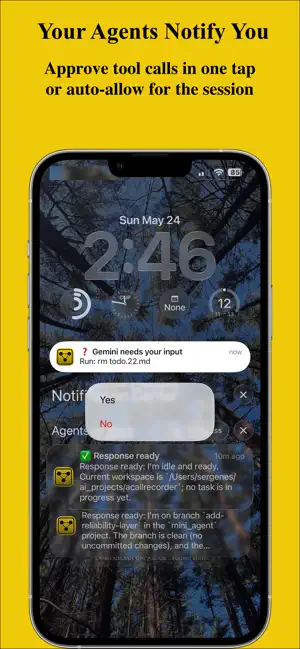
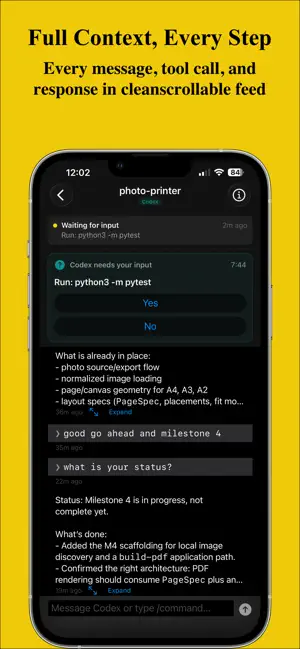
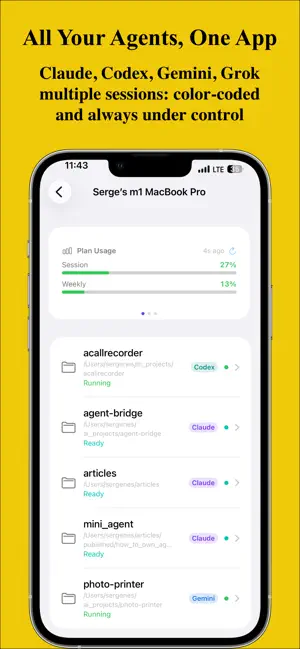
Your AI agents are working. You don't have to watch. Agents At Work lets you watch and steer Claude Code, Codex, Gemini CLI, Grok, Cursor, and Scoot from your iPhone or iPad, wherever they run: on your Mac or on a Linux machine. Your phone lets you know the moment an agent needs approval, finishes a task, or hits an error, and you answer from anywhere. WHAT YOU GET Push notifications you can answer: when an agent asks to run a command, edit a file, or use a tool, the question lands on your phone with the options. Tap Yes, No, or "Yes for this session" right from the notification, and the agent carries on. A live conversation feed: every message, tool call, and response streams to your phone as it happens. Long answers open in a full-screen reader that can read them aloud. Send and schedule prompts: give an agent a new instruction from anywhere, or queue one for later, for example 2 AM when your usage limit resets, so a spent quota turns into work done by morning. Auto-approve: trust a session, and it runs without asking while you stay in the loop. Every agent in one place: sessions from all your computers, color-coded by agent, with live status: running, waiting for you, or done. Local and cloud models with Scoot: our own open-source agent runs free local models through Ollama, or cloud models with your own key. Your project files: browse a computer's folders and open files from your phone. NO ACCOUNT, END-TO-END ENCRYPTED There is nothing to sign up for. Your phone pairs with your computer by scanning a QR code, and that same scan sets up AES-256-GCM encryption. Prompts and responses are encrypted on your computer before they leave it; our relay only ever carries ciphertext. Only your computer and your phone can read them. OPEN SOURCE The engine that runs on your computer, aaw-core, is MIT licensed, on GitHub and PyPI. Read exactly what touches your code and your agents, or run your own relay. HOW IT WORKS 1. Install the free companion on your computer: the Mac app from agentsatwork.app, or one command on Linux. 2. Open Agents At Work on your phone and scan the QR code your computer shows. 3. Start your agent the way you always do. 4. Your phone lets you know when it needs you. Approve, answer, or send a new prompt from anywhere. PLANS Free: follow one computer on our relay, with every feature. Personal: up to 3 computers, for anyone running agents on more than one machine. Pro: up to 15 computers, for teams and fleets of machines. Weekly, monthly, or yearly. Cancel anytime in your App Store subscriptions. One subscription covers every iPhone and iPad on your Apple ID. Computers on a relay you host yourself never count toward a plan. REQUIREMENTS - iPhone or iPad with iOS or iPadOS 17.6 or later - A Mac with macOS 14.6 or later, or a Linux machine with systemd, tmux, and Python 3.11 or newer - Claude Code, Codex CLI, Gemini CLI, Grok CLI, Cursor, or Scoot on that computer Not affiliated with Anthropic, OpenAI, Google, xAI, Anysphere, or Ollama. Terms of Use: https://www.apple.com/legal/internet-services/itunes/dev/stdeula/ Privacy Policy: https://agentsatwork.app/privacy
What’s new
Version 2.12 · Updated October 28, 2026
Attach more than photos - Send several files with one prompt: photos, PDFs, short videos, logs, and text or source files, up to 50 MB each. Pick photos from your library or anything from the Files app. - HEIC photos are converted for your agent automatically. - Each file shows as a card above the message field, and you can watch the upload's progress. If an upload fails, your message and files stay put so you can send them again. - Free includes 1 file per prompt, Personal up to 3, and Pro has no limit. Files other than photos need the latest Agents At Work on your computer: macOS 1.8.2, or aaw-core 0.1.12 on Linux. With it, your phone also tells you when Claude's login expires or it loses its connection to the API.
App privacy
The developer, AnswerSolutions LLC, reported these privacy practices to Apple.
Data Not Linked to You
The following data, which may be collected but is not linked to your identity, may be used for the following purposes:
- User Content: Customer Support, Other User Content
- Identifiers: User ID
- Usage Data: Product Interaction, Other Usage Data
- Diagnostics: Crash Data, Other Diagnostic Data
- Contact Info: Email Address
Used for: Analytics, Product Personalization, App Functionality
Alternatives to Agents At Work: You can Go!
Looking for apps like Agents At Work: You can Go!? Here are 6 similar apps on the App Store. The highest rated is BotBus: AI Coding Agent Remote (5.0/5), and all 6 are free to download.
-
 Exec Terminal: SSH & Mosh
-
 Telyrix: SSH & SFTP Client
-
 Yebo — AI Agent Authorization
-
 BotBus: AI Coding Agent Remote
5.0
BotBus: AI Coding Agent Remote
5.0
-
 ShellCast
-
 SSH Client & Terminal - Cura
5.0
SSH Client & Terminal - Cura
5.0
| App | Rating | Price | Last updated | Compare |
|---|---|---|---|---|
| Agents At Work: You can Go! | – | Free | October 28, 2026 | |
| Exec Terminal: SSH & Mosh | – | Free | Aug 18, 2026 | Compare |
| Telyrix: SSH & SFTP Client | – | Free | Sep 2, 2026 | Compare |
| Yebo — AI Agent Authorization | – | Free | Apr 30, 2026 | Compare |
| BotBus: AI Coding Agent Remote | 5.0 / 5 (1) | Free | Oct 8, 2026 | Compare |
| ShellCast | – | Free | Aug 20, 2025 | Compare |
| SSH Client & Terminal - Cura | 5.0 / 5 (1) | Free | Sep 14, 2026 | Compare |