

SlideLynk: PPT Control Remote
Abhishikth Raj Marepally Productivity iPhoneiPadiPod touchApple Watch
SlideLynk: PPT Control Remote is a free Productivity app for iPhone and iPad by Abhishikth Raj Marepally. Requires iOS 15.1. Updated October 23, 2026.
- Price
- Free
- on the App Store
- Size
- 61 MB
- Age 4+
- Updated
- Oct 23
- 2026 · v2.0.4
Screenshots

About SlideLynk: PPT Control Remote
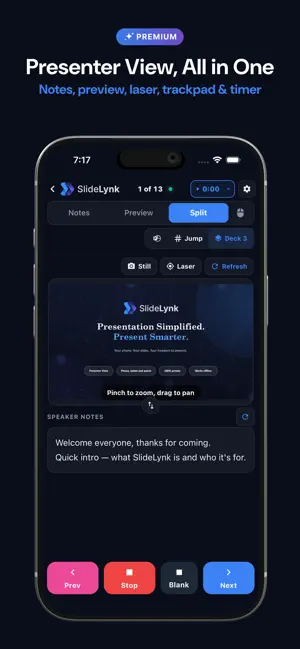
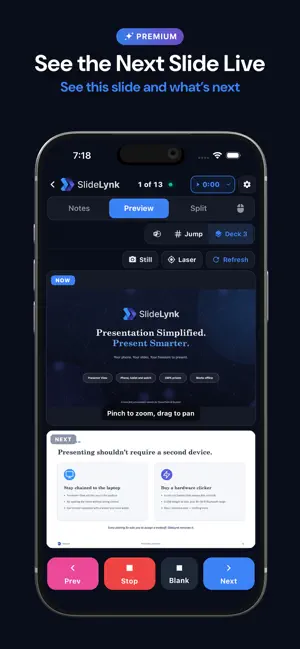
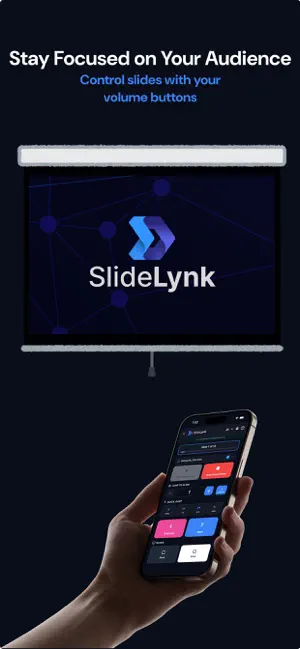
Turn Your iPhone or Apple Watch Into a Professional Presenter Console SlideLynk gives you complete control over your presentations from your iPhone or Apple Watch. Control PowerPoint and Keynote wirelessly over your local Wi‑Fi or mobile hotspot — no cables, no dongles, and no subscription required for core use. FREE TO START • 2 presentation sessions per day (60 minutes each) • Connect to 1 saved computer • QR code and auto-discovery connection • Manual IP connection as a fallback • Basic slide navigation — next, previous, start, and stop • Multiple phones can connect to the same presentation NEW: PRESENTER VIEW (SLIDELYNK PREMIUM) Your phone becomes a full presenter console. • Speaker notes, pulled live from PowerPoint or Keynote as you present • Live or Snapshot preview of your current slide, with the next slide always ready • Notes, Preview, or Split layout — SlideLynk remembers your pick • Wireless trackpad — move the cursor, click, and scroll from your phone • Laser pointer, visible only on the audience's screen • Built-in presentation timer, counting up or down with alerts as you run long • 14-day free trial KEY FEATURES INSTANT CONNECTION • Scan QR code to connect in seconds • Auto-discovery finds your computer automatically • Manual IP connection for restricted networks • Mobile hotspot support — present anywhere, even without Wi‑Fi • Try before you pair — explore the controls with a local Demo Session COMPLETE REMOTE CONTROL Included with the free tier: • Next/Previous slide navigation • Start/Stop presentations • Live slide counter and progress • Quick navigation (+/− 5 slides) SlideLynk Pro unlocks: • Jump to any slide instantly • Black/White screen controls • Volume button control — use physical buttons as a clicker • Pocket Mode — lock the screen face-down; volume buttons still work • Active Deck switching — control the right file when multiple decks are open • Unlimited sessions, no time limits • Unlimited saved computers • 14-day free trial APPLE WATCH COMPANION (PRO) • Control slides right from your wrist • Live slide indicators and easy tap targets PRIVATE & SECURE • Everything runs on your local Wi‑Fi or mobile hotspot • No cloud tracking for slide control — your presentations stay private • Optional sign-in with Google or Apple for Pro, Premium, and subscription sync • Password-protected access (Pro and Premium) TEAM SHARING (PRO & PREMIUM) • 1 Pro teammate seat included with every paid plan • Add extra Pro seats ($2.99/yr) or Premium seats ($4.99/yr, Premium owners only) • Invite via link, QR code, or team code • Choose whether each member gets a Pro or Premium seat • Manage members and remove access anytime WORKS EVERYWHERE • Microsoft PowerPoint (Windows, Mac) • Apple Keynote (Mac) • Free SlideLynk Desktop app for Windows, macOS, and Linux COMPREHENSIVE HELP • In-app Help Center, guides, FAQs, and an interactive onboarding tour Perfect for: • Business professionals, educators, students, conference speakers, and anyone who presents Download SlideLynk Desktop for free from slidelynk.com to get started. Privacy-focused. Free tier. Professional control. --- SlideLynk Pro and Premium are auto-renewable annual subscriptions. Renews automatically unless canceled at least 24 hours before the end of the current period. Manage or cancel in App Store account settings. A 14-day free trial may be available when offered. Privacy Policy: https://slidelynk.com/privacy Terms of Use: https://slidelynk.com/terms Apple Licensed Application EULA: https://www.apple.com/legal/internet-services/itunes/dev/stdeula/
What’s new
Version 2.0.4 · Updated October 23, 2026
Steadier connection on hotspots and weak Wi‑Fi
App privacy
The developer, Abhishikth Raj Marepally, reported these privacy practices to Apple.
Data Linked to You
The following data, which may be collected and linked to your identity, may be used for the following purposes:
- Identifiers: User ID, Device ID
- Usage Data: Product Interaction
- Contact Info: Name, Email Address
- Purchases: Purchase History
Used for: Analytics, Product Personalization, App Functionality
Data Not Linked to You
The following data, which may be collected but is not linked to your identity, may be used for the following purposes:
- Diagnostics: Crash Data, Performance Data
Used for: App Functionality
Alternatives to SlideLynk: PPT Control Remote
Looking for apps like SlideLynk: PPT Control Remote? Here are 6 similar apps on the App Store. The highest rated is NudgeBud (5.0/5), and all 6 are free to download.
-
 PowerPoint Remote
-
 Deck - Presentation Remote
1.0
Deck - Presentation Remote
1.0
-
 NotesPresenter: Slide Remote
-
 DeckCue Remote
-
 NudgeBud
5.0
NudgeBud
5.0
-
 Aimo Pointer
| App | Rating | Price | Last updated | Compare |
|---|---|---|---|---|
| SlideLynk: PPT Control Remote | – | Free | October 23, 2026 | |
| PowerPoint Remote | – | Free | May 24, 2026 | Compare |
| Deck - Presentation Remote | 1.0 / 5 (1) | Free | Jun 23, 2026 | Compare |
| NotesPresenter: Slide Remote | – | Free | Sep 4, 2026 | Compare |
| DeckCue Remote | – | Free | Aug 11, 2026 | Compare |
| NudgeBud | 5.0 / 5 (10) | Free | Oct 18, 2026 | Compare |
| Aimo Pointer | – | Free | Oct 26, 2026 | Compare |