

LORDLY: AI Game Design Creator
Lorden Games OÜ Productivity iPhoneiPadiPod touch
LORDLY: AI Game Design Creator is a free Productivity app for iPhone and iPad by Lorden Games OÜ. Rated 4.0/5 from 1 ratings. Requires iOS 15.0.
- Rating
- 4.0
- 1 ratings
- Price
- Free
- on the App Store
- Size
- 114 MB
- Age 4+
- Updated
- Oct 12
- 2026 · v1.2.0
Screenshots

About LORDLY: AI Game Design Creator
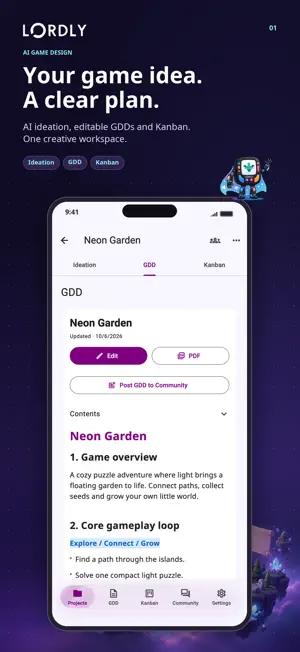
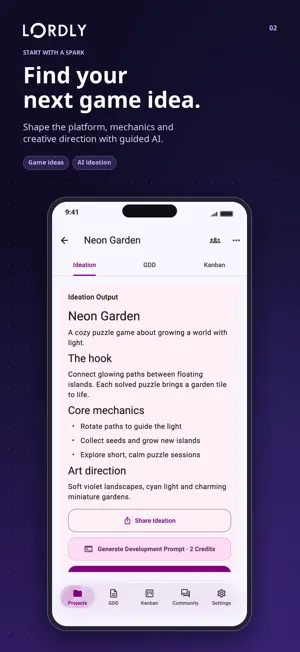
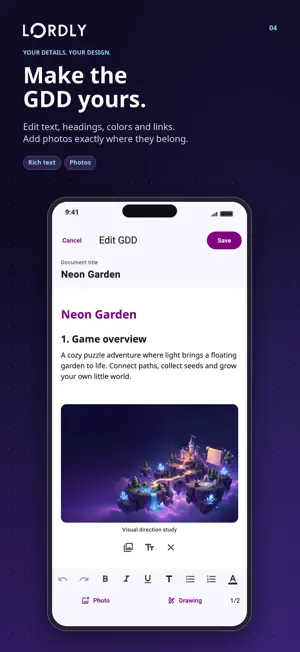
Turn a game idea into a clear design and production plan with Lordly AI Game Design Creator an AI game creator for developers, designers, indie teams and curious players. Plan a familiar board or puzzle concept such as Ludo, chess or Sudoku. Explore casual and hyper-casual mobile games. Structure web-based and PC-focused projects. Lordly helps you think through the experience before development begins. CREATE BETTER GAME IDEAS • Choose a platform, genre, theme, mechanics, audience, art direction and more. • Use guided AI ideation to discover and refine a concept. • Save your ideation and evolve it into a structured game design document (GDD). BUILD AND IMPROVE YOUR GDD • Generate structured GDDs from your game ideas. • Import PDF, DOCX, TXT or Markdown documents. • Improve, transform or adapt an existing design while keeping its core identity. • Keep your design decisions organized in one project. • Edit project GDDs by hand with headings, lists, links, fonts, text colors and highlights. • Place photos and editable whiteboard drawings between paragraphs. Each project includes 2 image slots, with optional coin unlocks up to 5. • Keep local drafts and edit text offline; reconnect to save to the cloud. • Export formatted PDFs with images, drawings, tables and clickable links. PREPARE FOR GAME DEVELOPMENT • Convert a concept into detailed development prompts. • Create prompts for vibe coding, Unity, Unreal Engine, backend tasks, art and asset production, or a custom workflow. • Use Lordly as a game maker planning companion. Lordly creates documentation, prompts and production structure not a finished playable game build. PLAN WITH KANBAN • Populate a backlog from your ideation or GDD. • Organize tasks by stage, priority and checklist. • Keep mobile, web and PC game development visible and manageable. • Long-press and drag project cards to arrange your personal project order. COLLABORATE AND SHARE • Invite viewers or editors to shared projects. • Preview invitations before joining. • Share progress, ask for feedback and react in the game creator Community. • Project owners can publish a PDF copy of their GDD as a Community post, separately from team sharing. • Reply with memes or gaming GIFs, like posts and use @mentions to connect with other creators. DAILY GAMES • Play Tic-Tac-Toe, Energy Flow, Memory, Rock–Paper–Scissors and Hanoi. • A different game rotates into the daily challenge. Earn 3 in-app coins for your first daily win, once per account per day. • Retry for free until you win, or practice without rewards even offline. • Try varied Energy Flow and Hanoi puzzles with a New Puzzle option in practice. TEST YOURSELF • Take a 10-question daily game knowledge challenge. • Track your progress, earn in-app coins and keep learning. • Open the familiar quiz directly from Daily Games. TRACK YOUR PROGRESS • Explore 80 achievements, including 20 new badge-only missions for games, GDD editing, drawings, sharing and teamwork. • See claimable achievement rewards on the Settings tab and follow relevant updates in your activity inbox. Whether you are exploring a Ludo-style board game, a chess or Sudoku puzzle, a casual prototype, a hyper-casual loop, a web game or a PC game concept, Lordly helps move from game ideas to an actionable GDD and production plan. Privacy Policy: https://www.lordengames.com/pages/privacy.html Terms and Conditions: https://www.lordengames.com/pages/termsconditions.html
What’s new
Version 1.2.0 · Updated October 12, 2026
Lordly 1.2.0 brings a richer journey from your first game idea to an editable GDD, a production plan and a daily creative break. EDIT YOUR PROJECT GDD • Open the visible Edit button above your document. Edit the title and text without renaming your project. • Use H1/H2/H3 headings, bold, italic, underline, lists, text colors, highlights and HTTP/HTTPS links. Choose Sans, Serif or Mono for the document. • Undo and redo during editing. Keep account-specific local drafts, continue text editing offline and reconnect to save. • Save to the active GDD without creating another AI history version. Existing AI history stays available. Owners and Editors can edit; Viewers can read and export PDFs. ADD PHOTOS AND WHITEBOARD DRAWINGS • Insert image blocks at your chosen text position, then replace, remove or describe them. • Draw on a single-page whiteboard with pen colors, three widths, an eraser, undo/redo and two-finger zoom and pan. Reopen saved drawings to edit them. • Each project includes 2 image slots, with optional coin unlocks up to 5. Drawings count toward this limit. Only the owner can buy extra slots; replacing an image does not require buying the slot again. READ, EXPORT AND SHARE • A cleaner document surface, heading hierarchy and Contents navigation make long GDDs easier to explore. • Export formatted PDFs with fonts, colors, highlights, links, tables, photos and drawings. iOS PDF sharing has been improved. • Project owners can publish a standalone PDF copy as a Community post. It is separate from team access and later changes to the private project. DAILY GAMES • Discover Tic-Tac-Toe, Energy Flow, Memory, Rock–Paper–Scissors and Hanoi in one hub. • One game rotates into the daily challenge. Your first successful daily completion earns 3 in-app coins, once per account per day. Rewarded play needs a connection. • Retry for free until you win. Other games and play after claiming the reward are practice, with offline support and no additional rewards. • Energy Flow now has obstacles, energy-loss zones and a drawing-length budget. Hanoi has mixed starting positions, changing target pegs and 4–5 disks. New Puzzle adds variety in practice; the daily puzzle stays fixed for the day. • Test Yourself remains available with its familiar 10-question daily quiz and existing rules and rewards. MORE PROGRESS TO CELEBRATE • Explore 80 achievements, including 20 new badge-only missions for daily victories, GDD editing, images, drawings, Community publishing and teamwork. Existing achievement coin rewards are unchanged. • A badge on Settings shows claimable achievement rewards, updates after claims and displays 9+ above nine. • Follow new badges, daily victories, shared-GDD updates and accepted invitations in the activity inbox. Supported notifications respect your preferences and device permission. COMMUNITY AND TEAMWORK • Search and share memes, use the side-by-side Memes and Gaming GIFs tools, and switch media without losing your draft. • Find @username suggestions while composing and open valid mentions as profile links. Eligible mentions can notify the recipient. • Community likes, scrolling, media-picker transitions and in-feed banner loading have been improved. • Pending invitations now remind you to check Spam or Junk for the invitation email. A MORE POLISHED LORDLY • Long-press and drag project cards to reorder them locally for your account. • Enjoy translucent navigation, refined dialogs and controlled animations that respect Reduce Motion. • Settings has a simpler profile card, one notification switch, a blue AI Credits card, aligned credit/coin actions and real Store icons for games made with Lordly. The daily login gift was removed; Lordly Coins remains. • In-app deletion waits 5 seconds with cancellation; account deletion keeps its 10-second window. • AI models were updated while preserving the existing prompts and 22-section GDD structure.
App privacy
The developer, Lorden Games OÜ, reported these privacy practices to Apple.
Data Linked to You
The following data, which may be collected and linked to your identity, may be used for the following purposes:
- Location: Coarse Location
- Identifiers: Device ID, User ID
- Usage Data: Product Interaction, Advertising Data
- Diagnostics: Performance Data
- Purchases: Purchase History
- Contact Info: Email Address, Name
- User Content: Other User Content
Used for: Third-Party Advertising, Analytics, Product Personalization, App Functionality
Data Not Linked to You
The following data, which may be collected but is not linked to your identity, may be used for the following purposes:
- User Content: Other User Content
Used for: App Functionality
Alternatives to LORDLY: AI Game Design Creator
Looking for apps like LORDLY: AI Game Design Creator? Here are 6 similar apps on the App Store. The highest rated is Aladdin AI - virtual assistant (5.0/5), and all 6 are free to download.
-
 Meanwhile: Daily Writing
4.5
Meanwhile: Daily Writing
4.5
-
 3D Model - AI Model Generator
2.3
3D Model - AI Model Generator
2.3
-
 Handphone
1.5
Handphone
1.5
-
 Aladdin AI - virtual assistant
5.0
Aladdin AI - virtual assistant
5.0
-
 AI helper: Rewriter assistant
5.0
AI helper: Rewriter assistant
5.0
-
 Engines To Search
5.0
Engines To Search
5.0
| App | Rating | Price | Last updated | Compare |
|---|---|---|---|---|
| LORDLY: AI Game Design Creator | 4.0 / 5 (1 rating) | Free | October 12, 2026 | |
| Meanwhile: Daily Writing | 4.5 / 5 (4) | Free | May 25, 2026 | Compare |
| 3D Model - AI Model Generator | 2.3 / 5 (3) | Free | Aug 31, 2026 | Compare |
| Handphone | 1.5 / 5 (2) | Free | Aug 26, 2026 | Compare |
| Aladdin AI - virtual assistant | 5.0 / 5 (3) | Free | Sep 16, 2026 | Compare |
| AI helper: Rewriter assistant | 5.0 / 5 (4) | Free | Mar 27, 2025 | Compare |
| Engines To Search | 5.0 / 5 (2) | Free | Aug 20, 2026 | Compare |