

Scraps: Auto Delete Photos
ALEX GIA LEE Utilities iPhoneiPadiPod touch
Scraps: Auto Delete Photos is a free Utilities app for iPhone and iPad by ALEX GIA LEE. Rated 1.0/5 from 1 ratings. Requires iOS 17.6. Updated May 2, 2026.
- Rating
- 1.0
- 1 ratings
- Price
- Free
- on the App Store
- Size
- 7 MB
- Age 4+
- Updated
- May 2
- 2026 · v1.1
Screenshots


About Scraps: Auto Delete Photos
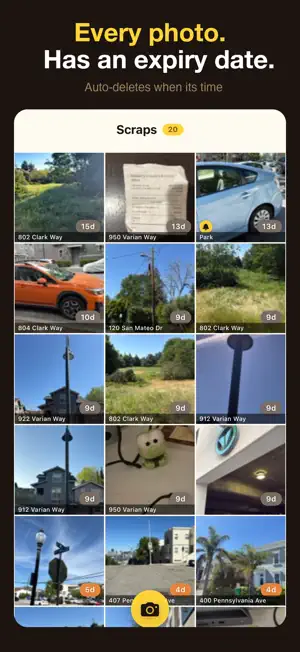
Snap a photo. Get reminded. Find your way back. Then it's gone. Parking spots. Return barcodes. Whiteboards. Receipts. QR codes. You needed them for five minutes — then they sat in your camera roll for three weeks. Scraps was built for exactly this. NEVER FORGET WHERE YOU PARKED Tap any photo and Scraps shows you exactly where it was taken: → Street address, on a map, ready to navigate. No digging through metadata. No trying to remember. Just tap and go. SET A REMINDER BEFORE YOU WALK AWAY → Taking a photo of a parking meter? Set a timer right there: +1hr, +2hr, or spin the wheel for a custom time. → Scraps alerts you before your time runs out. Your phone shows a live countdown on the lock screen the whole time. SCREENSHOT ANYTHING AND EXPORT. GONE WHEN YOU'RE DONE → Got a ticket confirmation, a receipt, or a QR code on your screen? Screenshot it directly into Scraps. → It stays just long enough. Then it disappears no camera roll clutter, no manual cleanup. SHARE THE LOCATION INSTANTLY → Tap the address on any photo and share the exact coordinates, open in Apple or Google Maps, or copy to clipboard in one tap. No apps. No metadata tools. No guesswork. EVERYTHING DISAPPEARS ON SCHEDULE → Every photo gets a countdown. When the timer hits zero it deletes itself — quietly, automatically, no action required. If you change your mind, one tap saves it to your Photos library forever. WHY PEOPLE USE SCRAPS → Photograph where you parked — navigate back with one tap → Set a parking reminder so you never get a ticket → Capture return barcodes and QR codes without cluttering your camera roll → Snap whiteboard notes, shelf labels, receipts — gone when you're done → Share a location with someone without sending your whole camera roll BUILT TO DISAPPEAR → Zero cloud sync — your photos never leave your phone → No account, no tracking — we literally cannot see your photos → Built-in GPS — tap any photo to see exactly where you took it → Countdown badges — always know how much time each photo has left → Live lock screen countdown when a parking reminder is active → Set your schedule once — Scraps does the rest Three screens. No learning curve. Point, shoot, forget.
What’s new
Version 1.1 · Updated May 2, 2026
• Save screenshots and shared images directly to Scraps from any app's share sheet • Photos sent via the share sheet auto-expire on the same clock as camera captures • Tap "More" → enable Scraps in your share sheet to start using it
App privacy
The developer, ALEX GIA LEE, reported these privacy practices to Apple.
Data Not Collected
The developer does not collect any data from this app.
Alternatives to Scraps: Auto Delete Photos
Looking for apps like Scraps: Auto Delete Photos? Here are 6 similar apps on the App Store. The highest rated is CheckCam: Photo Reminder (5.0/5), and 5 of the 6 are free to download.
-
 A Day - Temporary Camera
-
 StashCam - Temporary Camera
-
 CheckCam: Photo Reminder
5.0
-
 Temporary Photos
-
 Tally Counter by button press
-
 Battery Charger animation app
4.5
| App | Rating | Price | Last updated | Compare |
|---|---|---|---|---|
| Scraps: Auto Delete Photos | 1.0 / 5 (1 rating) | Free | May 2, 2026 | |
| A Day - Temporary Camera | – | Free | Sep 30, 2026 | Compare |
| StashCam - Temporary Camera | – | Free | Apr 7, 2026 | Compare |
| CheckCam: Photo Reminder | 5.0 / 5 (1) | Free | Oct 23, 2026 | Compare |
| Temporary Photos | – | 0.99 USD | Apr 27, 2026 | Compare |
| Tally Counter by button press | – | Free | Jul 3, 2026 | Compare |
| Battery Charger animation app | 4.5 / 5 (44) | Free | May 20, 2024 | Compare |