

Old Photo Repair・HD・Restore Ai
Tarun Paliwal Photo & Video iPhoneiPadiPod touch
Old Photo Repair・HD・Restore Ai is a free Photo & Video app for iPhone and iPad by Tarun Paliwal. Rated 5.0/5 from 2 ratings. Requires iOS 15.5.
- Rating
- 5.0
- 2 ratings
- Price
- Free
- on the App Store
- Size
- 140 MB
- Age 4+
- Updated
- Jul 4
- 2026 · v1.0.2
Screenshots

About Old Photo Repair・HD・Restore Ai
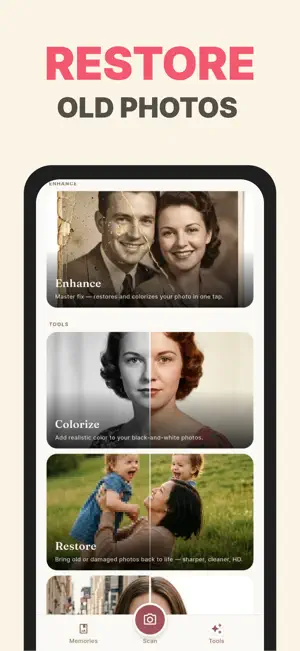
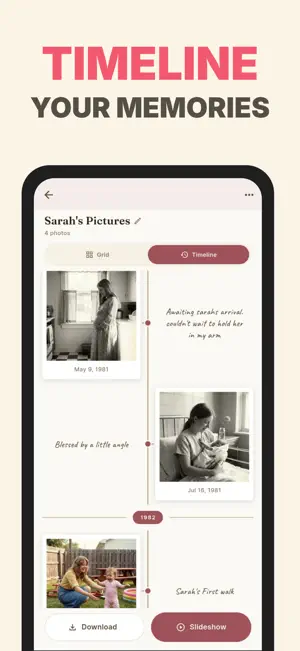
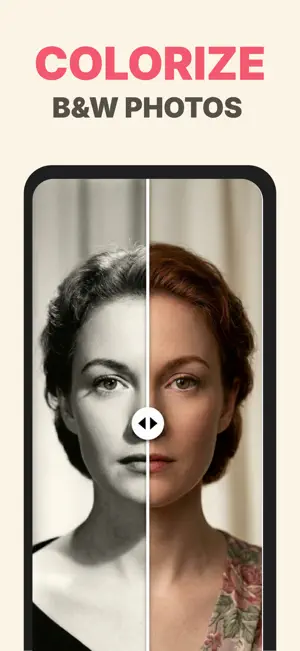
Restore Ai - Memory keeper and AI photo restorer Bring old photographs back to life - entirely on your phone. That faded wedding photo from 1972. The school portrait with the crease across your father's face. The black-and-white snapshot of your grandmother that has lived in a shoebox for forty years. Restore Ai turns them into the clearest, most vivid version they have ever been - and keeps them safe inside a beautiful private album you actually want to open. Every photo you bring in stays on your device. Nothing is uploaded. Nothing is sent to a server. Nothing is used to train a model. The AI runs locally, on the chip in your phone. FOUR PRO TOOLS, ALL ON-DEVICE > Restore - Sharpen old, soft, low-resolution scans into crisp natural detail. Powered by a Real-ESRGAN model running on your phone's neural engine. > Colorize - Add lifelike, period-accurate color to black-and-white photographs. Skin tones, fabrics, and skies look how memory says they should. > Enhance - One-tap repair that chains Restore and Colorize together. The full transformation in a single press. > Remove Background - Cleanly lift any subject from its background in seconds, with crisp hair and edge detail. A MEMORY KEEPER, NOT JUST AN EDITOR Most photo apps fix one image and forget it. Restore Ai keeps every photo in a warm, polaroid-styled album you'll want to revisit. Add handwritten captions, dates, locations, and the people in the frame. Browse a tactile timeline of your family's history - birthdays, weddings, first days, ordinary afternoons. Search by face, by year, by place. COMPLETE PRIVACY, BY DESIGN The entire AI pipeline runs on-device. Your photos never touch a server, never train a model, never leave your phone. The only thing that ever goes to the network is your anonymous subscription receipt. No accounts. No cloud library. No tracking. No ads on Pro. FIVE WAYS TO BRING IN A PHOTO • Photos - capture loose printed photographs with the in-app scanner • Scrapbook - multi-page capture for scrapbooks, photo albums, and yearbooks • Negatives - capture old film negatives; automatically converted from negative to positive • Slides - capture 35mm slides and transparencies; automatically inverted to a positive image • Upload - import any photo straight from your camera roll WORKS WITH ANY PHOTOGRAPH • Loose prints in any size - wallet, 4x6, 5x7, full-page portraits • Photo albums, scrapbooks, and yearbooks • Polaroids and instant film • 35mm film negatives, single frames or strips • 35mm slides and transparencies • Wedding albums and old portrait books • Black-and-white, sepia, and color prints from any era • Damaged, faded, or scratched scans • Recent phone photos that came out blurry or dim WHAT PRO UNLOCKS • Unlimited Restore, Colorize, Enhance, and Remove Background • No watermarks on any saved or shared photo • No ads, anywhere in the app • Full-resolution exports straight to your Photos library • Beautiful timeline export - share an entire memory as one image • Priority support START YOUR FREE TRIAL Try every Pro feature free for 3 days. No commitment. Cancel anytime. Payment is charged to your Apple ID at confirmation of purchase. Subscription auto-renews unless turned off at least 24 hours before the end of the current period. Manage or cancel anytime in Settings > Apple ID > Subscriptions. Privacy Policy: https://appenso.com/legal/privacy Terms of Service: https://appenso.com/legal/terms Contact: [email protected]
What’s new
Version 1.0.2 · Updated July 4, 2026
Performance improvements and bug fixes.
App privacy
The developer, Tarun Paliwal, reported these privacy practices to Apple.
Data Used to Track You
The following data may be used to track you across apps and websites owned by other companies:
- Identifiers: Device ID
- Usage Data: Advertising Data
Data Not Linked to You
The following data, which may be collected but is not linked to your identity, may be used for the following purposes:
- Identifiers: Device ID
- Usage Data: Advertising Data
- Diagnostics: Crash Data
Used for: Third-Party Advertising, App Functionality
Alternatives to Old Photo Repair・HD・Restore Ai
Looking for apps like Old Photo Repair・HD・Restore Ai? Here are 6 similar apps on the App Store. The highest rated is FotorPea - AI Photo Enhancer (5.0/5), and all 6 are free to download.
-
 Reviva: Restore Old Photos
3.5
Reviva: Restore Old Photos
3.5
-
 FotorPea - AI Photo Enhancer
5.0
FotorPea - AI Photo Enhancer
5.0
-
 Restory - Restore Old Photos
4.4
Restory - Restore Old Photos
4.4
-
 OldPic Renew • Fixela
4.6
OldPic Renew • Fixela
4.6
-
 Old Photo Restore Repair AI
4.6
Old Photo Restore Repair AI
4.6
-
 Colorize: Restore Old Photos
4.6
Colorize: Restore Old Photos
4.6
| App | Rating | Price | Last updated | Compare |
|---|---|---|---|---|
| Old Photo Repair・HD・Restore Ai | 5.0 / 5 (2 ratings) | Free | July 4, 2026 | |
| Reviva: Restore Old Photos | 3.5 / 5 (2) | Free | Aug 29, 2026 | Compare |
| FotorPea - AI Photo Enhancer | 5.0 / 5 (2) | Free | Jul 10, 2026 | Compare |
| Restory - Restore Old Photos | 4.4 / 5 (21) | Free | Jul 1, 2026 | Compare |
| OldPic Renew • Fixela | 4.6 / 5 (84) | Free | Jun 6, 2024 | Compare |
| Old Photo Restore Repair AI | 4.6 / 5 (39) | Free | Oct 14, 2026 | Compare |
| Colorize: Restore Old Photos | 4.6 / 5 (993) | Free | Oct 12, 2026 | Compare |