

Hoodik: Private Cloud Storage
TIBOR HUDIK Productivity iPhoneiPadiPod touchMac
Hoodik: Private Cloud Storage is a free Productivity app for iPhone and iPad by TIBOR HUDIK. Requires iOS 15.0. Updated August 30, 2026.
- Price
- Free
- on the App Store
- Size
- 68 MB
- Age 4+
- Updated
- Aug 30
- 2026 · v2.5.3
Screenshots

About Hoodik: Private Cloud Storage
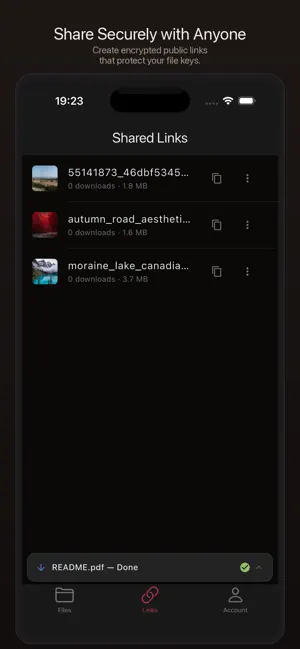
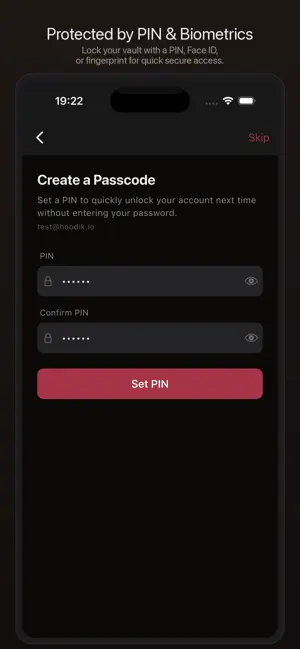
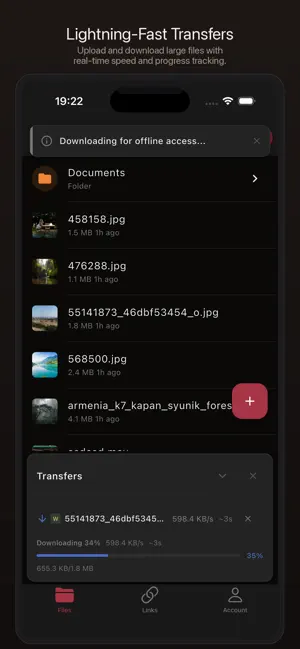
Hoodik is the client for your own Hoodik cloud storage server. Every file is encrypted on your device before it leaves, so the server never sees your data. YOUR FILES. YOUR KEYS. YOUR SERVER. All encryption and decryption happens locally on your device using native Rust cryptography. The server stores only ciphertext, and your private key never leaves your device. Not even the server administrator can read your files. FEATURES • Quantum-Proof Encryption: post-quantum hybrid key wrapping (X25519 + ML-KEM-768) with Ed25519 identities, so your files stay private even against future quantum computers. Each file gets its own key, sealed so only you can open it. • Secure Sign-In: login uses OPAQUE, so your password is never sent to the server. Existing accounts upgrade to the new encryption automatically the next time you log in. • Fast Chunked Transfers: upload and download large files with concurrent chunked transfers, real-time progress, and integrity checks. Where the server allows it, chunks move straight between your device and its storage. Interrupted transfers pick up where they stopped. • Encrypted Sharing: share files and folders with other Hoodik users end-to-end encrypted, with reader, editor, and co-owner roles and group sharing. Or create public links with the decryption key in the URL fragment, so recipients get the file without ever seeing your key. • Markdown Notes: write encrypted notes in a full markdown editor with version history. Notes sync to your server like any other file, ciphertext only. • File Preview: view images, videos, PDFs, and text files decrypted locally on your device. • Work On Many At Once: select several files and export or pin them in one go. • Privacy-Preserving Search: find notes by what is written inside them, not only by their names. Words are tokenized on your device under keys the server never holds, so it matches a query without learning a word of it. • Offline Access: pin files for offline use. Cached files stay encrypted on disk, and you set how much room the cache may take before older unpinned copies go. • PIN & Biometric Unlock: protect your account with a PIN or Touch ID / Face ID. • AI Access on Mac: a built-in MCP server lets local AI assistants work with your files on your terms, secured with a token you control. Decryption still happens only on your device. • Multi-Server Support: connect to multiple Hoodik servers with different accounts. • Light and Dark: pick the appearance in Account, or follow the system. Menus and navigation follow each platform's own conventions. SECURITY YOU CAN TRUST Hoodik uses modern, post-quantum cryptography: hybrid X25519 + ML-KEM-768 key wrapping, Ed25519 signatures, and AEGIS-128L and AEGIS-256 for fast hardware-accelerated encryption, with Ascon-128a and ChaCha20-Poly1305 as alternatives. Login uses OPAQUE so your password never crosses the network, and SHA-256 and BLAKE2b handle hashing and integrity. Older accounts using RSA-2048 migrate to the new keys automatically. FULLY AUDITABLE The complete source code of the app is published on GitHub, and the Rust crypto engine is shared across every Hoodik client. Read the code, build it yourself, verify every claim: https://github.com/hudikhq/hoodik-client NO TRACKING. NO ANALYTICS. NO ADS. Hoodik contains no analytics SDKs, no crash reporting tools, and no advertising frameworks. We don't track how you use the app. WHAT YOU NEED Hoodik connects to a Hoodik server. Run one yourself on your own hardware, or let us run a private instance for you at https://hoodik.cloud. Either way, your files are encrypted on your device first, so nobody who operates the server can read them, us included. The server's source code is published, and it's free for personal use: https://github.com/hudikhq/hoodik Deploy in minutes with Docker. Privacy Policy: https://hoodik.io/privacy-policy Terms of Use (EULA): https://www.apple.com/legal/internet-services/itunes/dev/stdeula/
What’s new
Version 2.5.3 · Updated August 30, 2026
Smarter search and shared folders that just work. Everything is still encrypted on your device before it uploads. This update makes your files easier to find again and shared folders dependable at any depth. • Shared Folders: create folders, add notes, upload and move anywhere inside a shared folder. Every member sees it, no matter how deep. • Smarter Search: exact name matches rank first, then the best matches from file names and note contents. • Reliable Note Saves: quick edits and save conflicts now resolve themselves, so your latest text always lands. • Index Upgrade: the one-time search index rebuild keeps its progress on screen until you dismiss it. • AI Access on Mac: assistants can search inside your notes, and the access token repairs itself if it breaks. Search works best with a server on 2.5.1 or newer.
App privacy
The developer, TIBOR HUDIK, reported these privacy practices to Apple.
Data Not Collected
The developer does not collect any data from this app.
Alternatives to Hoodik: Private Cloud Storage
Looking for apps like Hoodik: Private Cloud Storage? Here are 6 similar apps on the App Store. The highest rated is FitDen Gym Management App (5.0/5), and all 6 are free to download.
-
 FitDen Gym Management App
5.0
FitDen Gym Management App
5.0
-
 UVault
-
 Private Notes - Light
-
 MyCryptFS Mobile
-
 Damas - Video Link Transcriber
-
 Bibliome
5.0
Bibliome
5.0
| App | Rating | Price | Last updated | Compare |
|---|---|---|---|---|
| Hoodik: Private Cloud Storage | – | Free | August 30, 2026 | |
| FitDen Gym Management App | 5.0 / 5 (1) | Free | Sep 22, 2026 | Compare |
| UVault | – | Free | Apr 29, 2026 | Compare |
| Private Notes - Light | – | Free | Aug 29, 2026 | Compare |
| MyCryptFS Mobile | – | Free | Apr 22, 2026 | Compare |
| Damas - Video Link Transcriber | – | Free | Oct 5, 2026 | Compare |
| Bibliome | 5.0 / 5 (1) | Free | Oct 10, 2026 | Compare |