

Unfreeze - Screen Time Blocker
Mehmet Aksel Tulezoglu Productivity iPhoneiPadiPod touch
Unfreeze - Screen Time Blocker is a free Productivity app for iPhone and iPad by Mehmet Aksel Tulezoglu. Requires iOS 15.1. Updated September 25, 2026.
- Price
- Free
- on the App Store
- Size
- 68 MB
- Age 4+
- Updated
- Sep 25
- 2026 · v1.3.4
Screenshots



About Unfreeze - Screen Time Blocker
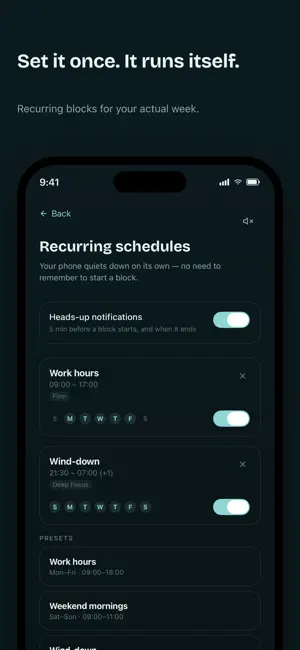
Unfreeze blocks the apps and websites that eat your day — and gets you moving again once you're stuck. Start with 2 weeks of Pro, free, so you can try the full blocking layer before you decide. Prefer to pay once? A lifetime option is available too. Answer four quick questions and Unfreeze builds a blocking schedule around how you actually get pulled away — not a generic timer, a plan shaped to your day. Turn it on, or start a manual block anytime: 15 minutes to a full day, with Deep Focus for the days you know you'll talk yourself out of it. Most screen-time blockers stop at blocking. Unfreeze's free AI layer goes further: type or say what you're stuck on and get back one step — small, physical, doable in thirty seconds. Not a plan, not a checklist. Ask for a smaller one if it still feels too big. Once you're moving, it hands you the next one. Free, up to five times a day, no Pro required. Not ready to move at all? Sit with me is free and always open, no daily limit: a small companion sits with you, brown noise playing, for as long as you need. No task required. A quiet timer keeps your step in front of you — on screen and on your Lock Screen as a Live Activity — and a home-screen widget puts the next one a tap away. Unfreeze Pro is the blocking layer: • App & website blocking — pick the apps (and the distracting sites) that pull you away and shut them off, on demand or on a recurring schedule • Deep Focus — no breaks until the timer ends • Recurring schedules that block for you, automatically • The whole task, broken down — still one step at a time • Unlimited daily sessions Works in whatever language you type in. No account, no streaks, no guilt if you close it and come back tomorrow. Built for anyone who freezes at the start, including people with ADHD. Terms of Use (EULA): https://www.apple.com/legal/internet-services/itunes/dev/stdeula/
What’s new
Version 1.3.4 · Updated September 25, 2026
• Voice input follows the language you speak. Tap the small language label next to the mic to pick any language. • Fixed an issue where the home screen could stop responding after opening the app.
App privacy
The developer, Mehmet Aksel Tulezoglu, reported these privacy practices to Apple.
Data Not Linked to You
The following data, which may be collected but is not linked to your identity, may be used for the following purposes:
- Identifiers: Device ID
- Usage Data: Product Interaction
- Purchases: Purchase History
- User Content: Other User Content
Used for: Analytics, App Functionality
Alternatives to Unfreeze - Screen Time Blocker
Looking for apps like Unfreeze - Screen Time Blocker? Here are 6 similar apps on the App Store.
-
 UnfreezeMe: ADHD Task Starter
-
 First Step: End Task Paralysis
-
 SoftOS AI: ADHD Todo Planner
-
 Smallish — ADHD Task Starter
-
 MindLink - Mental Load Managed
-
 Next Seven
| App | Rating | Price | Last updated | Compare |
|---|---|---|---|---|
| Unfreeze - Screen Time Blocker | – | Free | September 25, 2026 | |
| UnfreezeMe: ADHD Task Starter | – | Free | Mar 10, 2026 | Compare |
| First Step: End Task Paralysis | – | Free | Apr 29, 2026 | Compare |
| SoftOS AI: ADHD Todo Planner | – | Free | Oct 15, 2026 | Compare |
| Smallish — ADHD Task Starter | – | Free | Oct 7, 2026 | Compare |
| MindLink - Mental Load Managed | – | Free | May 20, 2026 | Compare |
| Next Seven | – | Free | Apr 23, 2026 | Compare |