

Go Show Audio
Richard Barker Music iPhoneiPadiPod touch
Go Show Audio is a free Music app for iPhone and iPad by Richard Barker. Requires iOS 15.1. Updated July 20, 2026.
- Price
- Free
- on the App Store
- Size
- 33 MB
- Age 4+
- Updated
- Jul 20
- 2026 · v1.0.7
Screenshots

About Go Show Audio
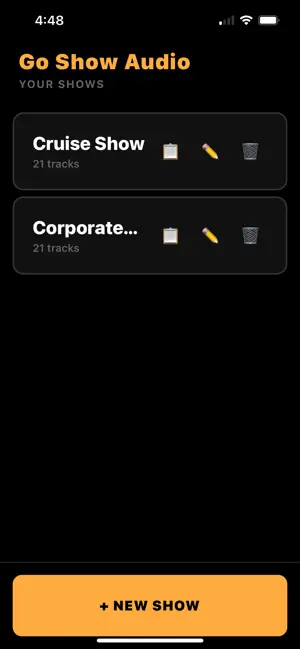
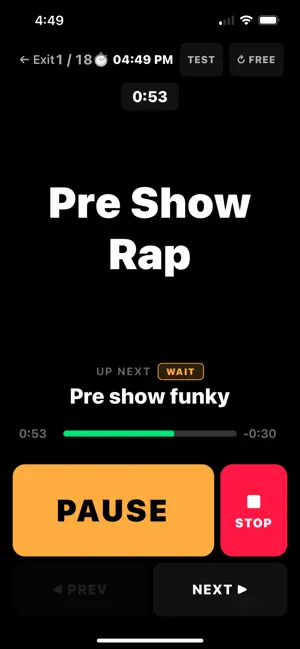
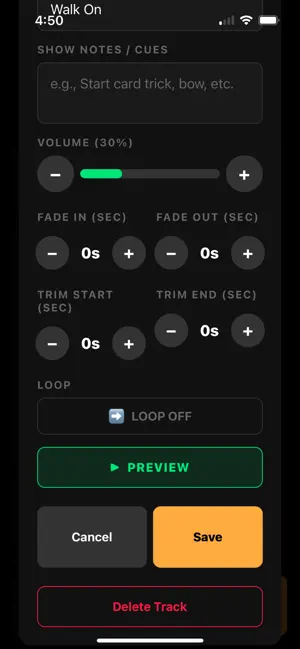
Go Show Audio is the offline audio player built for live performers... Full access requires a monthly or lifetime subscription. BUILT FOR THE STAGE, NOT THE GYM Terms of Use: https://goshowaudio.com/terms Privacy Policy: https://goshowaudio.com/privacy Unlike generic music apps, Go Show Audio is designed for one thing: flawless live audio. Big buttons you can see from across the stage. A high-contrast dark theme that won't blind you in a dark venue. Landscape mode for the biggest possible view. And complete offline support so venue WiFi is never a concern. CREATE AND MANAGE MULTIPLE SHOWS Build separate playlists for every gig. A wedding set, a corporate event, a theater production — each with its own tracks, cue order, and settings. Duplicate an entire show in one tap to create variations without starting from scratch. PER-TRACK CONTROL Every track has its own settings: volume control (including boost up to 200% for quiet tracks), fade in and fade out timing, trim start and end points, auto-follow or wait modes, loop mode for background music, and enable/disable without removing from your setlist. WIRELESS REMOTE CONTROL Control your show without touching your phone. Go Show Audio works with Audio Ape USB remotes, Bluetooth presentation remotes, and any standard media remote. Play, pause, next, and previous — all from a key fob in your pocket. WORKS 100% OFFLINE Every audio file is stored locally on your device. Turn on airplane mode and run your entire show with zero internet dependency. No buffering. No streaming failures. No mid-show phone calls. STAGE MODE One-tap access to a distraction-free performance view. Giant track name, up-next indicator, progress bar, and oversized play/pause/next/stop buttons. The last 10 seconds flash red so you always know when a track is about to end. Your show depends on your audio. Go Show Audio makes it bulletproof. Full access requires a monthly ($9.99/mo) or lifetime ($99.99) subscription
What’s new
Version 1.0.7 · Updated July 20, 2026
Fixes Bluetooth remote skipping/stacking tracks; updated in-app help
App privacy
The developer, Richard Barker, reported these privacy practices to Apple.
Data Not Collected
The developer does not collect any data from this app.
Alternatives to Go Show Audio
Looking for apps like Go Show Audio? Here are 6 similar apps on the App Store. The highest rated is ShowCue: Cue & Backing Player (5.0/5), and all 6 are free to download.
-
 ShowCue: Cue & Backing Player
5.0
-
 CueSuite
-
 CueMusic
3.2
-
 Sono - Soundboard & SFX Pad
5.0
-
 Audio Ape Pro
5.0
-
 MiX16 Show Cue Pro
4.3
| App | Rating | Price | Last updated | Compare |
|---|---|---|---|---|
| Go Show Audio | – | Free | July 20, 2026 | |
| ShowCue: Cue & Backing Player | 5.0 / 5 (1) | Free | Oct 12, 2026 | Compare |
| CueSuite | – | Free | Jul 24, 2026 | Compare |
| CueMusic | 3.3 / 5 (4) | Free | Mar 17, 2026 | Compare |
| Sono - Soundboard & SFX Pad | 5.0 / 5 (3) | Free | Jul 29, 2026 | Compare |
| Audio Ape Pro | 5.0 / 5 (26) | Free | Dec 11, 2025 | Compare |
| MiX16 Show Cue Pro | 4.3 / 5 (3) | Free | Oct 21, 2026 | Compare |
Compare Go Show Audio with the top alternatives: ratings, updates, ASO score and keyword gaps →