

QR Vault: WiFi QR Code Scanner
Nico Wurthenberger Utilities iPhoneiPadiPod touch
QR Vault: WiFi QR Code Scanner is a free Utilities app for iPhone and iPad by Nico Wurthenberger. Requires iOS 15.0. Updated October 8, 2026.
- Price
- Free
- on the App Store
- Size
- 41 MB
- Age 4+
- Updated
- Oct 8
- 2026 · v1.1.0
Screenshots


About QR Vault: WiFi QR Code Scanner
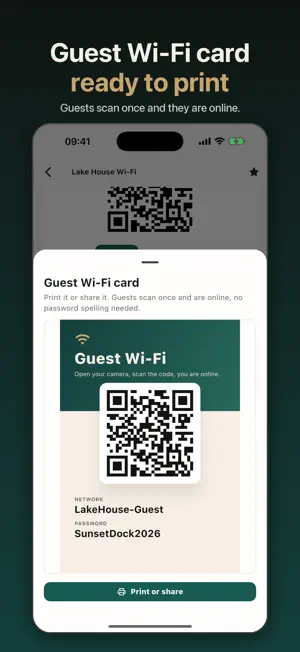
Scan, create and safely keep QR codes. No account, no cloud, no subscription. QR Vault is the QR code scanner and generator for people who prefer their data to stay on their own device. Everything works offline: scanning, creating, saving. NEW: GUEST WI-FI CARD Create a guest card for your Wi-Fi in seconds, with QR code, network name and password. Print it, stick it on the fridge or put it in your holiday rental. Guests open the camera, scan and they are online. WHAT YOU CAN DO WITH QR VAULT • Scan QR codes and open links, contacts, places and events right away • Create QR codes for websites, Wi-Fi, business cards (vCard), text, email, phone, SMS, location, WhatsApp and calendar events • Keep your most important codes in a private library • Share the QR code as an image or export its content as text • Browse your scan history and reuse saved codes PRIVATE BY DESIGN • Everything stays on your device, no account needed • Optional local encryption and Face ID unlock (Premium) • No cloud, no tracking of your QR content START FOR FREE • Scan and create with 10 templates • Keep up to 10 codes in your library • Banner ads and a small "Made with QR Vault" note on shared images PREMIUM: PAY ONCE, NO SUBSCRIPTION • No ads, no watermarks • All templates (app downloads, social profiles, meetings, reviews and more) • Unlimited library and history • Encryption, Face ID, notes and favorites
What’s new
Version 1.1.0 · Updated October 8, 2026
New in version 1.1: • Guest Wi-Fi card: QR code, network name and password as a card to print or share • The app now opens straight into the scanner • Free library raised from 3 to 10 codes • New app icon • Smaller improvements and fixes
App privacy
The developer, Nico Wurthenberger, reported these privacy practices to Apple.
Data Linked to You
The following data, which may be collected and linked to your identity, may be used for the following purposes:
- Location: Coarse Location
- Identifiers: Device ID
- Usage Data: Product Interaction, Advertising Data
- Diagnostics: Performance Data
Used for: Third-Party Advertising, Analytics, App Functionality
Data Not Linked to You
The following data, which may be collected but is not linked to your identity, may be used for the following purposes:
- Purchases: Purchase History
- Diagnostics: Crash Data
Used for: Analytics, App Functionality
Alternatives to QR Vault: WiFi QR Code Scanner
Looking for apps like QR Vault: WiFi QR Code Scanner? Here are 6 similar apps on the App Store.
-
 ScanShield: QR Scanner
-
 WiFi QR — Share WiFi Instantly
-
 Contact Backup & Export Secure
-
 Scan All:Smart QR Scanner
-
 Units Converter Pro7
-
 QR Box · Smart Code Manager
| App | Rating | Price | Last updated | Compare |
|---|---|---|---|---|
| QR Vault: WiFi QR Code Scanner | – | Free | October 8, 2026 | |
| ScanShield: QR Scanner | – | Free | Jul 8, 2026 | Compare |
| WiFi QR — Share WiFi Instantly | – | Free | May 26, 2026 | Compare |
| Contact Backup & Export Secure | – | Free | May 11, 2026 | Compare |
| Scan All:Smart QR Scanner | – | Free | Feb 9, 2025 | Compare |
| Units Converter Pro7 | – | 0.99 USD | Sep 4, 2025 | Compare |
| QR Box · Smart Code Manager | – | Free | Nov 16, 2025 | Compare |