

MediaEase: Universal Converter
佳颖 刘 Utilities iPhoneiPadiPod touch
MediaEase: Universal Converter is a free Utilities app for iPhone and iPad by 佳颖 刘. Requires iOS 15.0. Updated September 18, 2026.
- Price
- Free
- on the App Store
- Size
- 75 MB
- Age 17+
- Updated
- Sep 18
- 2026 · v2.0.5
Screenshots

About MediaEase: Universal Converter
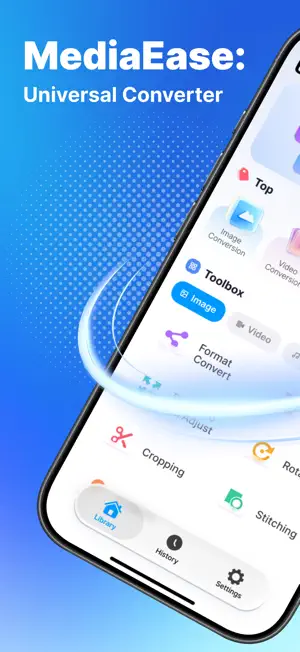
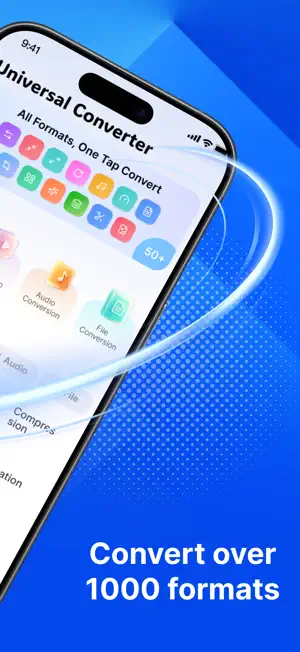
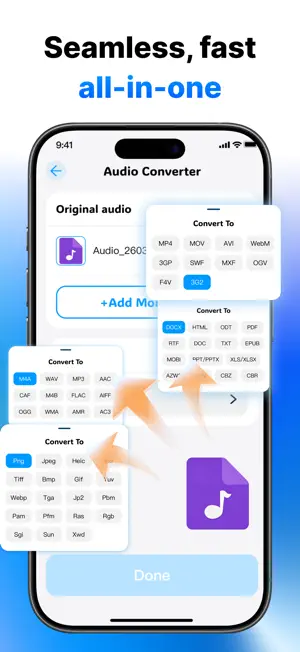
Transform Any File, Any Format, One Tap Universal Converter is the all‑in‑one media toolbox that puts 50+ powerful conversion and editing tools right at your fingertips. Whether you need to change a video’s format, compress a bulky PDF, extract audio from a movie, or fine‑tune an image’s proportions – everything happens offline, instantly, and with zero quality loss. What You Can Do Image Tools Convert between JPEG, PNG, WEBP, HEIC, and more. Adjust proportions, rotate, crop, stitch panoramas, remove shadows, and compress without visible degradation. Video Tools Change container formats (MP4, AVI, MKV, MOV…), trim, crop, merge clips, adjust speed, and extract audio tracks – all in high definition. Audio Tools Convert MP3, WAV, AAC, FLAC, M4A; change bitrate, speed, or pitch; extract sound from video; and merge multiple tracks. File & Document Convert Word ↔ PDF, compress PDFs, merge/split documents, and handle e‑books, spreadsheets, and presentations with ease. Batch & Bulk Processing Process multiple files at once – save time when converting entire folders. Why Universal Converter Offline & Private – All processing happens on your device. No uploads, no cloud fees, no privacy risks. Lossless Quality – Advanced algorithms preserve original resolution, frame rate, and audio fidelity. One‑Tap Simplicity – Intuitive interface: pick your file, choose output, hit “BEGIN CONVERSION” – done. 50+ Popular Features – From rotation and cropping to audio extraction and shadow removal, everything is built in. No Watermarks – Every export is clean and professional. Designed for Everyone Content creators, students, professionals, and casual users – Universal Converter adapts to your workflow. With a clean dashboard that groups tools by category (Image, Video, Audio, File), you’ll find exactly what you need in seconds. What’s New Improved HEIC/HEVC support Faster batch conversion engine New “Stitching” tools added Download now and convert anything – anywhere, anytime. Privacy Policy & Terms of Use available in‑app. Subscriptions auto‑renew unless turned off 24h before period ends. Universal Converter – All Formats, One Tap. Privacy:https://sites.google.com/view/picfactory-iconvert-privacy/home Terms: https://sites.google.com/view/picfactoryiconvert/home
What’s new
Version 2.0.5 · Updated September 18, 2026
This update fixes some known issues and improves the stability and overall user experience of the app.
App privacy
The developer, 佳颖 刘, reported these privacy practices to Apple.
Data Used to Track You
The following data may be used to track you across apps and websites owned by other companies:
- Identifiers: Device ID
Data Not Linked to You
The following data, which may be collected but is not linked to your identity, may be used for the following purposes:
- Identifiers: Device ID
Used for: Third-Party Advertising
Alternatives to MediaEase: Universal Converter
Looking for apps like MediaEase: Universal Converter? Here are 6 similar apps on the App Store. The highest rated is Vocal AI: AI Transcribe Notes (5.0/5), and all 6 are free to download.
-
 ScanReader:OCR Text Scanner
3.7
ScanReader:OCR Text Scanner
3.7
-
 TransVoice:AI Note
1.8
TransVoice:AI Note
1.8
-
 Vocal AI: AI Transcribe Notes
5.0
Vocal AI: AI Transcribe Notes
5.0
-
 ScanX:QR Code&Barcode Scanner
4.5
ScanX:QR Code&Barcode Scanner
4.5
-
 Clean Master: Storage Saver
4.4
Clean Master: Storage Saver
4.4
-
 Cleaner AI: Storage Assistant
4.4
Cleaner AI: Storage Assistant
4.4
| App | Rating | Price | Last updated | Compare |
|---|---|---|---|---|
| MediaEase: Universal Converter | – | Free | September 18, 2026 | |
| ScanReader:OCR Text Scanner | 3.7 / 5 (3) | Free | Aug 11, 2026 | Compare |
| TransVoice:AI Note | 1.8 / 5 (9) | Free | Oct 8, 2026 | Compare |
| Vocal AI: AI Transcribe Notes | 5.0 / 5 (1) | Free | Sep 15, 2026 | Compare |
| ScanX:QR Code&Barcode Scanner | 4.5 / 5 (8) | Free | Jun 30, 2026 | Compare |
| Clean Master: Storage Saver | 4.4 / 5 (64) | Free | Sep 14, 2026 | Compare |
| Cleaner AI: Storage Assistant | 4.4 / 5 (168) | Free | May 30, 2026 | Compare |