

Lychee AI
津 崔 Photo & Video iPhoneiPadiPod touch
Lychee AI is a free Photo & Video app for iPhone and iPad by 津 崔. Rated 5.0/5 from 1 ratings. Requires iOS 17.0. Updated June 9, 2026.
- Rating
- 5.0
- 1 ratings
- Price
- Free
- on the App Store
- Size
- 47 MB
- Age 17+
- Updated
- Jun 9
- 2026 · v1.8.4
Screenshots

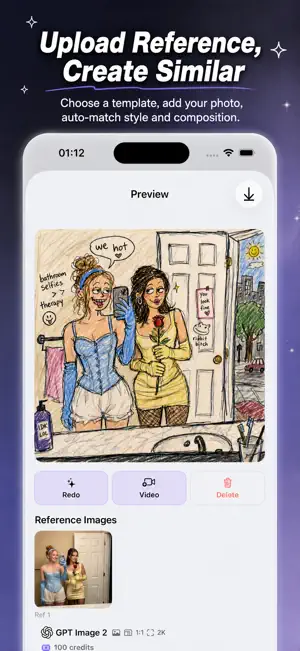


About Lychee AI
Lychee AI brings professional-grade AI visual creation to your iPhone. Powered by the most advanced AI image and video models, the app lets you generate stunning artwork, remix photos, and create short videos — all from your pocket. Whether you are an artist, content creator, or simply curious about what AI can do, Lychee AI gives you a complete creative studio in one app. Key Features: • Text-to-Image — Describe any scene and watch it come to life. From photorealistic portraits to abstract art, just type a prompt and let the most powerful AI model handle the rest. • Image-to-Image — Upload a reference photo and transform it with style transfer, remixing, or creative reinterpretation. Perfect for exploring new visual directions. • Text-to-Video — Create dynamic short videos from text descriptions. Powered by cutting-edge AI video technology, turn your ideas into motion. • Image-to-Video — Breathe life into still photos by animating them into short video clips. • Community Gallery — Discover featured AI artworks from creators around the world. Find inspiration and remix any piece with a single tap. • Video Frame Chaining — Use the last frame of a generated video as the starting point for your next creation, enabling seamless creative continuity. • Video Upscaling — Enhance your generated videos up to 720P or 1080P resolution for crisp, shareable content. • Always-Evolving Model Catalog — New AI models are added to the app automatically, so you always have access to the latest creative tools without updating. • Credits for Everyone — New users receive 1,000 credits to start creating right away. No subscription required to begin. • Designed for iPhone — Supports 9 in-app languages and both Light and Dark themes, so the app adapts to your preferences. Start creating with Lychee AI today — your imagination is the only limit. Terms of Use: https://legal.lizh.ai/terms
What’s new
Version 1.8.4 · Updated June 9, 2026
- Improved Home page image loading for a faster, smoother browsing experience. - Optimized loading priority for carousel, pipeline, and featured images. - Added better handling for image loading during scrolling. - Updated app metadata and native project configuration. - General stability improvements and bug fixes.
App privacy
The developer, 津 崔, reported these privacy practices to Apple.
Data Linked to You
The following data, which may be collected and linked to your identity, may be used for the following purposes:
- Purchases: Purchase History
- Contact Info: Email Address
- User Content: Photos or Videos
- Identifiers: User ID
- Diagnostics: Other Diagnostic Data
- Other Data: Other Data Types
Used for: App Functionality
Alternatives to Lychee AI
Looking for apps like Lychee AI? Here are 6 similar apps on the App Store. The highest rated is Vogla: AI Photo to Video Maker (5.0/5), and all 6 are free to download.
-
 Vogla: AI Photo to Video Maker
5.0
Vogla: AI Photo to Video Maker
5.0
-
 Pnevoo: AI Photo Video Remix
-
 Nelu AI: Personal Photo Studio
-
 BytePic AI - Photo Generator
-
 Flux Lord AI
-
 Cuter AI - AI Photo & AI Video
| App | Rating | Price | Last updated | Compare |
|---|---|---|---|---|
| Lychee AI | 5.0 / 5 (1 rating) | Free | June 9, 2026 | |
| Vogla: AI Photo to Video Maker | 5.0 / 5 (1) | Free | Oct 21, 2026 | Compare |
| Pnevoo: AI Photo Video Remix | – | Free | Oct 14, 2026 | Compare |
| Nelu AI: Personal Photo Studio | – | Free | Jun 8, 2026 | Compare |
| BytePic AI - Photo Generator | – | Free | Oct 16, 2026 | Compare |
| Flux Lord AI | – | Free | Apr 29, 2026 | Compare |
| Cuter AI - AI Photo & AI Video | – | Free | Aug 12, 2026 | Compare |
Compare Lychee AI with the top alternatives: ratings, updates, ASO score and keyword gaps →