

PhotoFridge
Francis Ogbankwa Food & Drink iPhoneiPadiPod touch
PhotoFridge is a free Food & Drink app for iPhone and iPad by Francis Ogbankwa. Rated 5.0/5 from 1 ratings. Requires iOS 15.1. Updated October 13, 2026.
- Rating
- 5.0
- 1 ratings
- Price
- Free
- on the App Store
- Size
- 49 MB
- Age 4+
- Updated
- Oct 13
- 2026 · v1.1
Screenshots



About PhotoFridge
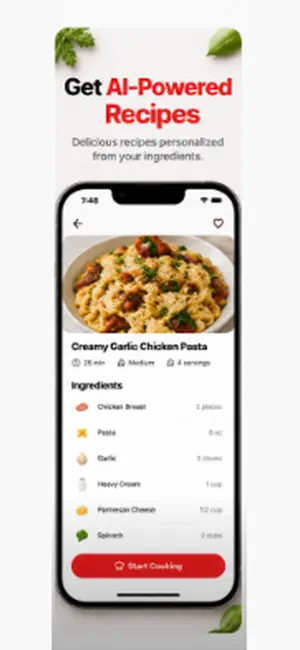
PhotoFridge turns a photo of your fridge into dinner. Snap a picture of what's inside and PhotoFridge's AI instantly identifies your ingredients, then generates real recipes you can make right now — no more staring into a full fridge wondering what to cook, and no more food going to waste. WHAT YOU CAN DO • Scan your fridge — point your camera and AI detects your food in seconds • Get instant recipes — personalized to the ingredients you actually have • Add ingredients by hand — type in anything your camera missed • Track your inventory — see what you have and what's about to expire • Cook Mode — step-by-step, hands-free guided cooking • Grocery lists — build a shopping list from any recipe • Earn as you cook — streaks, badges, and levels keep it fun EAT WELL, WASTE LESS PhotoFridge helps you use what you already own before it expires — saving money and cutting food waste, one meal at a time. MADE FOR YOUR TASTES Set your dietary preferences, cuisines, skill level, and household size, and every recipe is tailored to you. PHOTOFRIDGE PRO Upgrade to Pro for: • Unlimited fridge scans • Unlimited AI recipes • A fresh recipe suggestion every day Free members get 3 scans and 5 recipes each month. Pro is available as a monthly or annual subscription. Your privacy matters: fridge photos and ingredient lists are sent to OpenAI only to return results, with your consent, and are never used for advertising. You can delete your account and all data anytime. Terms of Use (EULA): https://www.apple.com/legal/internet-services/itunes/dev/stdeula/ Questions or feedback? Email [email protected]
What’s new
Version 1.1 · Updated October 13, 2026
Ask PhotoFridge A new assistant that knows what's actually in your kitchen. Ask "what can I make tonight?" or "something quick with what's expiring" and get answers built from your own inventory, grocery list and dietary preferences instead of generic recipes. Find it in Profile, under Ask PhotoFridge. A grocery list that follows you Your grocery list now saves to your account and syncs to any device you sign in on. You can also generate recipes straight from the list, so you can plan meals before you shop. Fixes - Pro subscribers are no longer blocked by the free scan limit. If you bought Pro and the app still asked you to upgrade, this is fixed. - Purchases now attach to your account correctly, so Restore Purchases works the way it should. - Your inventory, recipes and cooking progress save reliably to your account. A sync bug could previously drop changes or fail to carry them to another device. - Stability improvements around sign-in and the upgrade screen.
App privacy
The developer, Francis Ogbankwa, reported these privacy practices to Apple.
Data Linked to You
The following data, which may be collected and linked to your identity, may be used for the following purposes:
- Contact Info: Email Address, Name, Other User Contact Info
- User Content: Photos or Videos, Audio Data
Used for: App Functionality
Alternatives to PhotoFridge
Looking for apps like PhotoFridge? Here are 6 similar apps on the App Store. The highest rated is TasteOS (5.0/5), and all 6 are free to download.
-
 TasteOS
5.0
TasteOS
5.0
-
 Imperial Garden Seafood
5.0
Imperial Garden Seafood
5.0
-
 RecipeScan: Save Any Recipe
5.0
RecipeScan: Save Any Recipe
5.0
-
 Fridge AI: Food & Recipes
-
 Pantry Pic: Photo to Recipe
4.3
Pantry Pic: Photo to Recipe
4.3
-
 Guapo’s Taqueria & Chicken
| App | Rating | Price | Last updated | Compare |
|---|---|---|---|---|
| PhotoFridge | 5.0 / 5 (1 rating) | Free | October 13, 2026 | |
| TasteOS | 5.0 / 5 (4) | Free | Oct 13, 2026 | Compare |
| Imperial Garden Seafood | 5.0 / 5 (3) | Free | May 22, 2026 | Compare |
| RecipeScan: Save Any Recipe | 5.0 / 5 (1) | Free | Oct 19, 2026 | Compare |
| Fridge AI: Food & Recipes | – | Free | Sep 5, 2026 | Compare |
| Pantry Pic: Photo to Recipe | 4.3 / 5 (19) | Free | Oct 3, 2026 | Compare |
| Guapo’s Taqueria & Chicken | – | Free | Oct 17, 2026 | Compare |
Compare PhotoFridge with the top alternatives: ratings, updates, ASO score and keyword gaps →